@
Í
@
”
£
11
ABSORmatic
®
plus.
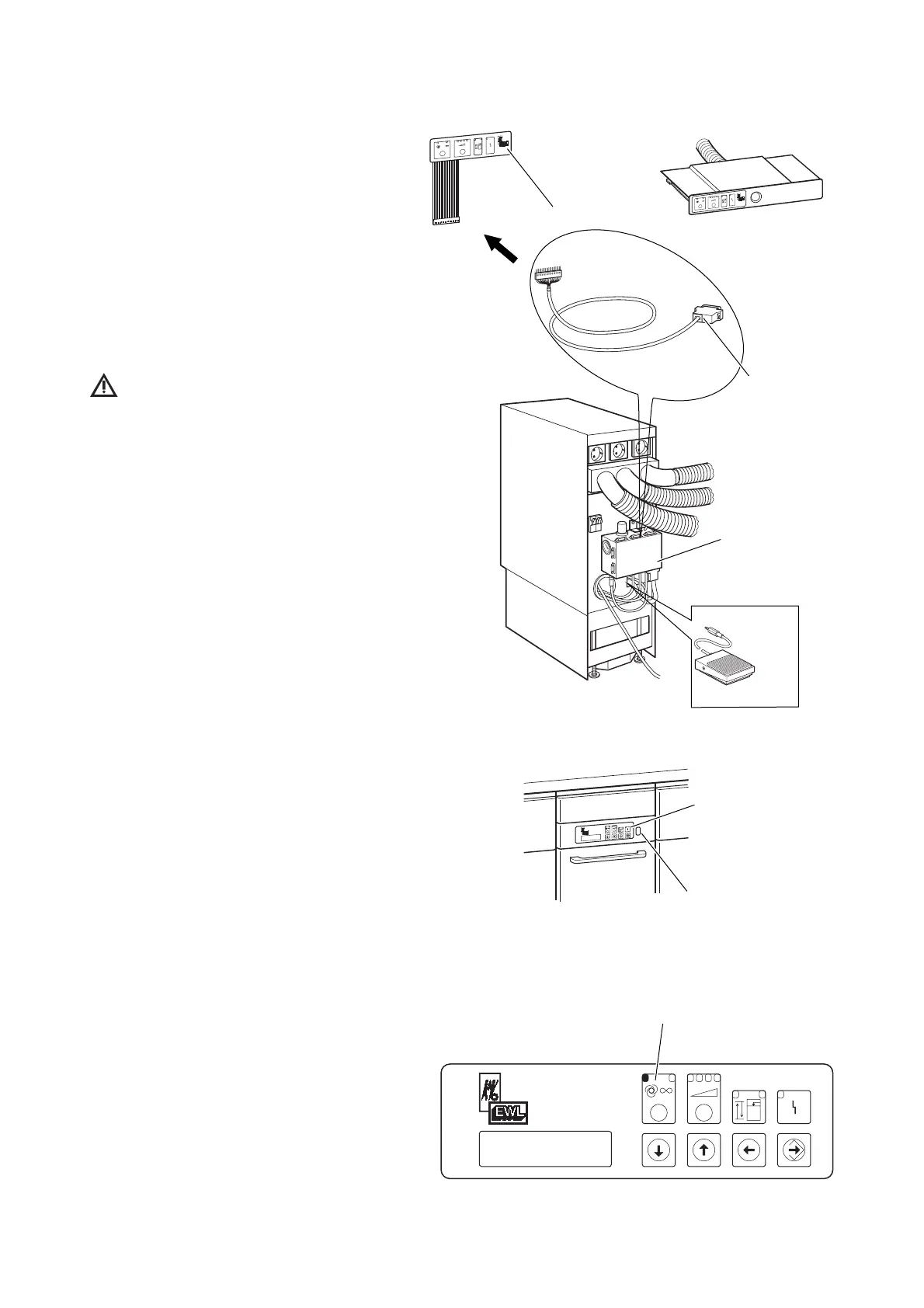
A 5.4 Connection of external control-
display 1 (remote control connec-
tion).
Install the control-display-holder in the
intended location and insert the control dis-
play in the support frame.
Plug the control cable into the control-
display lay it to the control box of the suc-
tion route switching modul Í and also
plug it in at this point.
Check correct allocation of control
cable with control-display, suction
hose connection and socket outlet for the
dust collector.
A 5.5 Connection of foot switch
Connect foot switch by means of snap plug
to suction route switching modul Í -
ensure correct assignment
A 6 Preparation for commencing
operation
First press power switch to position “0“
OFF and plug the power cord plug into a
correctly fused socket outlet.
Press power switch to “I“ ON. The unit
then automatically carries out a filling level
measurement cycle and cleans the individ-
ual suction passages in turn at the highest
suction stage.
The dust collector is then in automatic
mode (LED lights in automatic mode).
The dust collector automatically detects
whether one, two or three external control
panels are connected.











 To Next Page