Instructions for use ELECTROmatic M/C and PM/PC
4 Installation | 4.5 Installation position 2: Mount on the side of a holder
36 / 78
▪ 4x Washers ②
▪ 2x Plastic screws ⑥ for fastening to the mounting plate
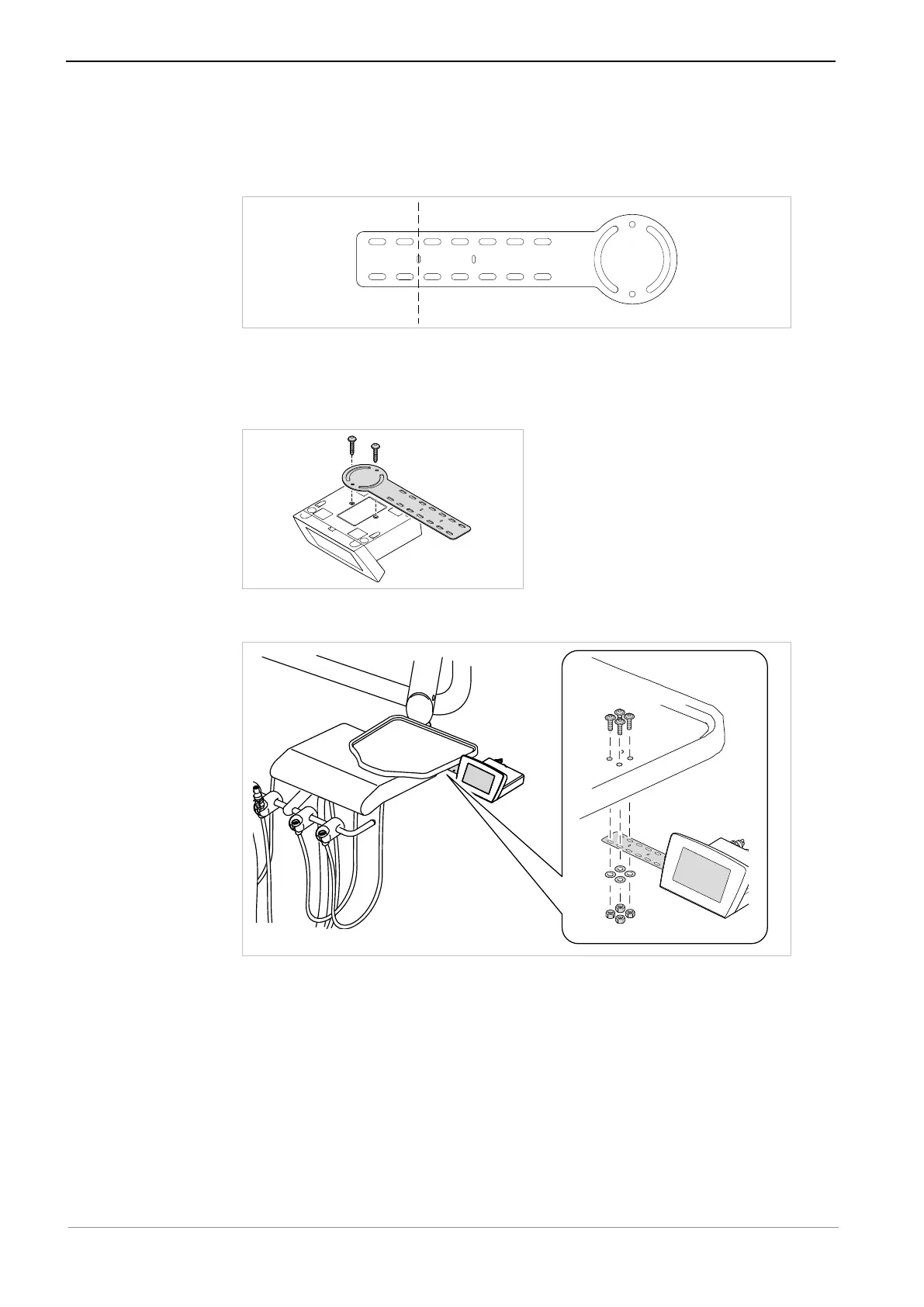
▶ Shorten the mounting plate with a suitable tool, if needed.
▶ Select the position of the mounting plate. If possible, use existing screws or
perforations as screw positions.
▶ Screw the ELECTROmatic to the round side of the mounting plate using 2
plastic screws ⑥ tightening the screws only lightly.
▶ Use the 4 screws ④ and 4 washers ② to screw the mounting plate to the
holder and secure it with the 4 nuts ①.
▶ Align the ELECTROmatic in its final ergonomic position and screw it to the
mounting plate such as to be hand-tightened.










 To Next Page