Instructions for use ELECTROmatic M/C and PM/PC
6 Operation | 6.6 Protection function SAFEdrive (PM/PC only)
58 / 78
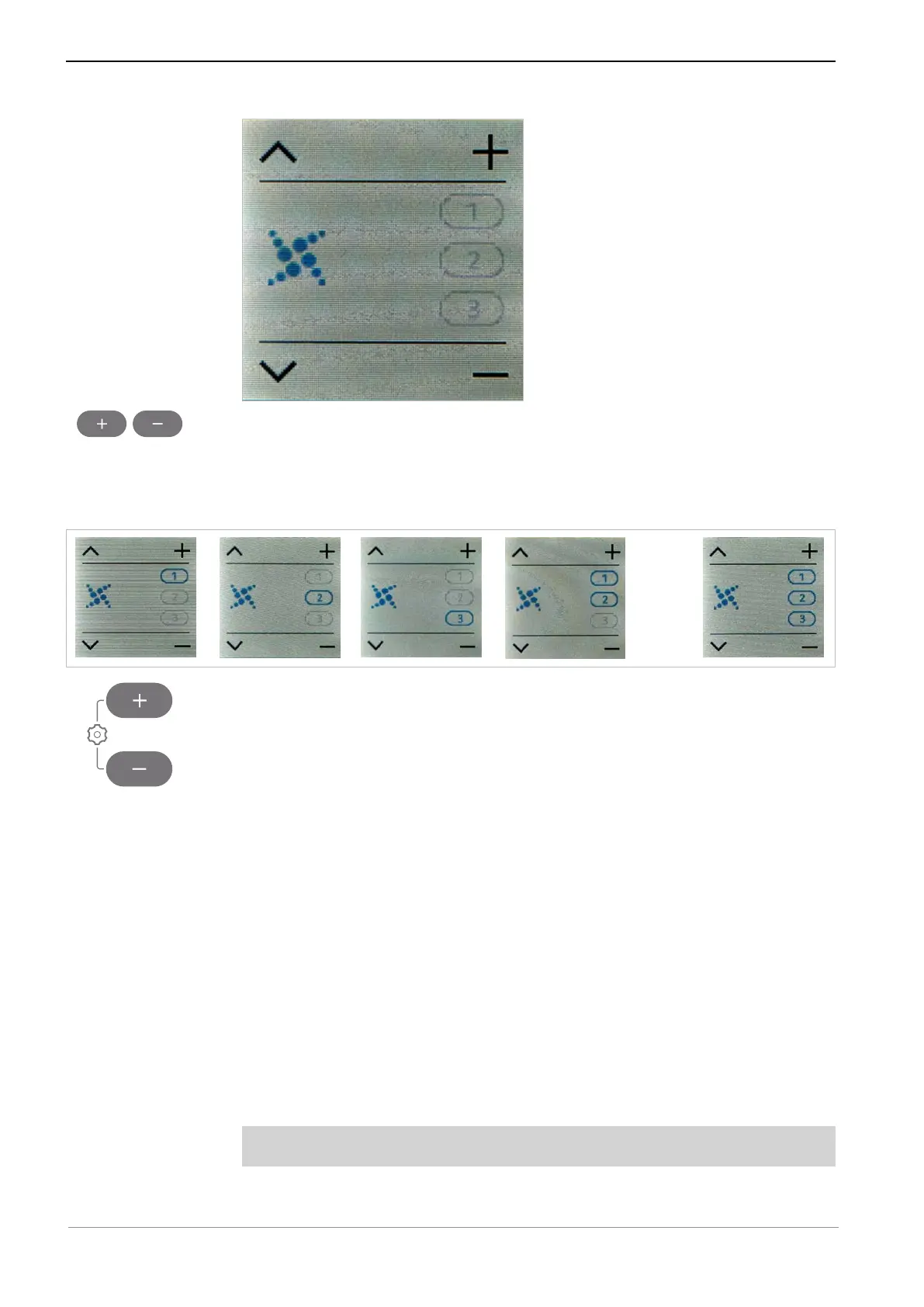
▶ Use the Plus and Minus keys to select the desired SAFEdrive combination
for the speed memory.
ð The settings are always saved instantaneously.
ð The activated speed memories are shown in blue.
ð All combinations for SAFEdrive are possible:
▶ Press both the plus and minus key for 2 seconds to exit from the "Settings"
menu.
6.6.2 Use with the SAFEdrive function
With regard to handpieces from third-party manufacturers, KaVo recommends
inactivating the SAFEdrive function as the SAFEdrive protection function is ef-
fective only with high-speed handpieces from KaVo.
See also:
2 6.6.1 Turning SAFEdrive on / off, Page 57
If SAFEdrive is activated and the handpiece is overloaded, the first stage,
"SAFEdrive alert", is activated:
▪ The motor power is reduced (can lead to a drop in motor speed).
▪ The LUX light starts to pulse.
▪ The SAFEdrive icon flashes yellow.
Requirement
The handpiece is not defective
▶ If a handpiece from a third-party manufacturer is used, deactivate SAFEd-
rive or use a high-speed handpiece from KaVo.










 To Next Page