Instructions for use ELECTROmatic M/C and PM/PC
4 Installation | 4.7 Installation position 4: Mount control panel as remote control (PM/PC only)
44 / 78
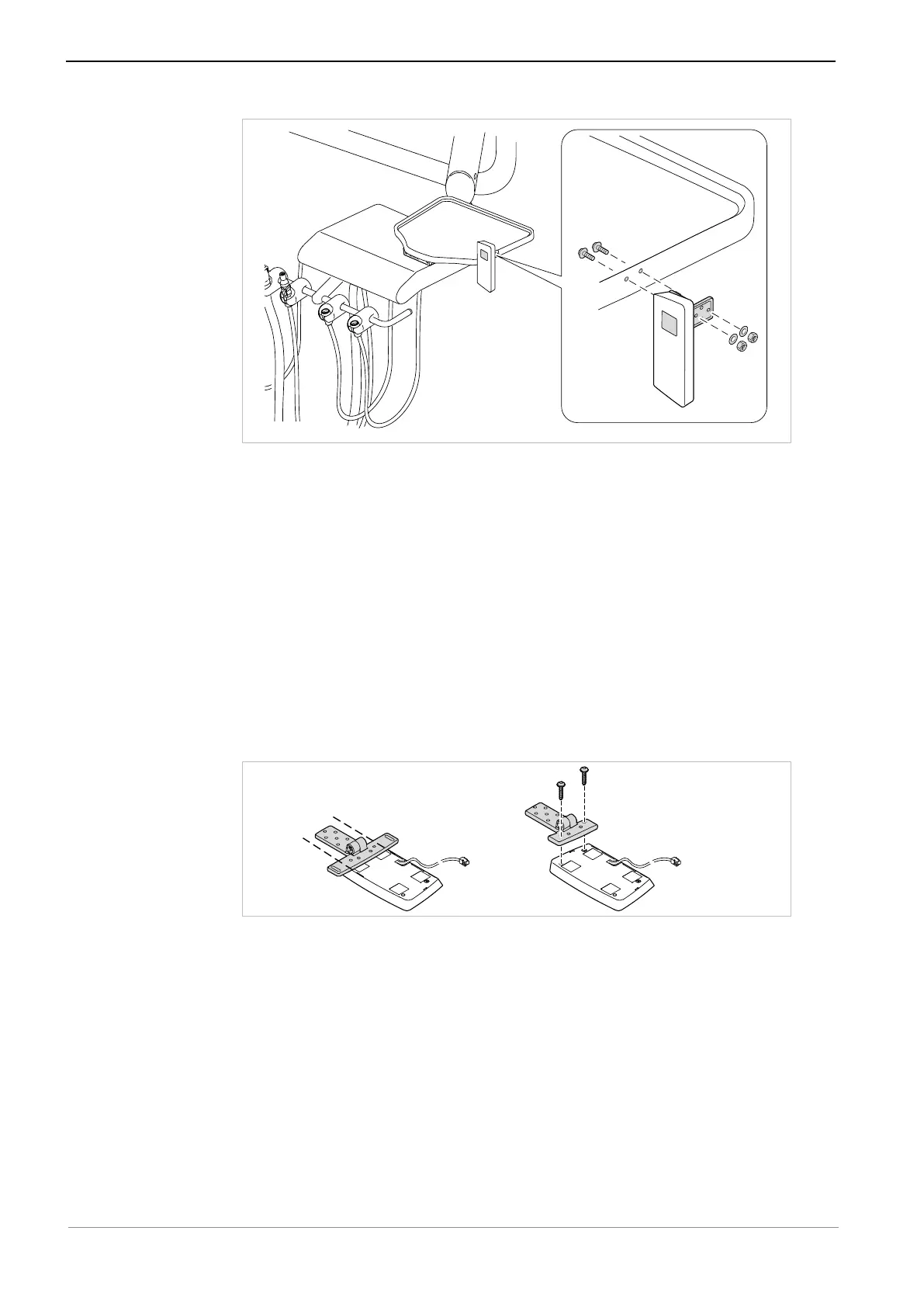
Assembly variant c)
The following parts from the scope of delivery and the installation set are
needed:
▪ 1x Mounting bracket
▪ 1x Cover panel
▪ 2x Screws M4x12 ④ with self-locking nuts ①
▪ 2x Washers ②
▪ 2x Plastic screws ⑥, for fastening to the mounting bracket
▶ Use a suitable tool to shorten the angle bracket to the size of the control
panel.
▶ Use 2 plastic screws to screw the control panel to the mounting bracket
such as to be hand-tightened.
▶ Mark the fixing points on the holder and drill the holes.
▶ Use the 2 screws ④ and the washers ② to screw the mounting bracket with
control panel to the holder and secure it with the nuts ①.
▶ Align the ELECTROmatic in its final ergonomic position and screw it down
such as to be hand-tightened.










 To Next Page