Instructions for use ELECTROmatic M/C and PM/PC
10 Troubleshooting
70 / 78
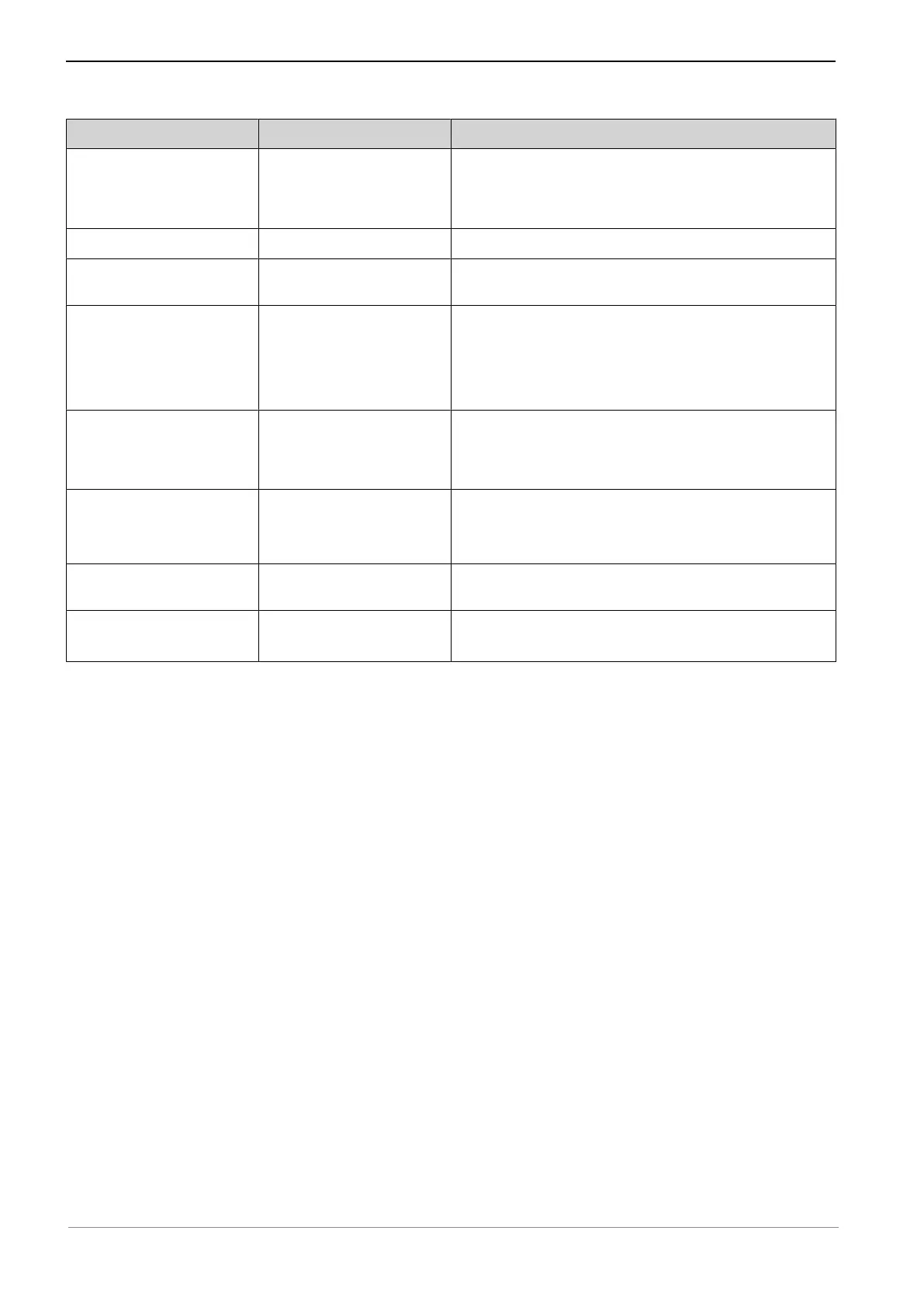
Malfunction Cause Remedy
Event E2 Foot control is being
actuated during start-
up.
▶ Do not press the foot control when you switch
the unit on.
Event E3 No motor attached.
▶ Connect the motor.
Event E4 Motor blocked.
▶ Relieve the motor, stop and start on foot con-
trol.
Event E5 Automatic light and
motor shut-off during
continuous operation of
the motor.
▶ Comply with defined operating mode.
Event E8 Saved data or settings
have been reset to
starting value.
▶ Confirm message and check or correct the pro-
gram settings.
▶ If error persists, notify the service engineer.
Event E12 No connection to mo-
tor.
▶ Check/restore correct connection.
▶ Replace motor cord.
▶ If error persists, notify the service engineer.
Event E14 Motor overload.
▶ Relieve the motor, stop and start on foot con-
trol.
All other events Internal system error.
▶ Turn the unit off and on.
▶ If error persists, notify the service engineer.










 To Next Page