Internal Sections & Feature Parameters
3
SUB section
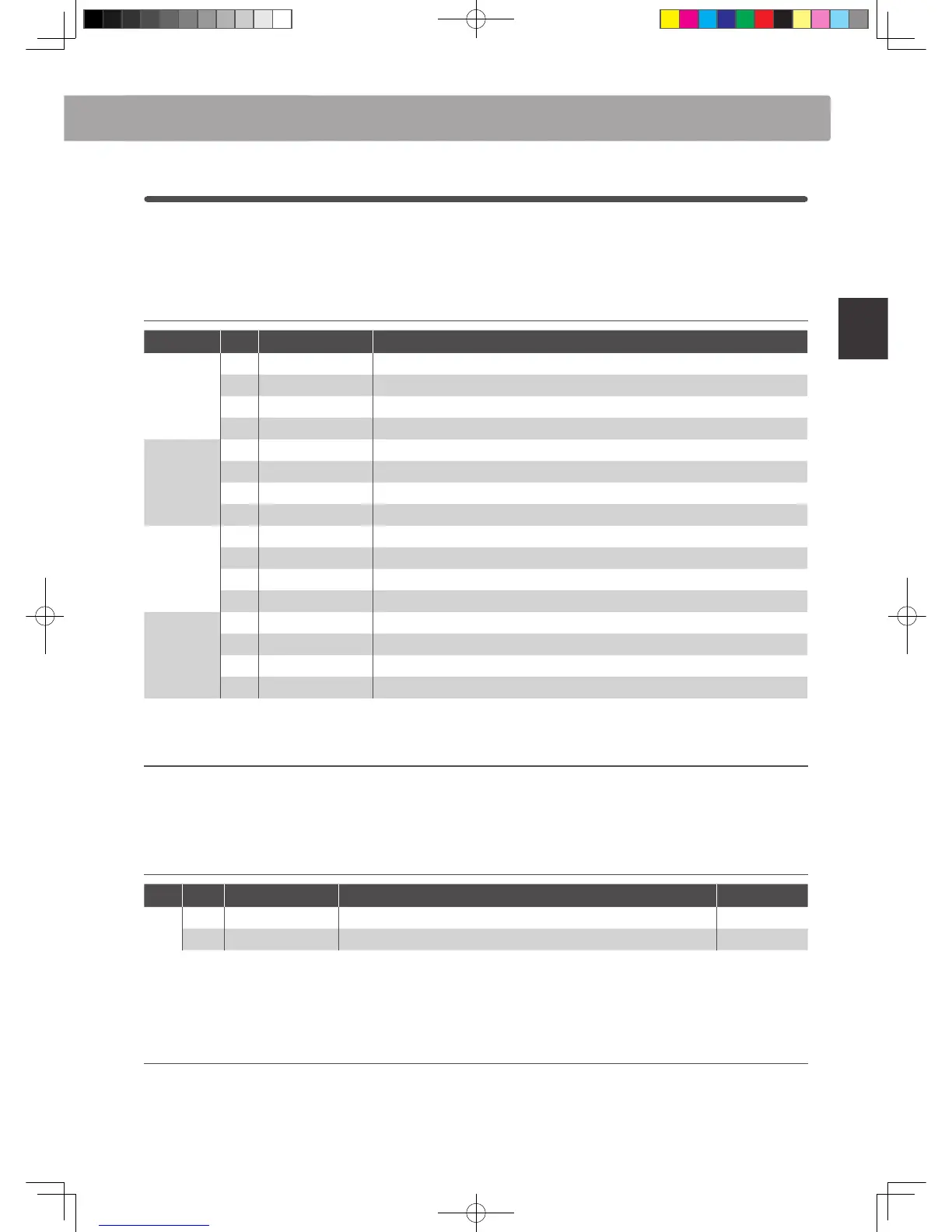
The MP11’s SUB section features 16 additional ‘subsidiary’ sounds arranged into STRINGS, PAD, HARPSI/MALLET,
and BASS categories. These sounds are suitable for layering with PIANO or E.PIANO section sounds, or for assigning
to keyboard splits/zone, but can of course be played independently if desired.
SUB section sounds
Category No. Sound Name Description
STRINGS
1 String Ensemble A natural string sound with a lush, open character.
2 Beautiful Str. A mellow string sound with slow attack and ne treble.
3 String Pad A typical synth strings pad with a soft texture.
4 Warm Strings A warm string sound with a muted treble.
PAD
1 Pad 1 A typical synth pad.
2 Pad 2 A fatter synth pad, with a slow release and attack characteristics.
3 Pad 3 A warm synth pad with a vocal quality.
4 Pad 4 A lush, airy synth pad with bell and vocal characteristics.
HARPSI /
MALLETS
1 Harpsichord A baroque period plucked instrument.
2 Vibraphone A percussive, tuned instrument played using mallets.
3 Celesta A metallic instrument with a soft timbre, played using a keyboard.
4 Marimba A percussive instrument with wooden bars, played using mallets.
BASS
1 Wood Bass A large, low-pitched string instrument often used to accompany jazz.
2 Finger Bass A standard electric bass guitar with a clean tone.
3 Fretless Bass An electric bass guitar without frets.
4 Wood Bass & Ride A typical double bass combined with a ride cymbal.
Feature Parameters: Virtual Technician
When Harpsichord or Bass sounds are selected, the SUB section’s Virtual Technician includes parameters to adjust
key-o behaviour.
Virtual Technician parameters
Page
Knob Parameter Description Value range
1
A Key-o Noise Adjust the volume of the noise heard when the keys are released. OFF, 1 ~ 127
B Key-o Delay Adjusts the delay time before the Key-o Noise is heard. 0 ~ 127
* The above parameters will only be available when a Harpsichord or Bass sound i s selected.
* For more detailed information about the SUB section’s Virtual Technician parameters, please refer to page 51.
Adjusting Virtual Technician parameters
Please refer to page 28 for a full explanation of how to enter the Virtual Technician menu and adjust parameter.



 To Next Page