EasyManua.ls Logo

Kaypro 10 - Graphics Characters

Kaypro 10
155 pages
Print Icon
To Next Page IconTo Next Page
To Previous Page IconTo Previous Page
Loading...
)
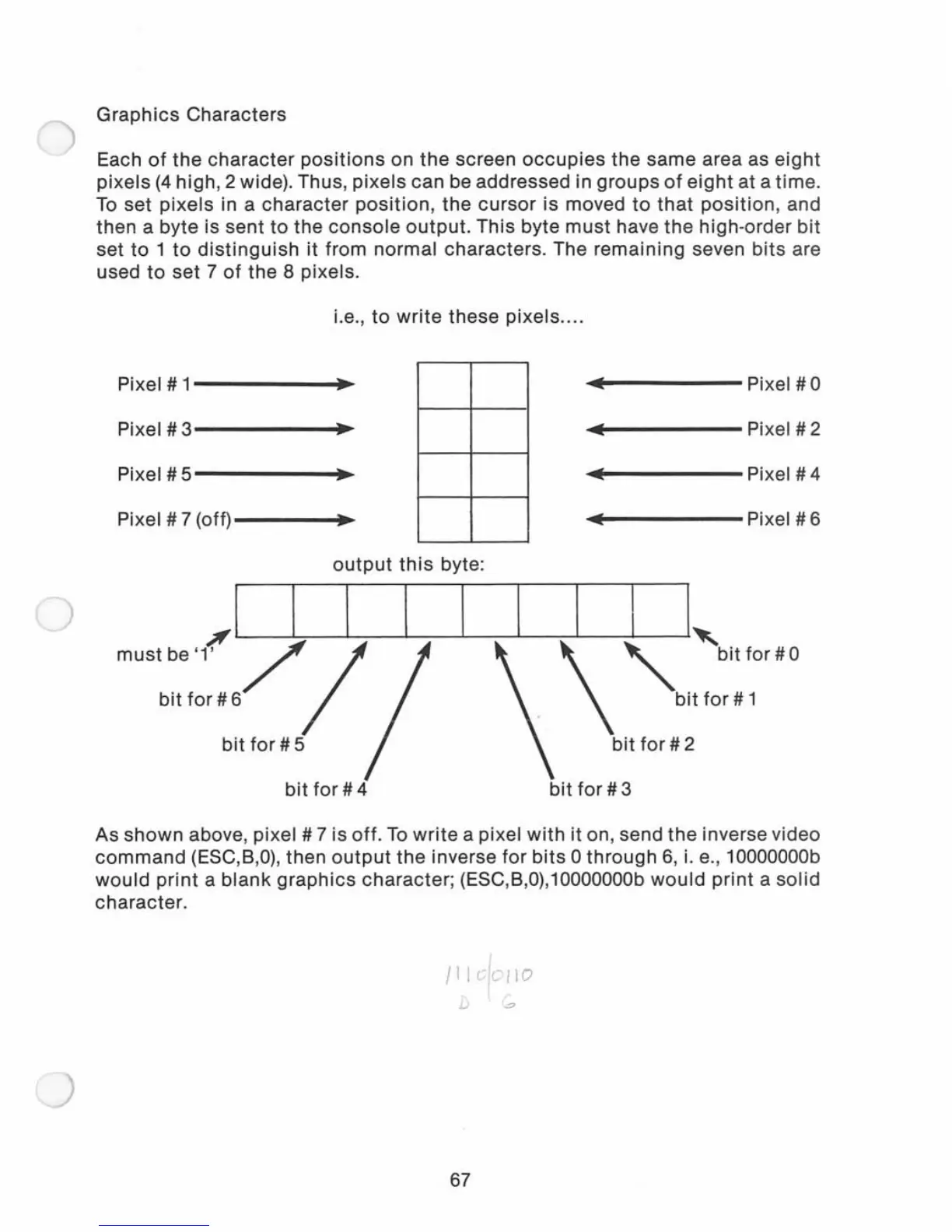
Graphics
Characters
Each
of
the
character
positions
on
the
screen
occupies
the
same area as
eight
pixels
(4
high, 2 wide). Thus,
pixels
can be addressed in
groups
of
eight
at a time.
To
set
pixels
in a
character
position,
the
cursor
is moved
to
that
position,
and
then a byte is sent
to
the
console
output.
This byte
must
have
the
high
-order bit
set
to
1
to
distinguish
it
from normal characters. The remaining seven
bits
are
used
to
set
7
of
the
8 pixels.
i.e.,
to
write
these
pixels
....
Pixel # 1
.,
...
Pixel
#0
Pixel # 3
.,
..
Pixel # 2
Pixel # 5
.,
..
Pixel
#4
Pixel # 7 (off)
..
Pixel
#6
output
this
byte:
,) I I I
must
be '1'
//
bit
for
# 6
1 1 I
I,
\
"
bitfor#O
bit
for
# 1
bit
for
# 5
bit
for
# 2
bit
for
# 4
bit
for
# 3
As
shown
above, pixel # 7 is
off
.
To
write
a pixel
with
it
on, send
the
inverse video
command
(ESC,B,O), then
output
the
inverse
for
bits
0
through
6,
i.
e., 10000000b
would
print
a
blank
graphics
character; (ESC,B,0),10000000b
would
print
a
solid
character.
/11
elollo
D
~
67

Related product manuals