EasyManua.ls Logo

Kaypro 10 - CONNECTING A PRINTER; Parallel Printer

Kaypro 10
155 pages
Print Icon
To Next Page IconTo Next Page
To Previous Page IconTo Previous Page
Loading...
)
CONNECTING A PRINTER
Parallel
Printer
Your
KAYPRO 10
computer
comes
equipped
with
a Centronics-type
connector
on
the
back
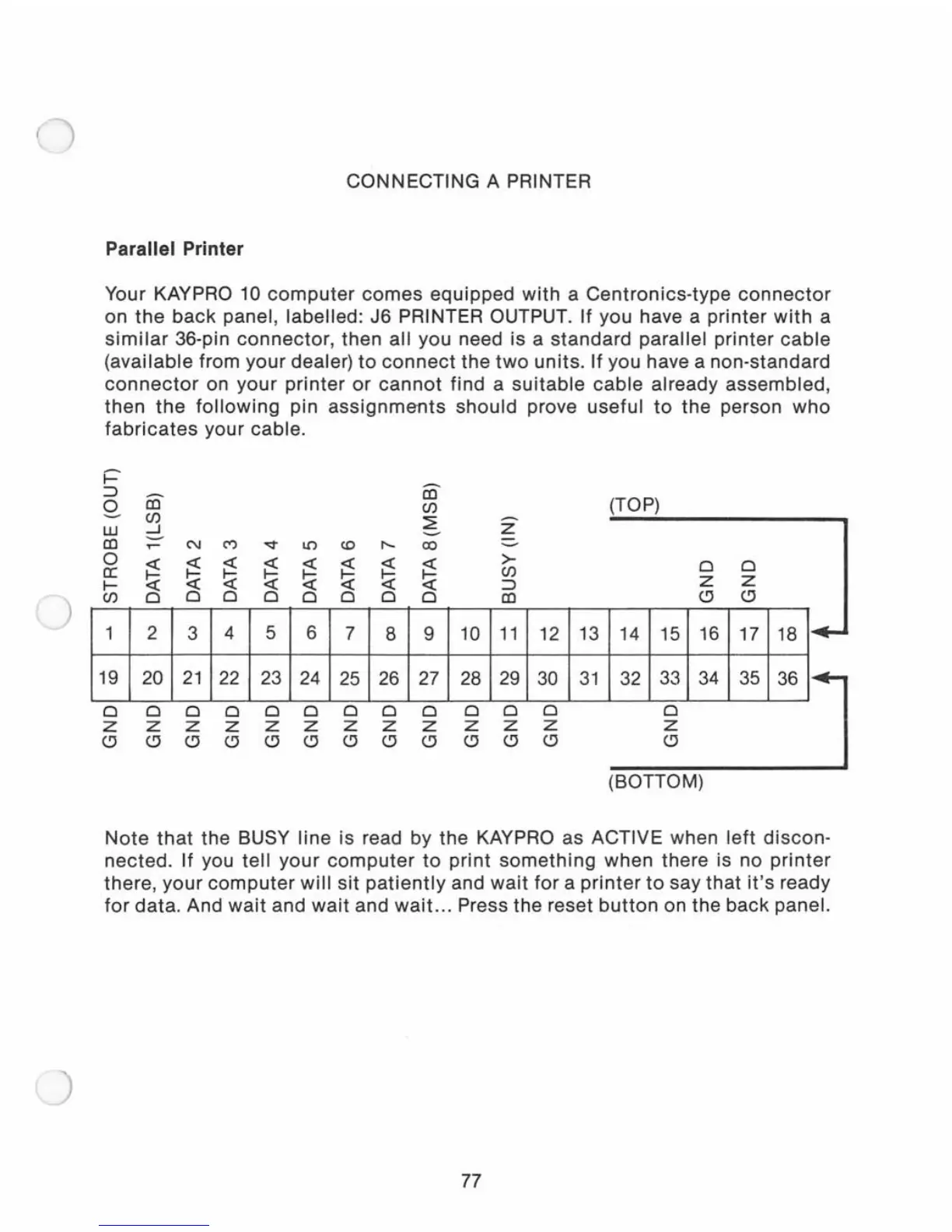
panel, labelled: J6 PRINTER OUTPUT. If you have a
printer
with
a
similar
36
-pin
connector,
then all you need is a standard parallel
printer
cable
(available from
your
dealer)
to
connect
the
two
units. If you have a non-standard
connector
on
your
printer
or
cannot
find a
suitable
cable
already assembled,
then
the
following
pin
assignments
should
prove
useful
to
the person
who
fabricates
your cable.
-
W
co
0
a:
I-
CJ)
1
19
o
z
~
CJ)
-l
-
..-
N
cry
~
~
~
<{
<{
<{
0
0 0
2
3
4
20
21
22
000
z z z
~ ~
~
~
l!)
~
<{
~
<{
0
0
5 6
23 24
o 0
z z
~ ~
<0
I'-
~
<{
~
<{
0 0
7
8
25 26
o 0
z z
~ ~
co
CJ)
~
-
co
~
<{
0
9
27
o
z
~
-
Z
-
>-
CJ)
:::l
co
10
11
28
29
o 0
z z
~
~
12
30
o
z
~
13
31
(TOP)
0
0
Z
Z
~
~
14 15 16
17
18
I'"
32
1
331
34
1
35
1
36
1
]
o
z
~
(BOTTOM)
Note
that
the BUSY
line
is read by the KAYPRO as ACTIVE when
left
discon
-
nected.
If you
tell
your
computer
to
print
something
when there is no
printer
there
,
your
computer
will
sit
patiently
and
wait
for
a
printer
to
say
that
it's
ready
for
data
. And
wait
and
wait
and
wait...
Press the reset
button
on the
back
panel.
77

Related product manuals