ELECTRIC BICYCLE METER KT—LCD3 Product User Manual
- 17 -
General Project Setting
○ Maximum Trip Speed
Under power off status, hold button long (SW), the meter is turned on. Within
5 seconds after boot-up, hold button (UP) and button (DOWN)
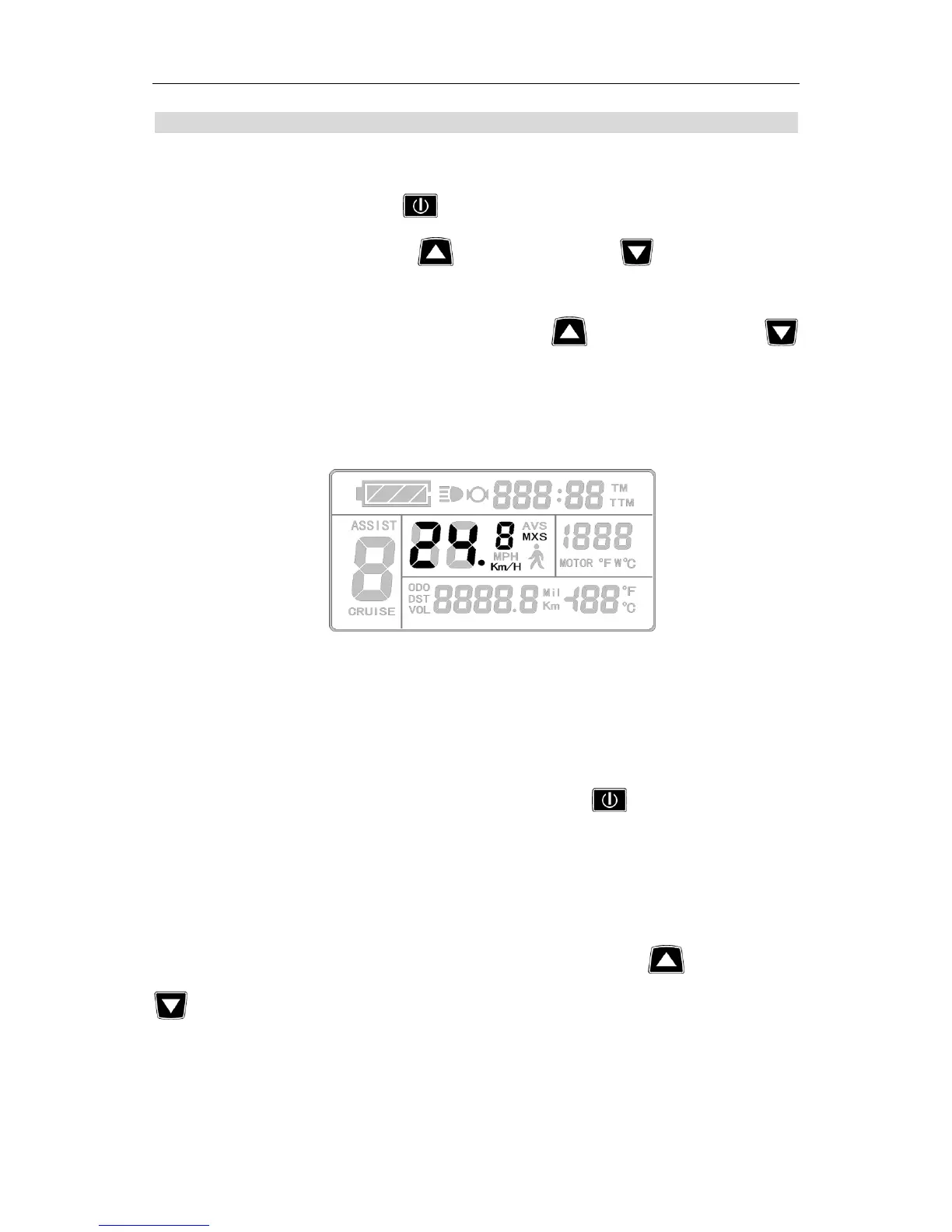
simultaneously for about 2 seconds, the first is to enter the maximum riding speed setting
interface, then the speed display column flashes. Hold button shortly (UP) or
button (DOWN) in order to set the maximum riding speed value. The default maximum
riding speed value was 25Km/h. When the speed of the electric vehicle exceeds the set
value, the motor will be stopped driving.
Setting interface of maximum trip speed
Under the setting maximum riding speed interface, if there’s no button operation
on the meter for more than 1 minute, and then the meter will automatically return to
display 1, and the original set values will be saved.
After finishing the maximum riding speed setting, hold button shortly (SW) to
save the current set values and enter into the next setting.
○ Wheel Diameter
After finishing the maximum riding speed setting, enter the wheel diameter setting
interface, and then the wheel diameter display column flashes. Hold button (UP) or
button (DOWN) to choose the corresponding wheel diameter specification to a
selected vehicle. The selection range of wheel diameter specifications are 13 species such
as 6,8,10,12,14,16,18,20,22,24,26,700 c and 28 inches.


 To Next Page