EasyManua.ls Logo

Kemper VacuFil Compact - Page 82

Kemper VacuFil Compact
Print Icon
To Next Page IconTo Next Page
To Previous Page IconTo Previous Page
Loading...
EN
1502872-02 - 82 -
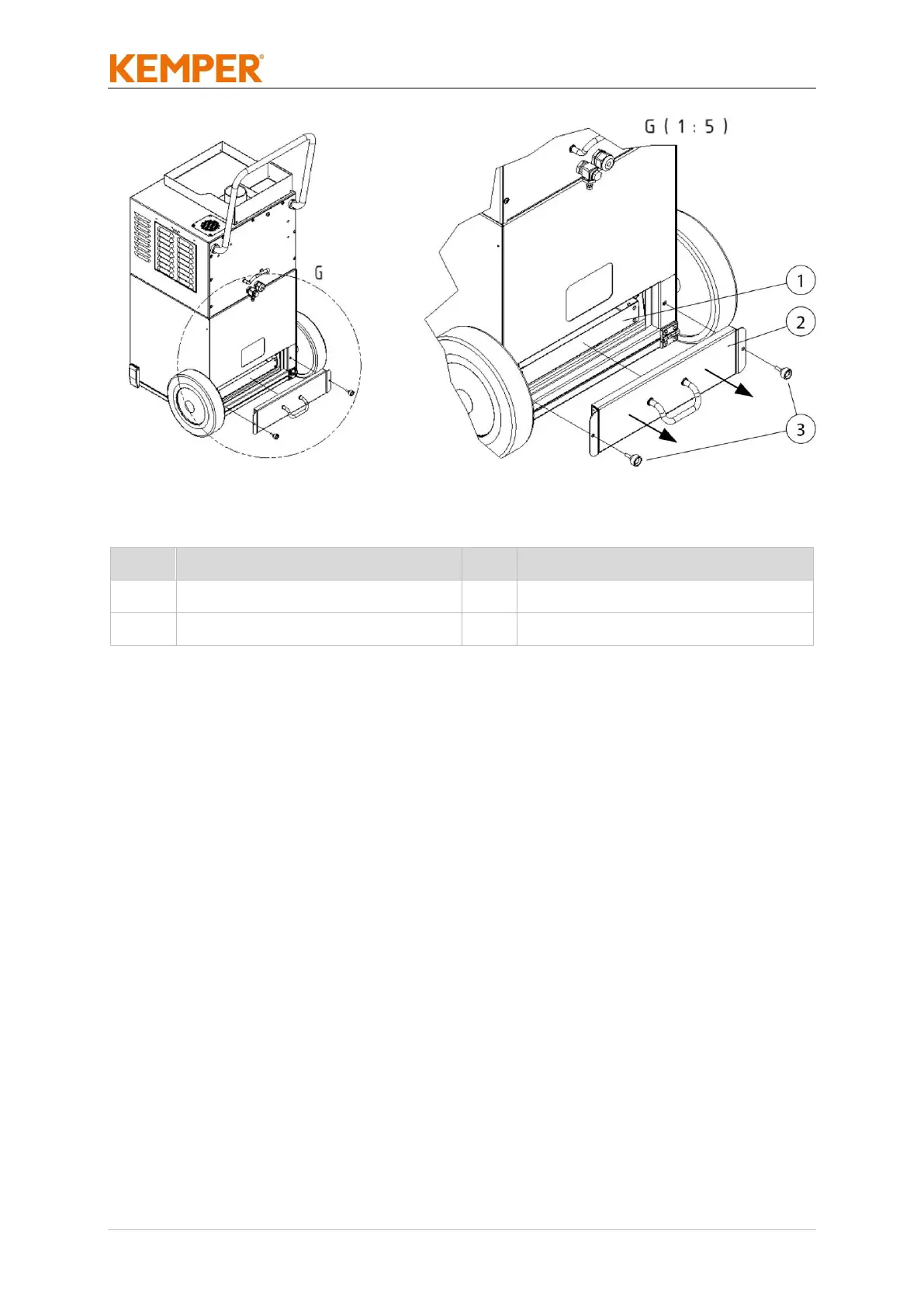
Fig. 21: Changing the dust collection container
Pos.
Description
Pos.
Description
1
Dust collection container
3
Knurled screw (2x)
2
Maintenance cover
Tab. 25: Positions on the product
To replace the dust collection container, please proceed as follows:
1. Switch off the product at the rotary switch.
2. Disconnect the product from the power supply by unplugging.
3. Provide a new dust collection container (Pos. 1) and disposal bag.
4. Dismantle the maintenance cover (Pos. 2) by loosening the knurled
screw (Pos. 3).

Table of Contents

Related product manuals