EasyManua.ls Logo

Kemper VacuFil Compact - Troubleshooting

Kemper VacuFil Compact
Print Icon
To Next Page IconTo Next Page
To Previous Page IconTo Previous Page
Loading...
EN
1502872-02 - 89 -
11. Insert the new filter cartridge (Pos. 4) and mount it with the hexagon
nut, sealing washer and serrated lock washer (Pos. 5) according to the
figure.
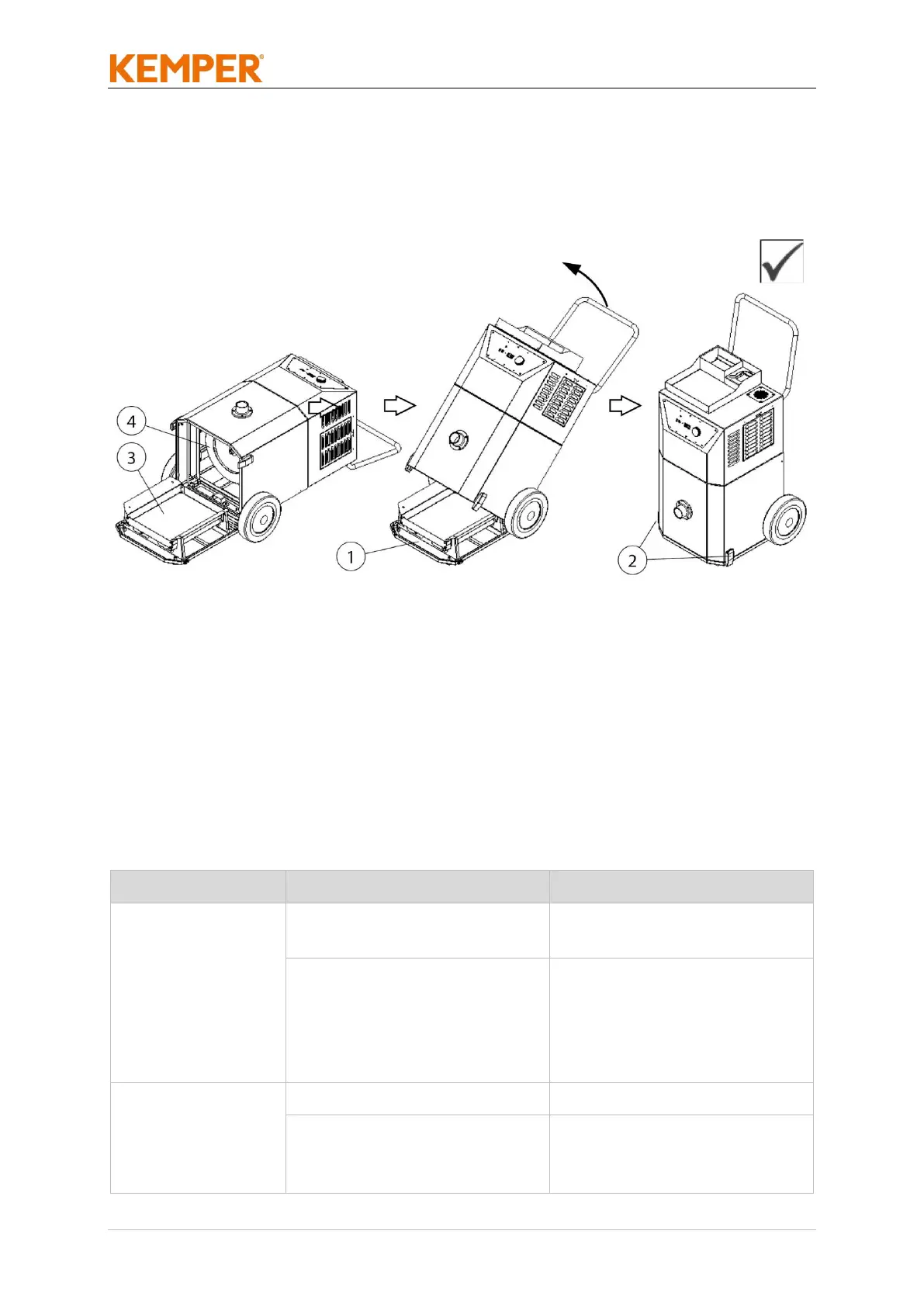
Fig. 28: Closing the maintenance cover
12. Set the product upright and close the maintenance cover (Pos. 1) with
the two clamp fasteners (Pos. 2).
13. Reconnect the product to the power supply by plugging in.
14. Put the product back into operation. (see also “Commissioning” chapter)
7.3 Troubleshooting
Fault
Cause
Note
Product will not
start up
No mains voltage
Have it checked by a
qualified electrician
Start/stop sensor (optional
fitting) connected but no
welding current detected.
Welding process not yet
started
Start welding process
Not all fumes are
being captured
Draught
Avoid draughts
Incorrect extraction
capacity set
Check and correct
required extraction
capacity

Table of Contents

Related product manuals