16
Quick Start Guide
How to Play Movie/Picture
You can play DVD video, Video CD (VCD), movie files from disc media, iPod and
picture files from USB storage device.
NOTE
•Fordetailsonplayablefileformat,deviceformat,etc.,refertotheInstructionManual.
1
Connect the media you want to play.
For the method of connecting, see How to Play Music (P.14).
2
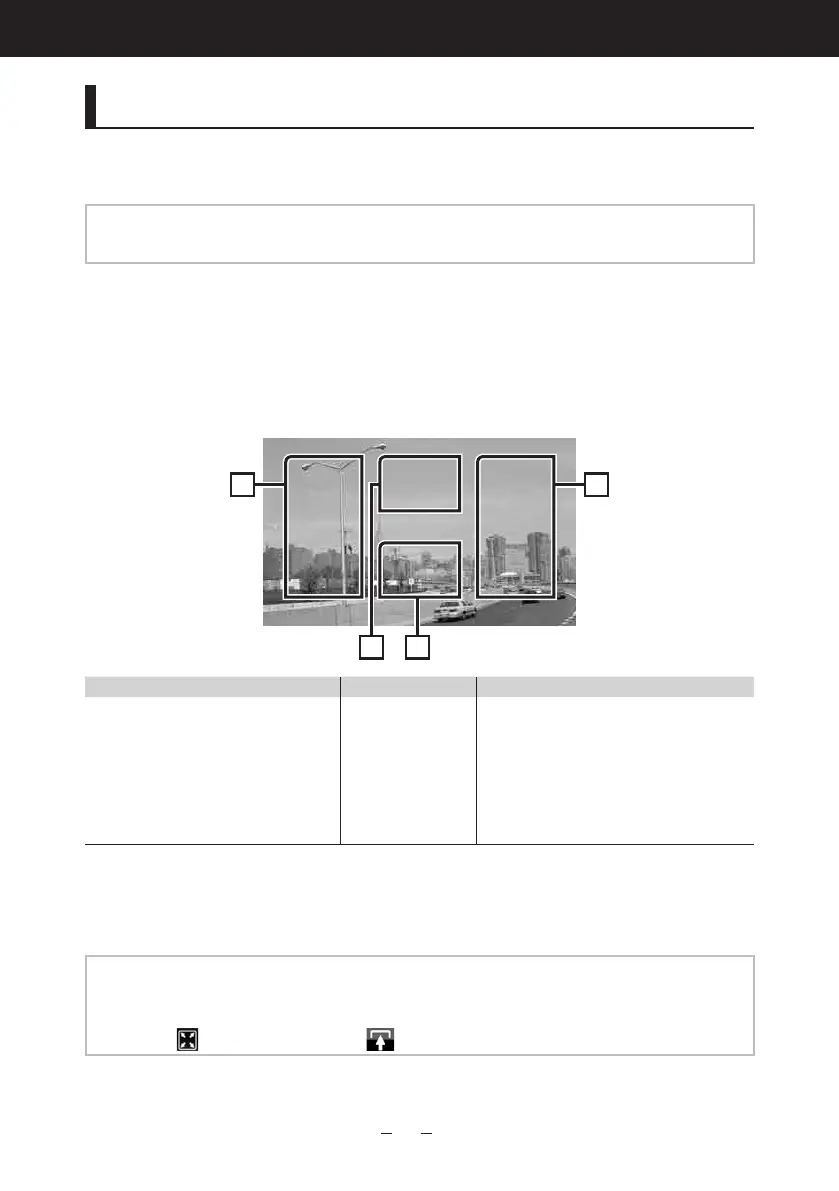
Control the movie/picture by touching the screen.
Each area on the screen has a separate function.
1 2 3
DVD:DisplaystheDVDmenu.*
1
VCD:DisplaystheZoomControl
screen.*
2
Disc media:Displaysthediscmenu.*
3
DisplaystheSource
Controlscreen.
•Searchesthenext/previouscontentor
file.
•Scrollingfromcenterofdisplaytoleft
orrightperformsfastbackwardorfast
forward.
Tostopfastbackward/forward,touch
centerofthedisplay.*
4
*
1
SeeDVD/VCD Basic Operation (P.24)intheInstructionManual.
*
2
SeeZoom Control For DVD And VCD (P.28)intheInstructionManual.
*
3
SeeMovie Control (P.45)intheInstructionManual.
*
4
ForiPod/USB,thisfunctionmaybeunavailabledependingontheplayingfileformat.
NOTE
•Foroperationsonthesourcecontrolscreen,seeHow to Play Music (P.14).
However,searchingbycategory/link/albumartworkisnotavailable.
•Touching[
](displayedbytouching[ ]inthesourcecontrolscreen)hidesallkeys.



 To Next Page