24
Quick Start Guide
Removing Procedure
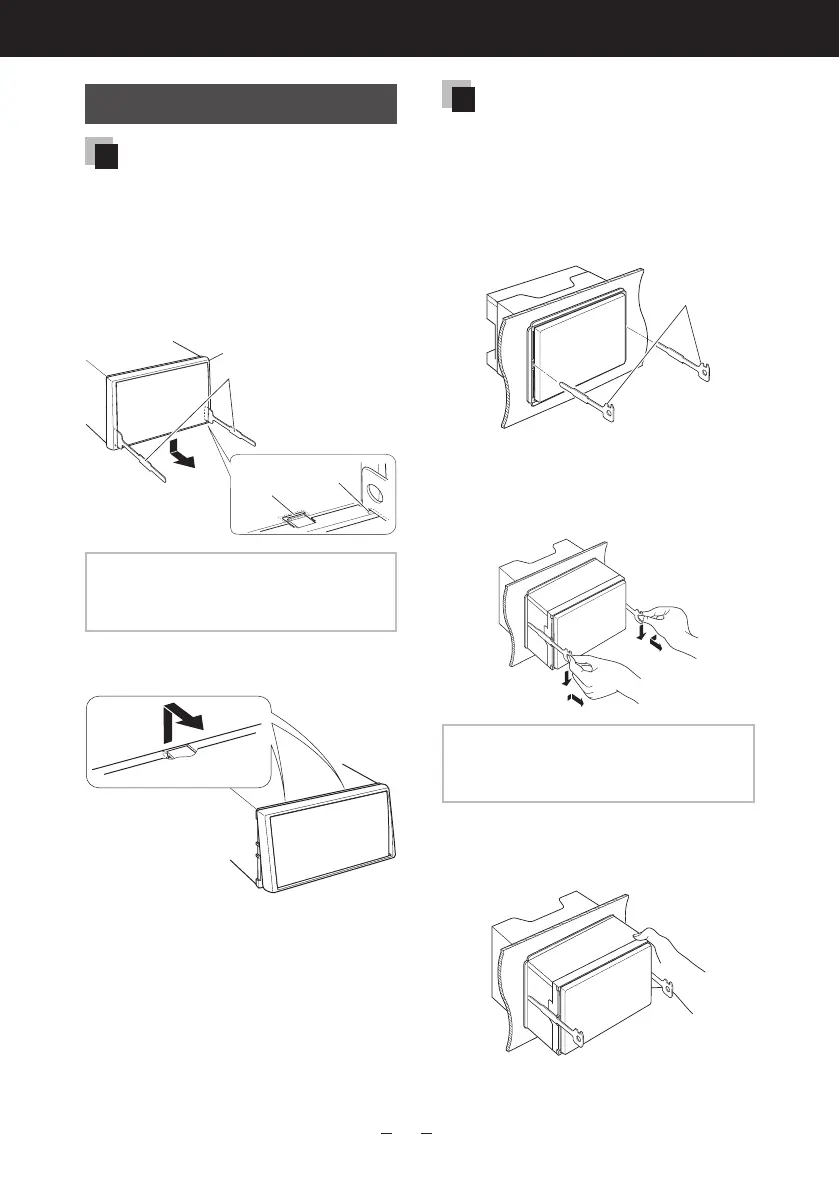
Removing the trim plate
1) Engage the catch pins on the
extraction key (accessory 3)
and remove the two locks on the
lower level.
Lower the trim plate (accessory
4) and pull it forward as shown
in the figure.
3
4
Lock
Catch
NOTE
•Thetrimplatecanberemovedfromthe
topsideinthesamemanner.
2) When the lower level is removed,
remove the upper two locations.
Removing the unit
1) Remove the trim plate by
referring to step 1 in “Removing
the trim plate”.
2) Insert the two extraction keys
(accessory3) deeply into the slots
on each side, as shown.
3
3) Lower the extraction key toward
the bottom, and pull out the unit
halfway while pressing towards
the inside.
NOTE
•Becarefultoavoidinjuryfromthecatch
pinsontheextractionkey.
4) Pull the unit all the way out with
your hands, being careful not to
drop it.








 To Next Page