18
Quick Start Guide
How to Make a Phone Call
You can use your Bluetooth cell-phone when paired to this unit.
1
Register your cell-phone to the unit.
Follow as the procedures shown below. For detailed operation, see Registering the Bluetooth
Unit (P.65) in the Instruction Manual.
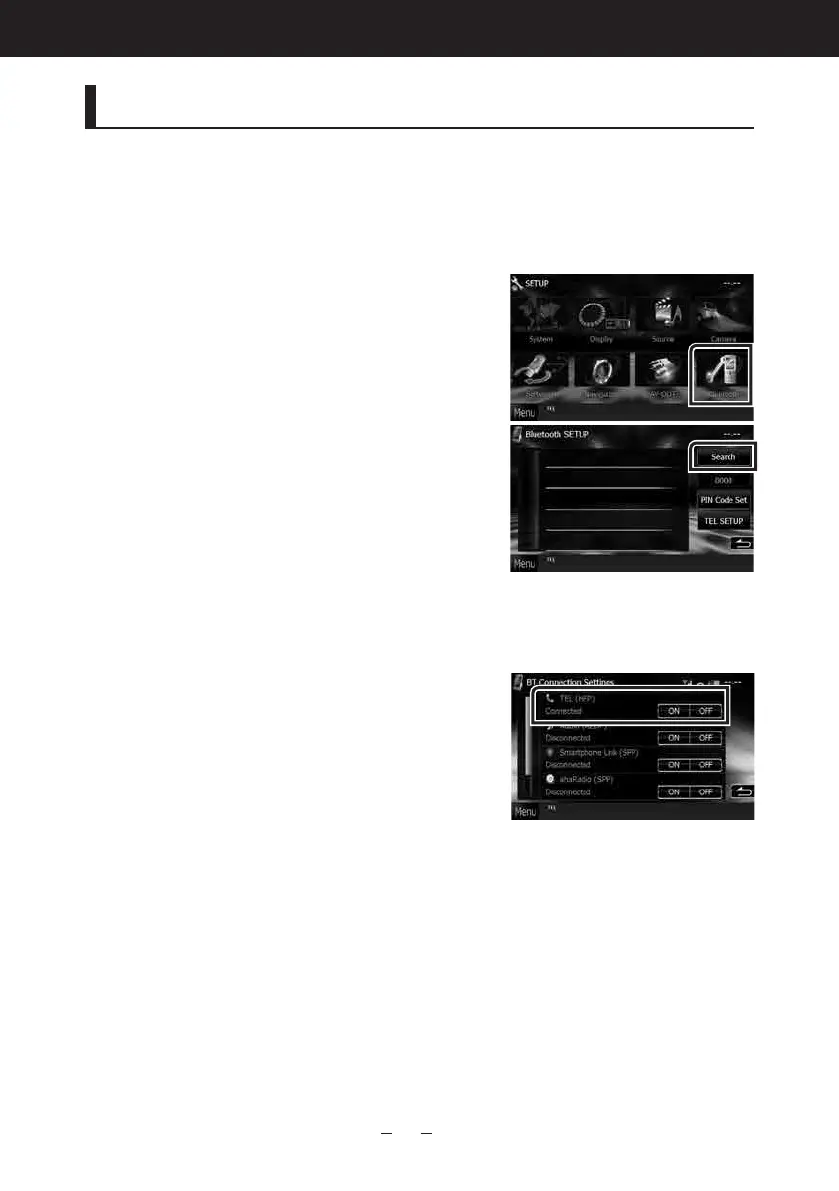
1) Touch [Menu] on any screen.
Top Menu screen appears.
2) Touch [SETUP].
SETUP Menu screen appears.
3) Touch [Bluetooth].
Bluetooth SETUP screen appears.
4) Touch [Search].
Searched Device List screen appears.
5) Touch [PIN Code Set] in the Searched Device
List screen.
6) Enter PIN code and touch [Enter].
7) Select your cell-phone from the displayed list
in the Searched Device List screen.
Registering is completed.
2
Connect your cell-phone to the unit.
1) Touch the device name you want to connect
in the Bluetooth SETUP screen.
2) Touch [ON] of [TEL(HFP)] in the BT
Connection Settings screen.
The selected device is connected to the unit.
When registration of your cell-phone is completed,
the phone book of the cell-phone is automatically
downloaded to this unit.



 To Next Page