User’s Manual
Published on February 2017 UMn°154 – rev.05 26
This document and any information disclosed herein are the property of Keopsys and constitutes and contains proprietary information.
Receipt or possession of this document does not confer or transfer any right to duplicate, use disclose any information
6.3. Telnet protocol
The Telnet protocol is not available on all device, please check device specifications.
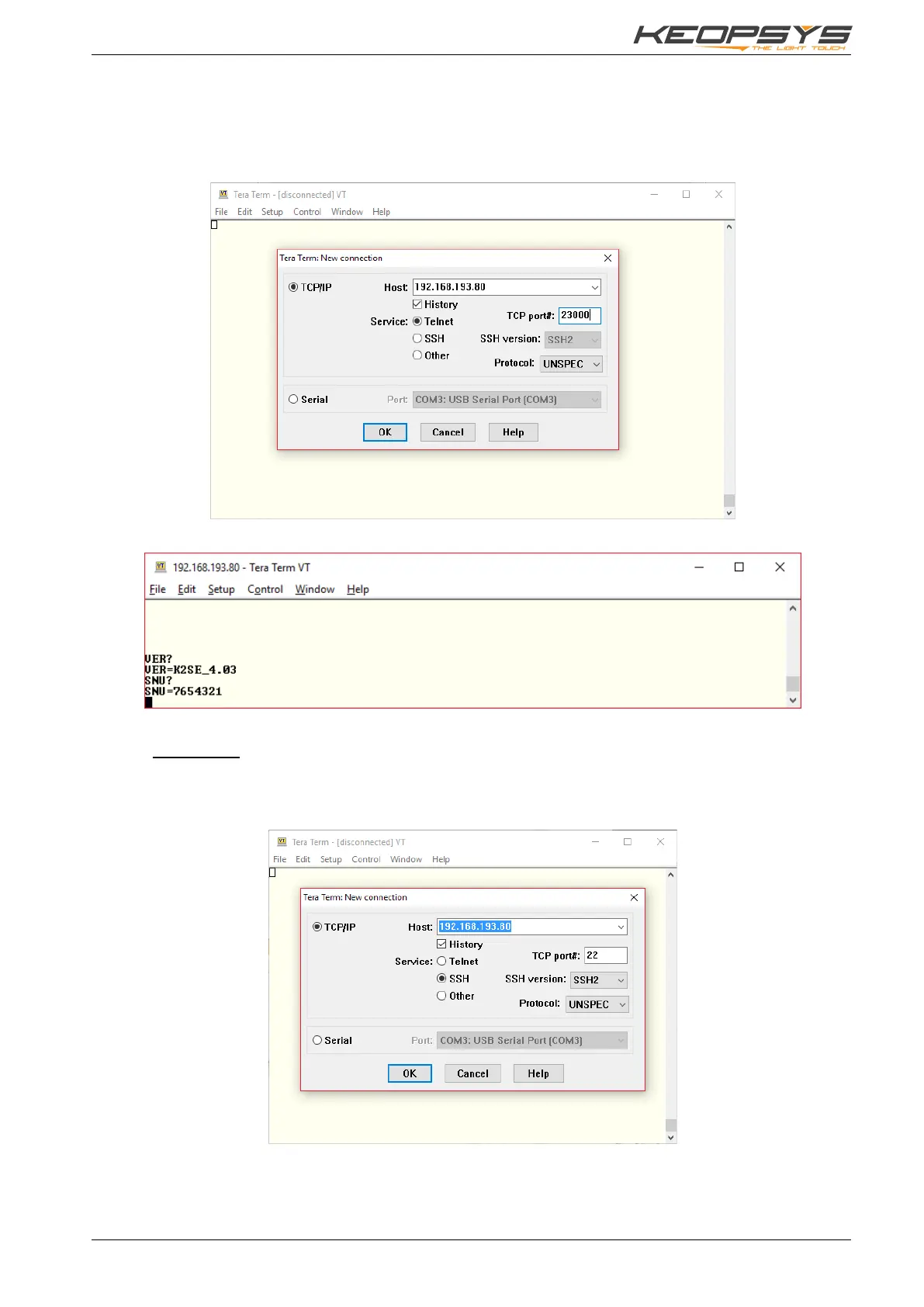
You can communicate with the device using Telnet protocol throw RJ45 connector. The IP is same as
for Web Server Interface, and the port is 23000. For the communication, you can use any software which
support the Telnet protocol like Tera Term:
When you are connected, you can use same command as RS232 (see §5.2):
6.4. SSH protocol
6.4.1. Connection
You can connect to the device using SSH protocol throw RJ45 connector. The IP is same as for Web
Server Interface, and the port is the default SSH port: 22. For the communication, you can use any
software which support the SSH protocol like Tera Term:


 To Next Page