User’s Manual
Published on February 2017 UMn°154 – rev.05 31
This document and any information disclosed herein are the property of Keopsys and constitutes and contains proprietary information.
Receipt or possession of this document does not confer or transfer any right to duplicate, use disclose any information
7. Human Interface
7.1. Operating through the front panel
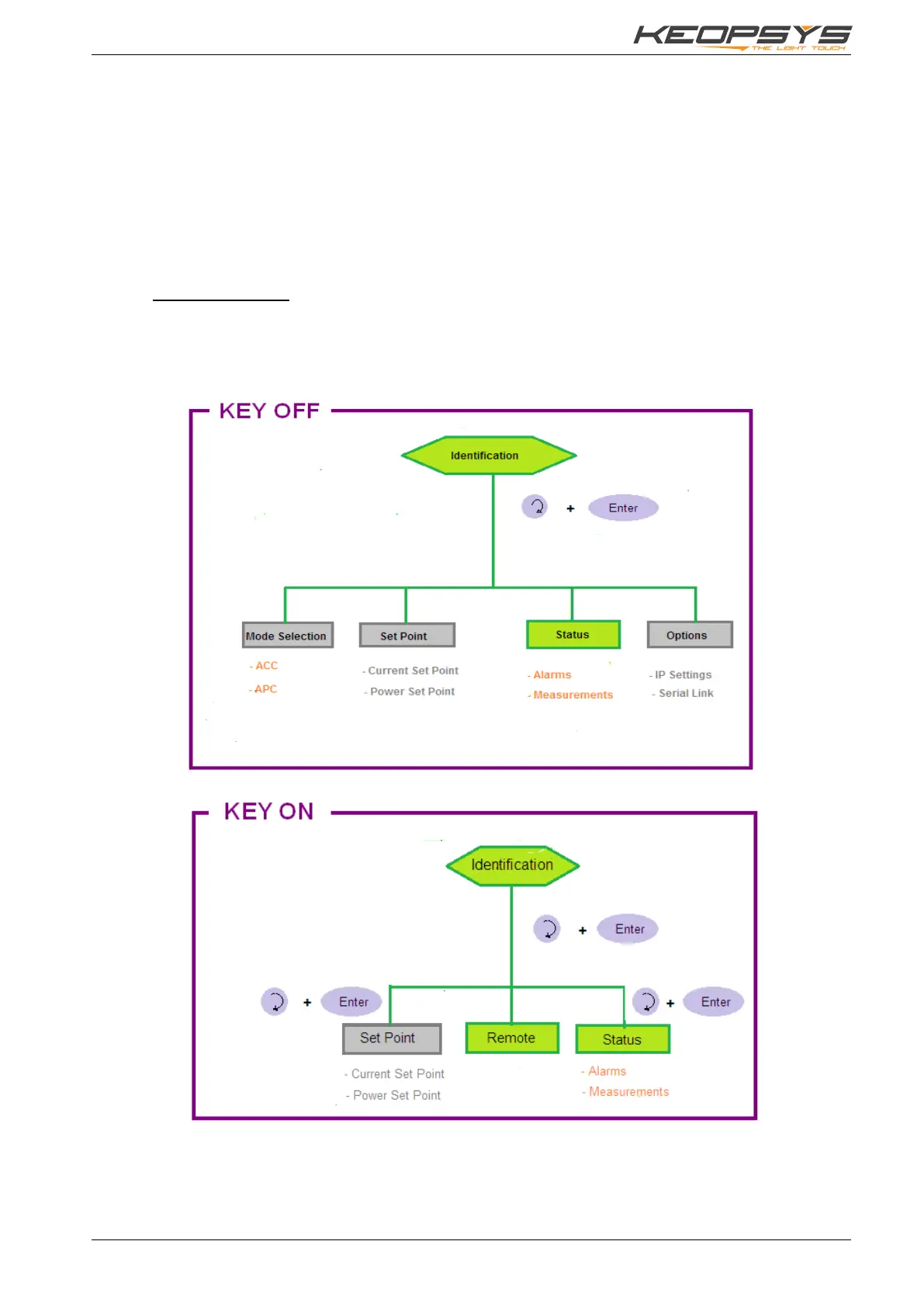
The laser shall be configured and set with Key OFF. In this state, the following menus are available:
• Control mode (ACC or APC)
• Set point
• Alarm status (such as power measurements and temperatures)
• Options (RS232, IP Settings)
Regardless the configuration, the pump current is enabled only when the Key is ON and the pump
parameter is ON.
7.1.1. Menu architecture
The following windows specifies the architecture of the device.
The green items represent the available menus
The grey items represent adjustable parameters
The orange items represent defined parameters


 To Next Page