7
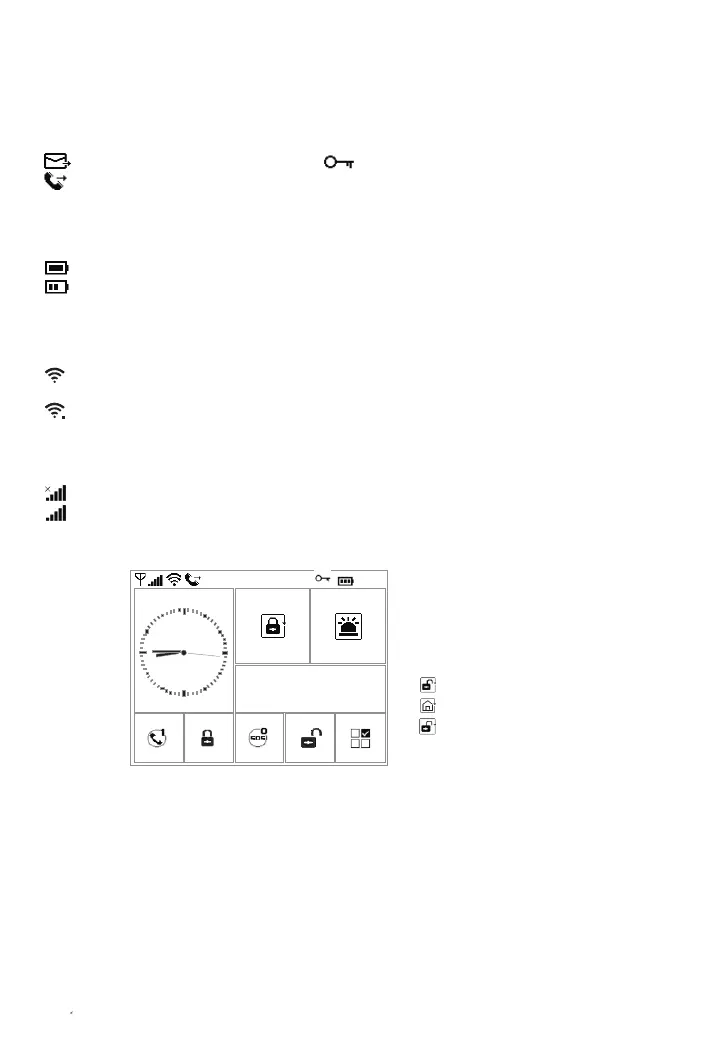
What you see and What it means about the home screen display
SMS/Call Status
Text message sending
Calling
Keypad locked
Power status
AC powered, and the progress bars shows in case of charging.
Displayed when the system has lost AC power. The icon is red when the backup battery
power is low.
Wi-Fi network status
Indicates that the hub is connected to a WiFi source and the signal strength when it
is displayed in white.
Indicates that the hub is connected to internet when dot is displayed.
Cellular network status
No SIM card inserted or SIM card faulty
RSSI level signal strength, it is displayed by a series of 1 to 5 bars (weak to strong),
and bars are gray if not registered with cell network.
2016-12-28 Wednesday
8:45
Arm/Disarm status area
System is AWAY ARMED.
System is HOME ARMED.
System is DISARMED.
System status display area
Ready: Clock
‘Please exit’ Countdown Bar: You now have xx seconds to leave home before the exit delay expires.
When the exit delay is completed, the alarm system is armed.
‘Please disarm’ Countdown Bar: You must disarm the system before the entry delay expires, or an
alarm will go off.
‘Synchronizing’ Countdown Bar: You must active the wireless transmitter before the sniffer delay expires
Alarm status area
An alarm(bell) icon is displayed alternately with the ZONE that has caused the alarm.



 To Next Page