EasyManua.ls Logo

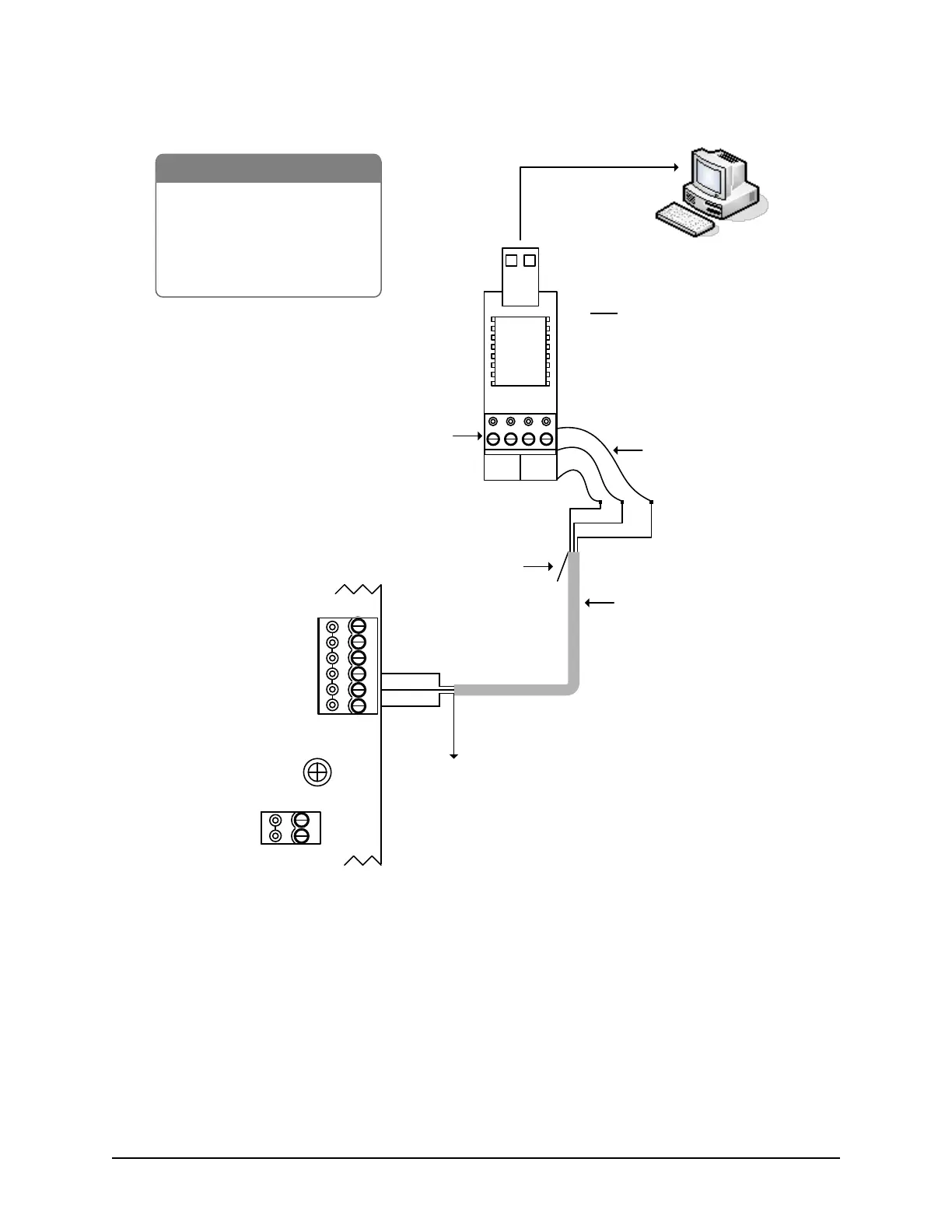
Keyscan CA8500B - Figure 74 - Single ACU Communication - USB Adaptor

Default Icon
142 pages
Print Icon
To Next Page IconTo Next Page
To Previous Page IconTo Previous Page
Loading...
Keyscan Inc. Technical Guide (PC109x - 07.15)
101
Figure 74 Single ACU Communication - USB Adaptor
PC with
Communication
Manager
- USB Adaptor (USB-SER)
- RS-232 Data Cable
- Control Board
- PC (requires USB port)
- USB extension cable optional
BRNWHTGRN WHT
+ TX - + RX -
485 OUT 485 IN
To USB port on PC
(may require USB
extender cable)
485 terminal
block not used
use 3 loose
RS-232 wires
tape
back
shield
Note
USB communication is slower
than direct serial or NETCOM
communication.
Do not connect USB adaptor to
modem.
RS-232
22 AWG shielded cable
Maximum - 100 ft (30 M)
Green
Black
Red
Unused conductors are
taped back separately.
Unused conductors are
taped back separately.
GND
RS-232 (COM4)
Control Board
(PC 109x)
Green
Black
TD
RD
DCD
DTR
CTS
Red
To ground lug
Shield*
IOCB (COM1)
RX
TX
Parts List
KI-00156E-04-13
* Insulate shield with PVC tubing such as
Alpha (p/n PVC10516 16 AWG) or
comparable insulator.
Ensure S2
DIP switches 7 & 8
are OFF

Table of Contents

Other manuals for Keyscan CA8500B

Related product manuals