EasyManua.ls Logo

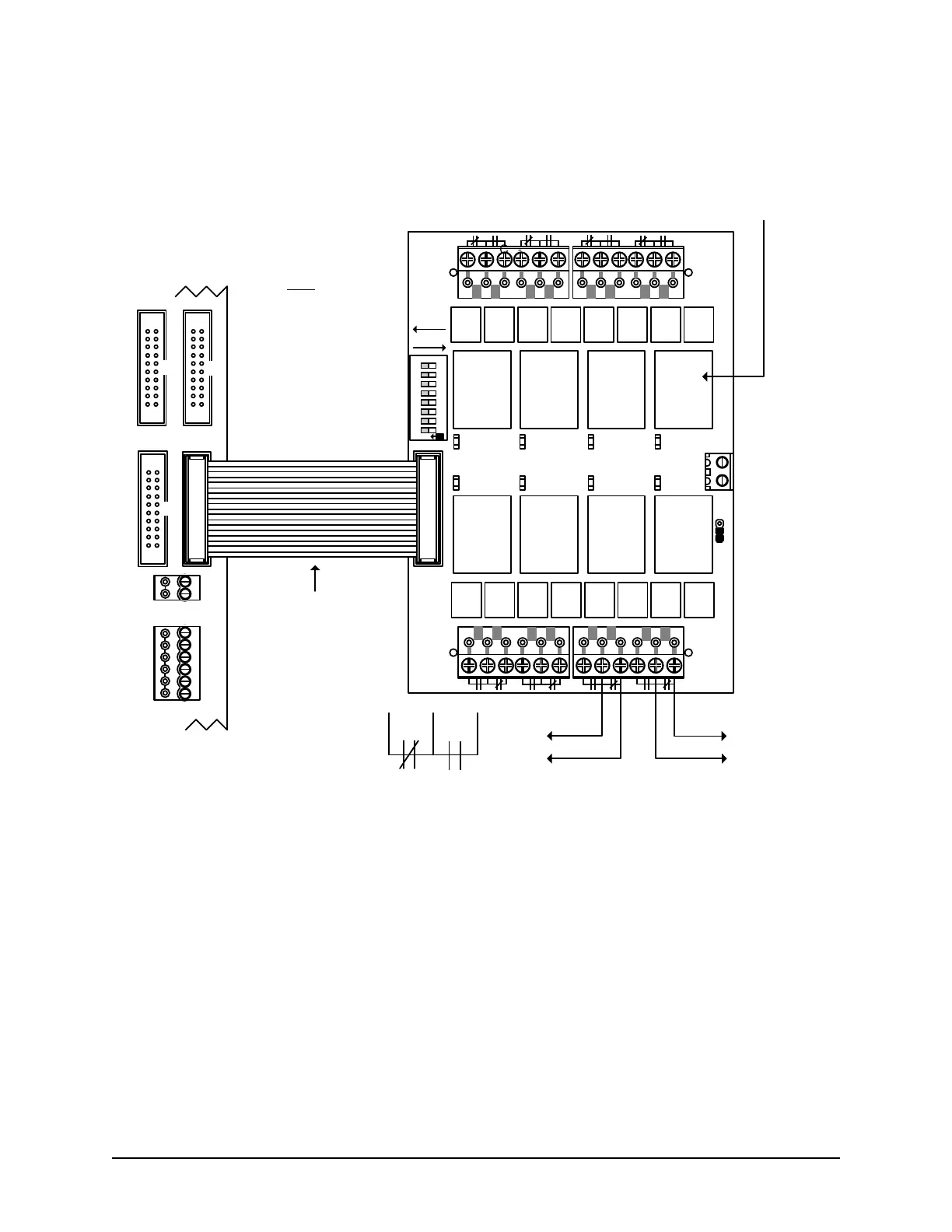
Keyscan CA8500B - Figure 26 - Terminate Auxiliary Outputs CA250 B

Default Icon
142 pages
Print Icon
To Next Page IconTo Next Page
To Previous Page IconTo Previous Page
Loading...
Keyscan Inc. Technical Guide (PC109x - 07.15)
42
Figure 26 Terminate Auxiliary Outputs CA250B
Normally
Closed
N.C.
Normally
Open
N.O.
alarm panel input
or
CCTV input
time zone
lock/unlock
CA250B
Control
Board
Cut View
OCB-8 ribbon cable
connects to CONTROL 1.
red stripe
OCB-8
When OCB-8 connected to CA250B
Relay 5 = Aux Output 3 or HC Output 1
Relay 6 = Aux Output 4 or HC Output 2
Do not use relays for both functions.
OCB-8
Relays
CONTROL
2
RS-232 (COM4)
CTS
CONTROL
5
DTR
DCD
RD
TD
GND
OCB-8 powered
through ribbon
cable with J1
Relay Power set
on ACU.
TAMPER TB3
SWITCH
+
-
KI-00139E-10-14
CONTROL
4
S1
TB1
J1
OUTPUT
CONTROL
BOARD
K1
K2
K3 K4
K5K6K7K8
LE D ON =
RELAY
ENERGIZED
O
N
1 2 3 4 5 6 7 8
ACU
EXT
12V
GND
H1
TB2
TB3
TB4
OCB8
PC1102
RELAY
REV.
NORMAL
KEYSCAN
INC.
Door
Output
1
(DIP
Switch 1)
Door
Output
2
(DIP
Switch 2)
Aux
Output
1
(DIP
Switch 3)
Aux
Output
2
(DIP
Switch 4)
HC
Output
1
(DIP
Switch 5)
HC
Output
2
(DIP
Switch 6)
Pre-
Alert
1
(DIP
Switch 7)
Pre-
Alert
2
(DIP
Switch 8)
Relay
Power
Note
DIP switches set
relays for normal or
reverse, as
indicated by the
arrows.

Table of Contents

Other manuals for Keyscan CA8500B

Related product manuals