12
You can access the radio player either by pressing the
RADIO
key or by
selecting the Radio menu option from All Menus on the Home screen. Select
the SiriusXM™ band from the radio player.
i
Information
• If you press the
RADIO
key when the power is off, the power will turn on and a radio
broadcast will be tuned from the current mode.
• If you are in the SiriusXM™ mode, select the SiriusXM™ radio widget from the Home
screen to access the radio player.
• When the power is off, pressing the
RADIO
key will turn the power on and play a
SiriusXM™ Radio broadcast.
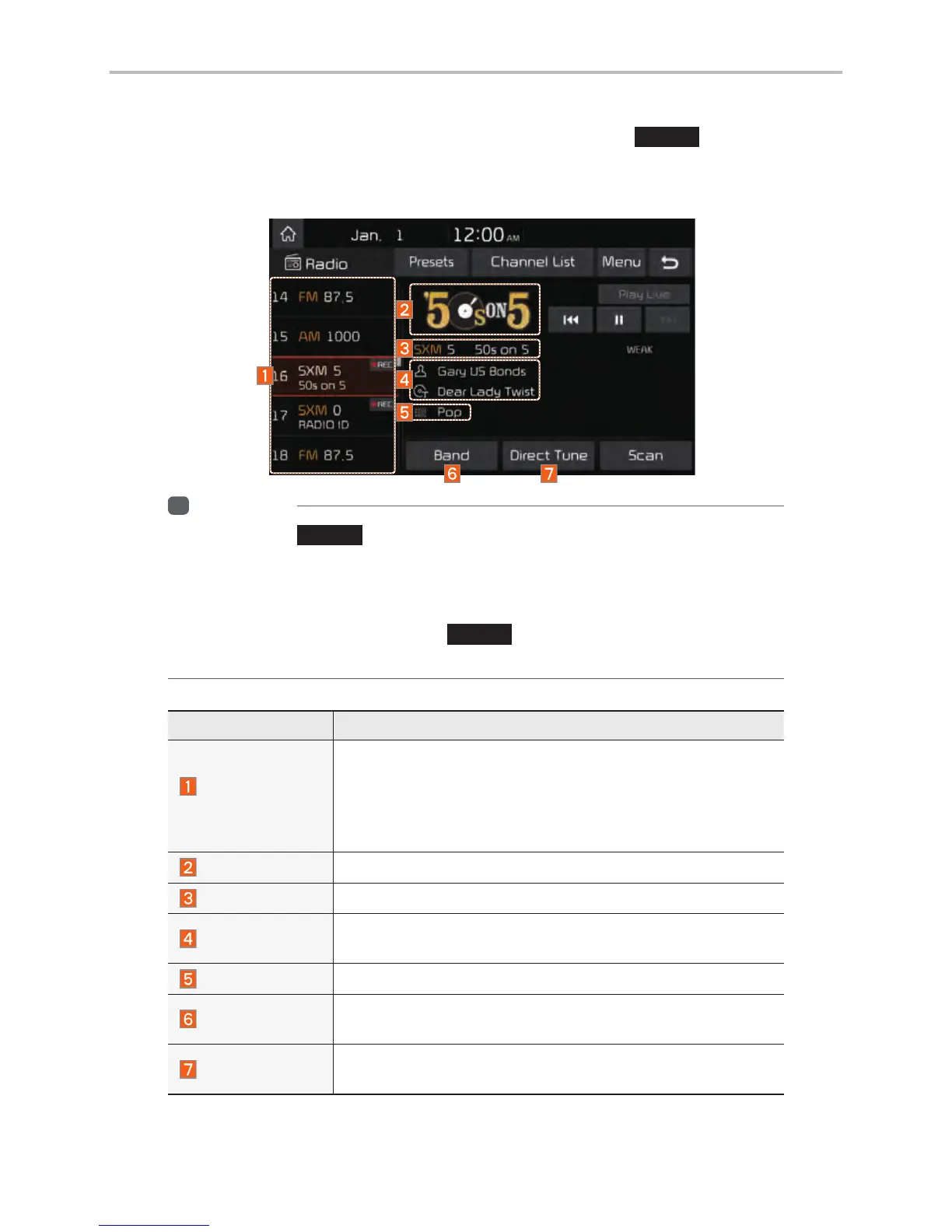
Features Description
Preset
Frequencies
• Shows the stored presets for user selection.
• After selecting frequency, press and hold the preset but-
ton for more than 0.8 seconds.
A beep sound will be heard and the frequency is to be stored
in the selected preset button.
Channel Logo
Displays the current channel logo.
Channel Info
Displays the current channel number and name.
Content Info
Displays the artist, title and other information about the cur-
rent playing song.
Category Info
Displays the category of the currently playing song.
Band
Changes to the desired band from among FM, AM, and
SiriusXM™.
Direct Tune
Used to search for the desired channel by entering the
channel number.
SiriusXM™



 To Next Page