EasyManua.ls Logo

Kia Stinger - Navigation Route Information; Route Details and Road Avoidance

Kia Stinger
60 pages
Print Icon
To Next Page IconTo Next Page
To Previous Page IconTo Previous Page
Loading...
55
Display Route Information
Press the
NAV
head unit key.
Select the
Route
tab.
Select
Route Info.
.
Press the
Route Info.
icon.
Check the information on the map.
Select the desired item to see the
map information.
Avoiding a road
Click the
Avoid Street
button to avoid
the street or road.
Check the desired item and press
the
Done
button to finish.
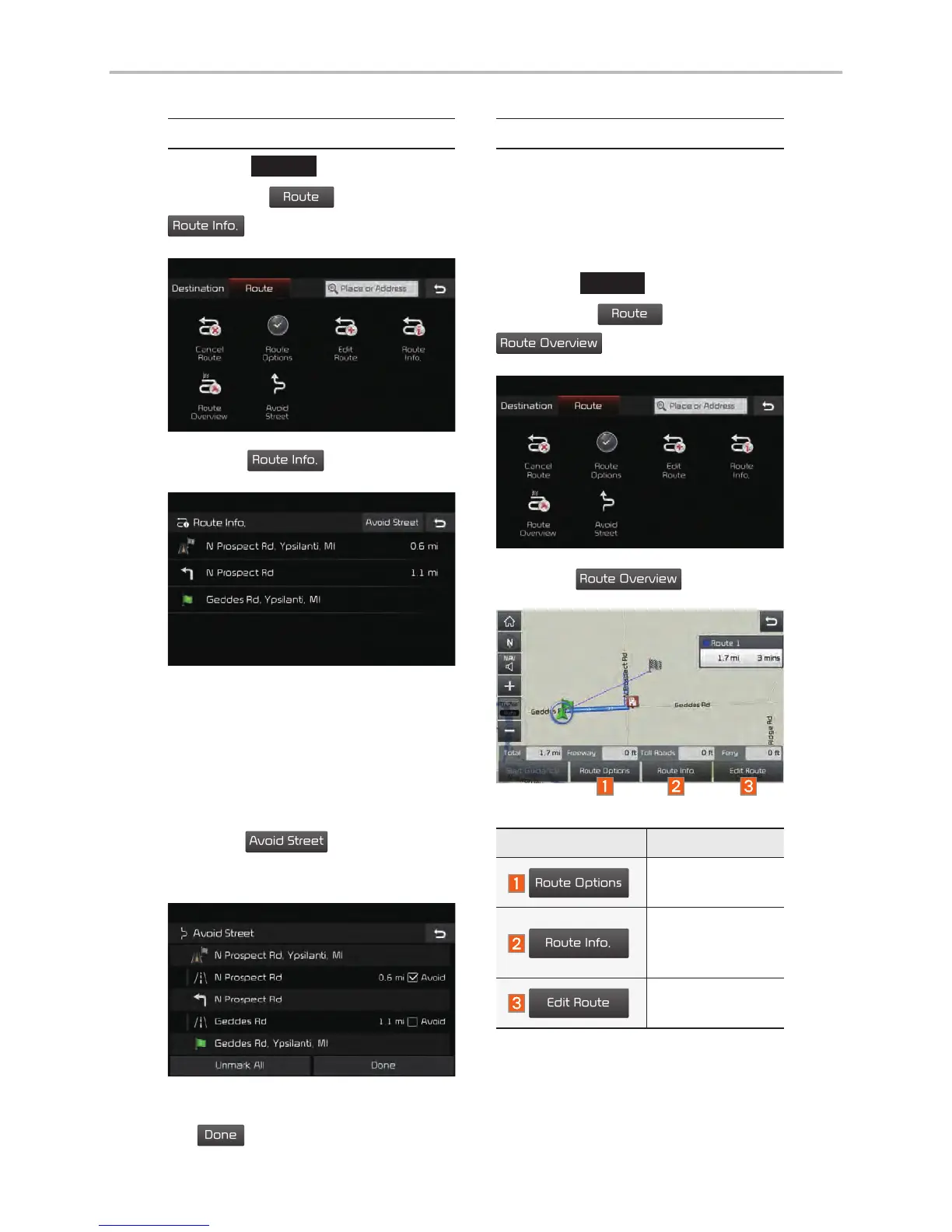
Route Overview
Check the information on route
including the distance, estimated
time, toll fees, etc.
Press the
NAV
head unit key.
Select the
Route
tab.
Select
Route Overview
.
Press the
Route Overview
icon.
Name Description
Route Options
Change the
search option.
Route Info.
You can check
route informa-
tion.
Edit Route
Edit the current
route.

Other manuals for Kia Stinger

Related product manuals