9
FM/AM
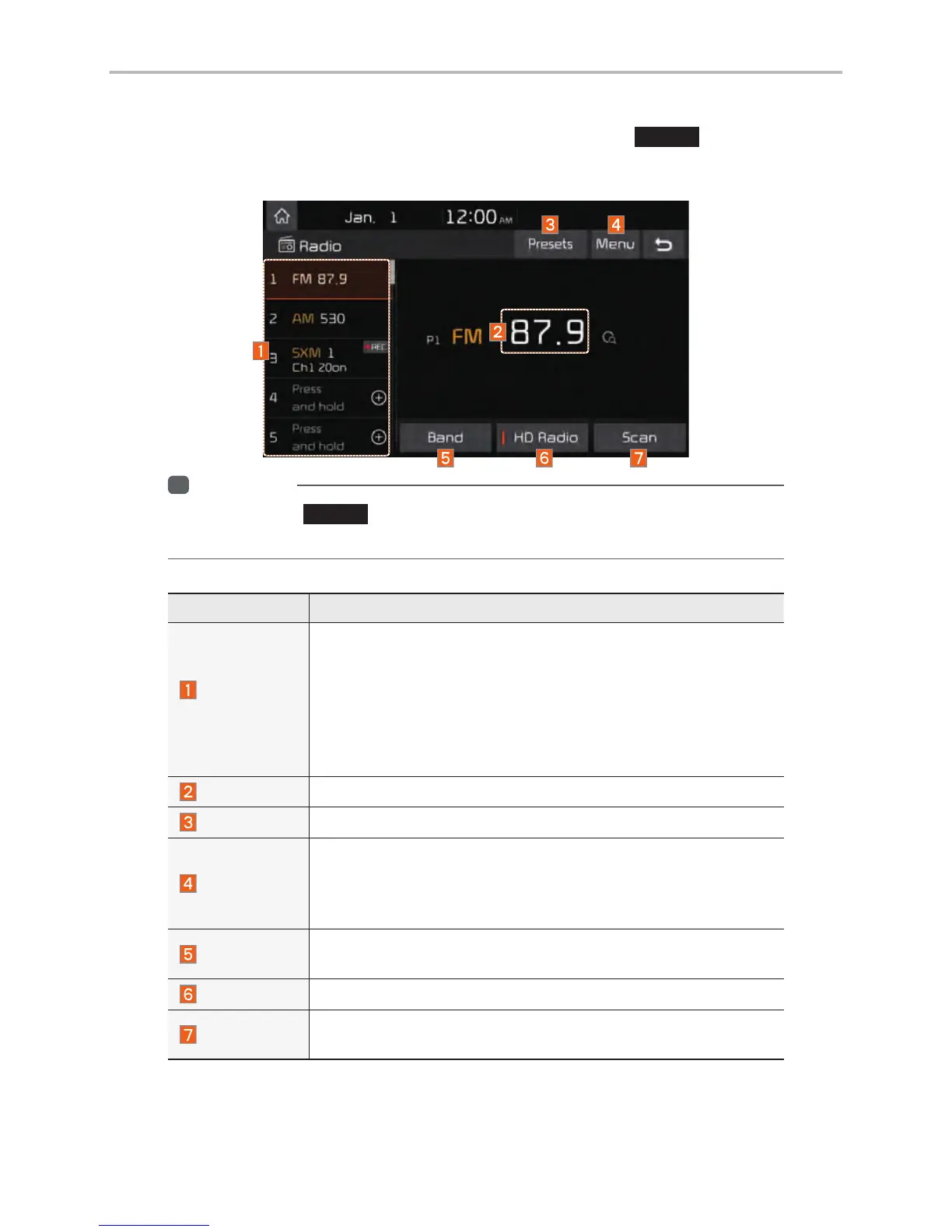
You can access the radio player either by pressing the
RADIO
key or by
selecting the Radio menu from All Menus on the Home screen.
i
Information
• If you press the
RADIO
key when power is off, the power will turn on and a radio
broadcast will be tuned from the current mode.
Features Description
Preset
Frequencies
• The stored preset frequencies are displayed for user selec-
tion.
• After selecting frequency, press and hold the preset button for
more than 0.8 seconds. A beep sound will be heard and the
frequency is to be stored in the selected preset button.
• Flick the preset frequencies up/down to scroll quickly through
presets.
Frequency
Displays the current frequency.
Presets
Shows the stored presets for user selection.
Menu
• Station List: Moves to the station list.
• Info: Turns the Radio text information transmitted from the
broadcasting station on and off.
• Sound Settings: Moves to the Sound Settings.
Band
Changes to the desired band from among FM, AM, and
SiriusXM™.
HD Radio
Used to set whether to turn HD Radio™ reception On or Off.
Scan
Shortly plays the broadcasts for the frequencies with superior
reception for 5 seconds per item.



 To Next Page