EasyManua.ls Logo

Kia Stinger - Bluetooth Phone; Call History; Bluetooth Settings

Kia Stinger
60 pages
Print Icon
To Next Page IconTo Next Page
To Previous Page IconTo Previous Page
Loading...
18
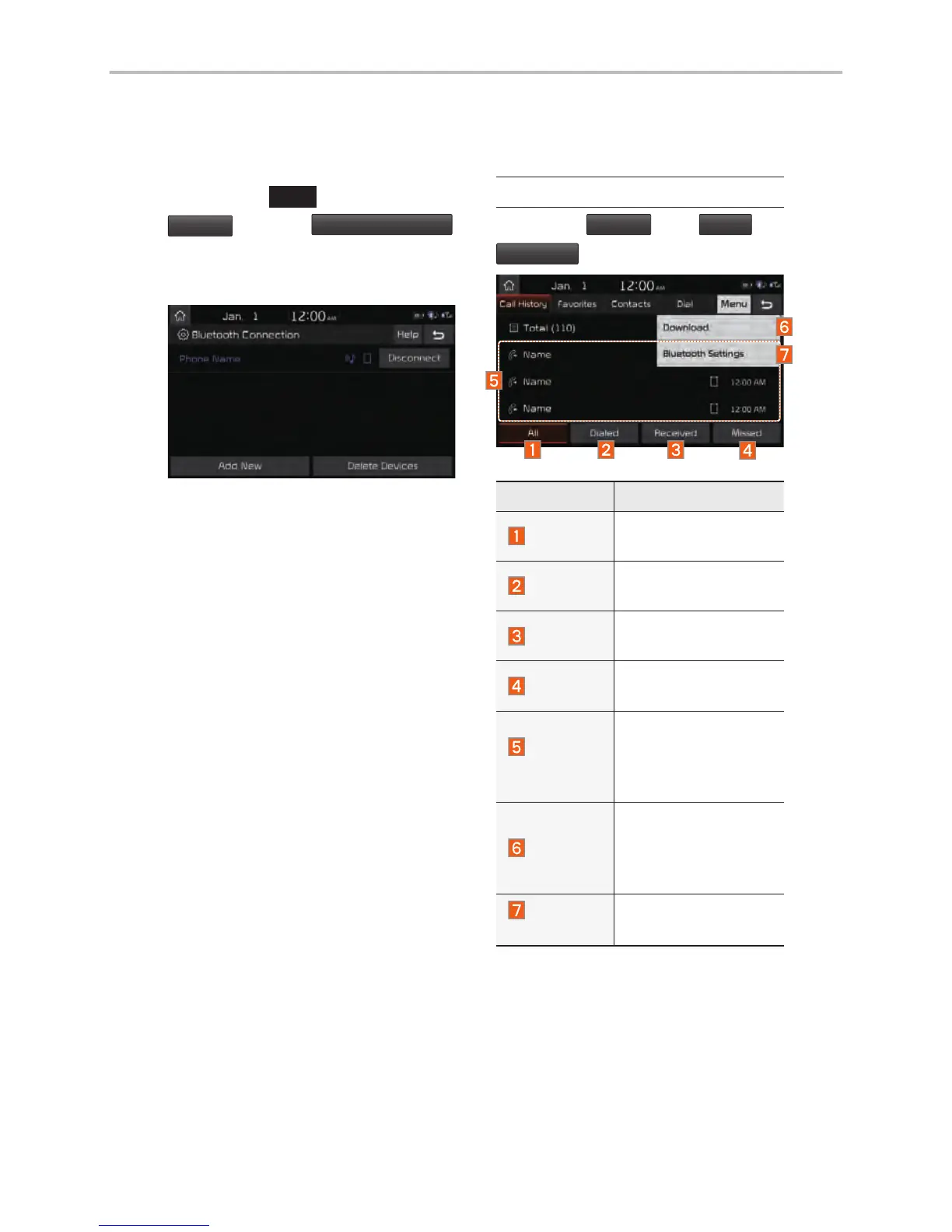
Connecting Devices Through the
Phone Settings
Press the
SETUP
key.
Select
Bluetooth
.
Select
Bluetooth Connection
.
Select the name of the device to
connect.
Connect Bluetooth.
Bluetooth Phone
Call History
Select
All Menus
Phone
Call History
.
Name Description
All
Lists the all call his-
tory.
Dialed
Lists the calls that
you made.
Received
Lists the calls that
you have received.
Missed
Lists the calls you
missed.
Call
History
Displays all of your
call history. Select
from the list to dial
the number.
Download
Downloads the call
history information
from your mobile
phone.
Bluetooth
Settings
Moves to a screen of
Bluetooth Settings.
Bluetooth

Other manuals for Kia Stinger

Related product manuals