2
Controls and Functions
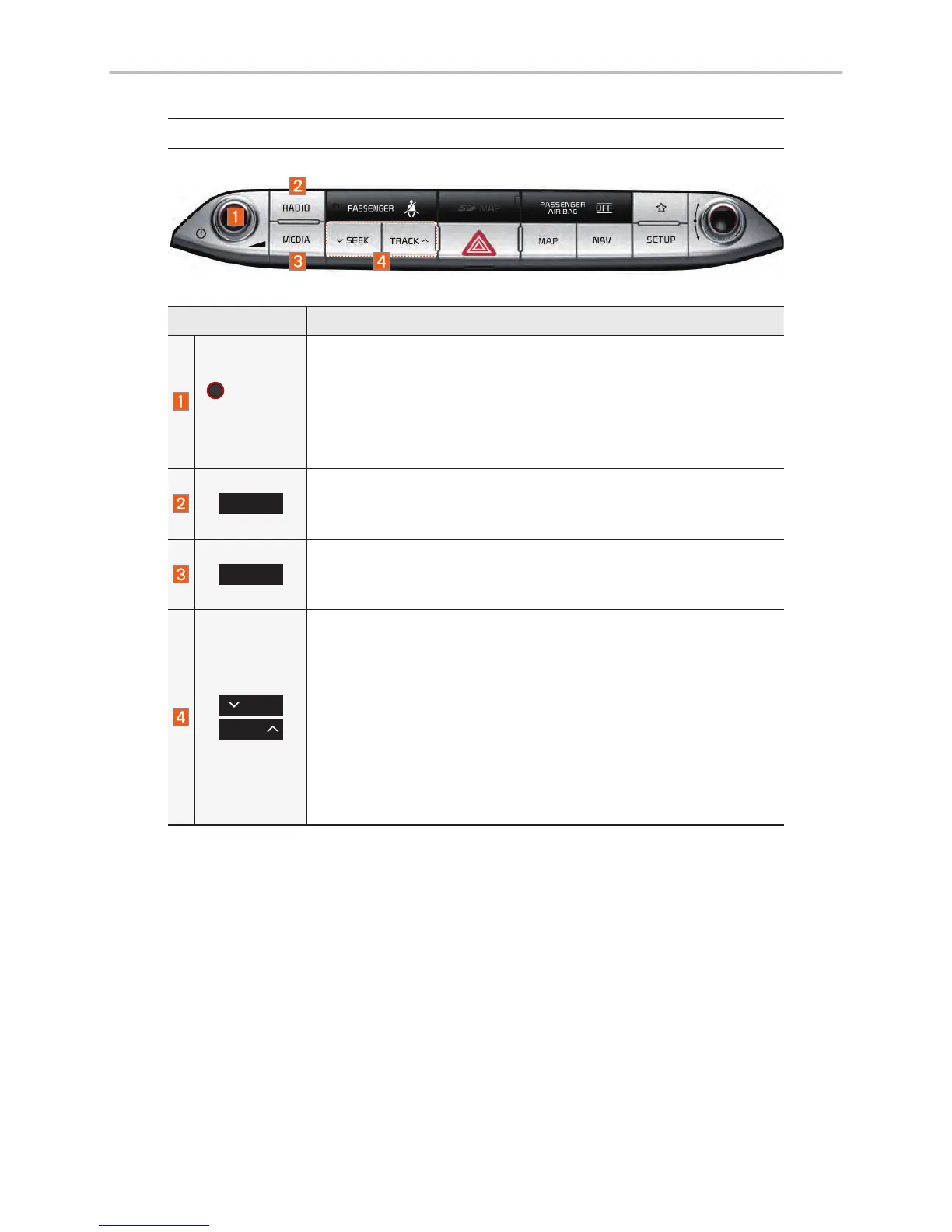
Head Unit
Name Description
POWER/
VOLUME
• When power is off, press to turn power on.
• When power is on, press and hold (over 0.8 seconds) to turn
the power off.
• When power is on, press quickly (less than 0.8 seconds) to
turn Audio off.
• Turn left/right to adjust the volume.
RADIO
Selects FM/AM/SiriusXM™ mode
• Each time this is pressed, the mode is changed in the fol-
lowing order: FM
→
AM
→
SiriusXM™
→
FM.
MEDIA
Selects MEDIA mode.
• If the media is not connected MEDIA mode will not be acti-
vated.
TRACK
SEEK
When the key is pressed quickly (less than 0.8 seconds),
• FM/ AM mode: Plays the previous/next frequency.
• SiriusXM™ mode: Changes the channel.
• MEDIA mode: Changes the track, file or title (except for AUX).
When the key is pressed and held (over 0.8 seconds),
• FM/AM mode: Moves quickly through all of the frequencies.
The moment that you release the button, the system seeks
the next available frequency.
• MEDIA mode: Rewinds or fast forwards the track or file
(except for AUX and Bluetooth Audio).



 To Next Page