15
USB Music
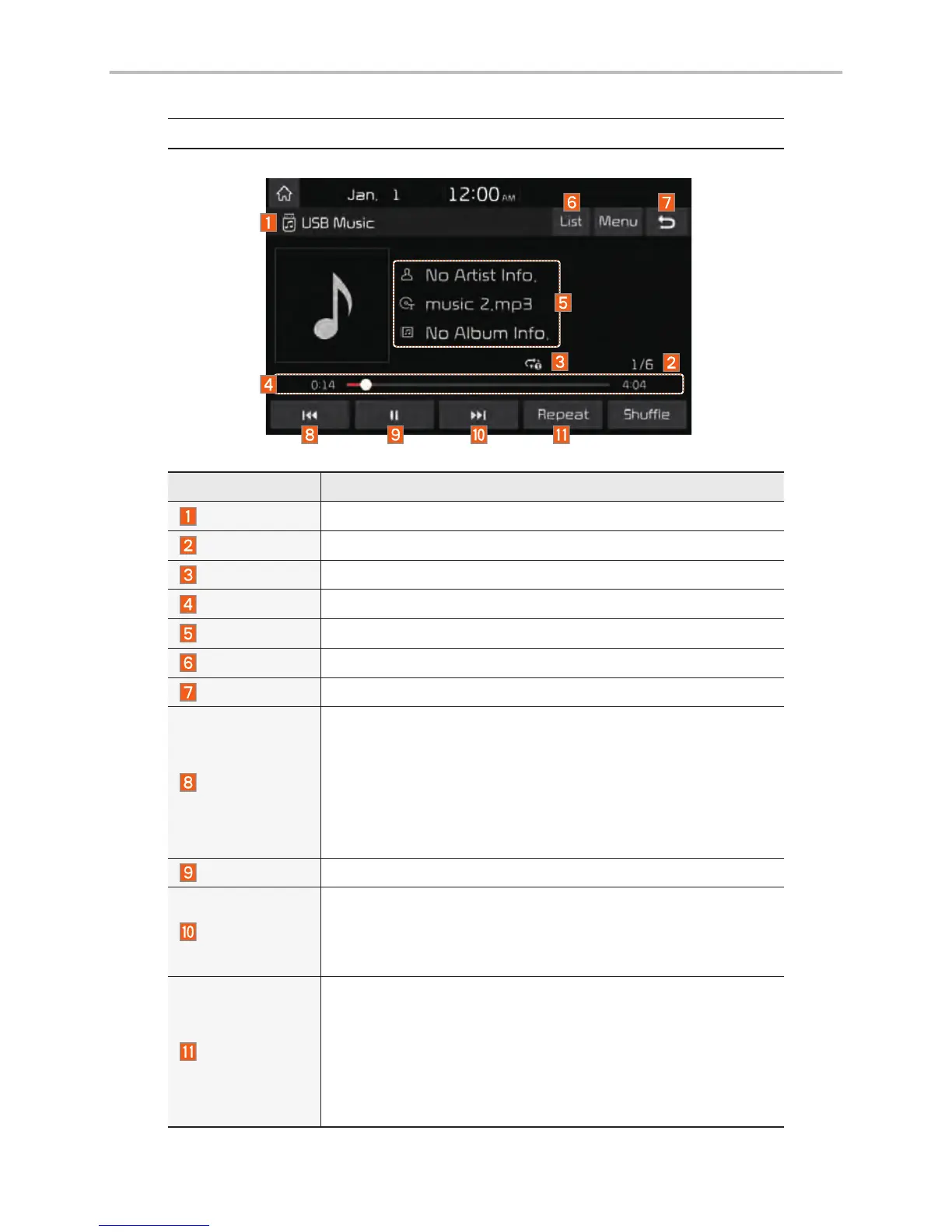
Features Description
Mode
Displays the current operating mode
File Index
Shows the current file/total files within the USB
Repeat/Shuffle
From Repeat/Shuffle, displays the current operating function
Play Time
Displays the current play time/total play time
Song Info
Displays the artist/title/album info
List
Moves to the list screen
Back Button
Converts to basic mode screen
Previous File
• If the button is selected (less than 0.8 seconds): Moves to
the previous file or play the current file from the beginning
(depends on the play time)
- If play time is less than 3 seconds, moves to previous file
- If play time is over 3 seconds, play the current file from the
beginning
• If the button is selected (over 0.8 seconds) it rewinds the track
Play/Pause
Plays/pauses the current file
Next File
• If the button is selected (less than 0.8 seconds): Moves to
the next file.
• If the button is selected (over 0.8 seconds): It fast-forwards
the track.
Repeat
Repeats the current file.
• If select the file in the file tab on the list screen: select this
button to switch between repeating the current file, repeat-
ing folder, and repeating all files.
• If select the file in the other tabs on the list screen: select
this button to switch between repeating the current file and
repeating all files.
USB



 To Next Page