EasyManua.ls Logo

Kia Stinger - Bluetooth Dialing; Using the Dial Menu

Kia Stinger
60 pages
Print Icon
To Next Page IconTo Next Page
To Previous Page IconTo Previous Page
Loading...
20
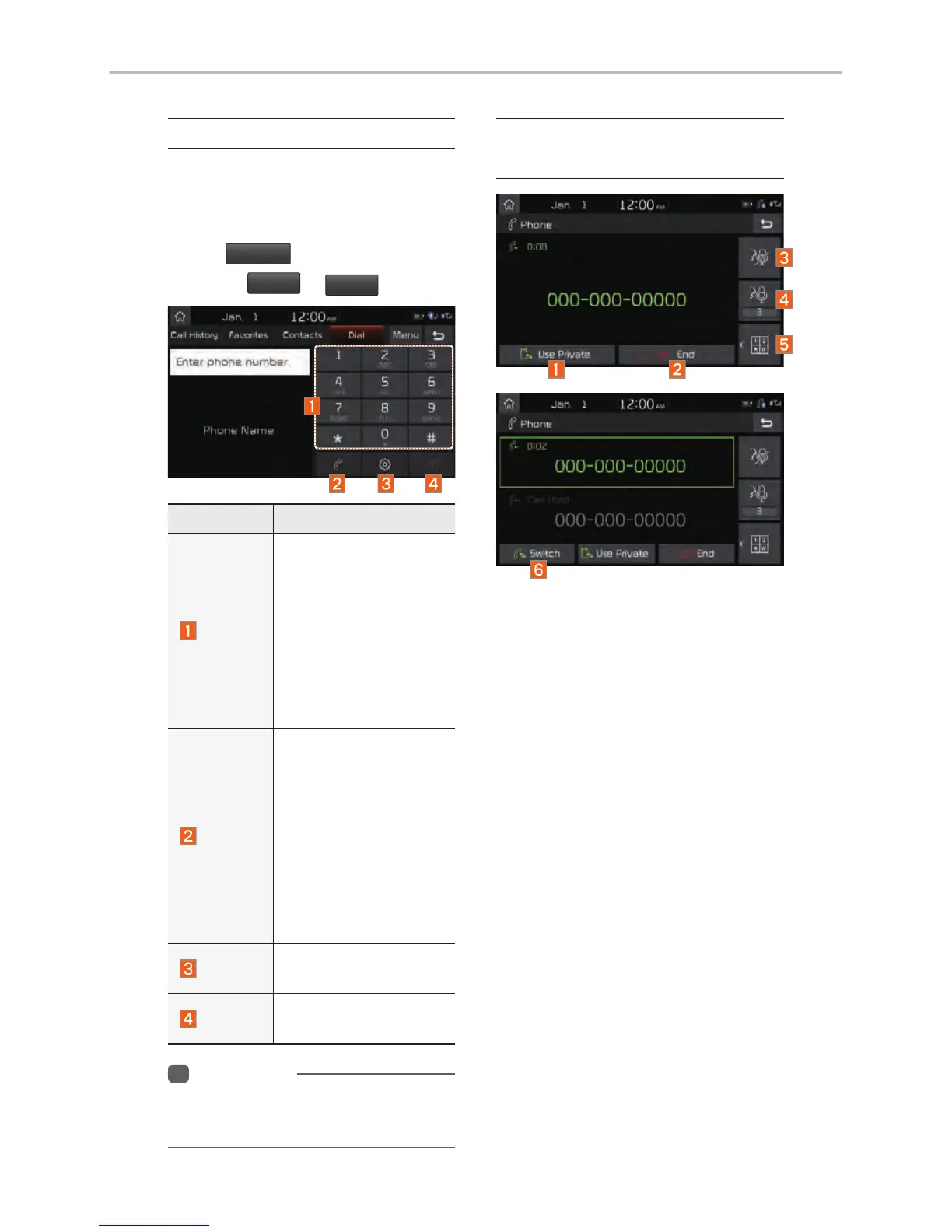
Dial
Dials a call after the Bluetooth
devices are connected.
Select
All Menus
from Home Screen
display
Phone
Dial
.
Name Description
Keypad
Use the keypad to
enter the phone num-
ber that you want to
call. Select and hold
the last number of
a speed dial to dial
a number that you
added to the Speed
Dial list in the phone
Call
Makes a call after
you dial a number
and select this but-
ton. If the number is
listed in Dialed Calls,
you can select the
number and select
this button to auto-
matically dial that
number again.
Settings
Moves to a screen of
Bluetooth Connection.
Delete
Deletes the numbers
that you entered.
i
Information
Some types of mobile phones may not
support the Speed Dial function.
Using the Menu
During a Phone Call
When making a call, you can use
the following menu items.
Bluetooth

Other manuals for Kia Stinger

Related product manuals