EasyManua.ls Logo

Kia Stinger - Navigation POI Search; Searching for Points of Interest; Viewing Nearby POIs

Kia Stinger
60 pages
Print Icon
To Next Page IconTo Next Page
To Previous Page IconTo Previous Page
Loading...
40
POI
Select the button on the bottom
left of the screen
Select the
POI
button.
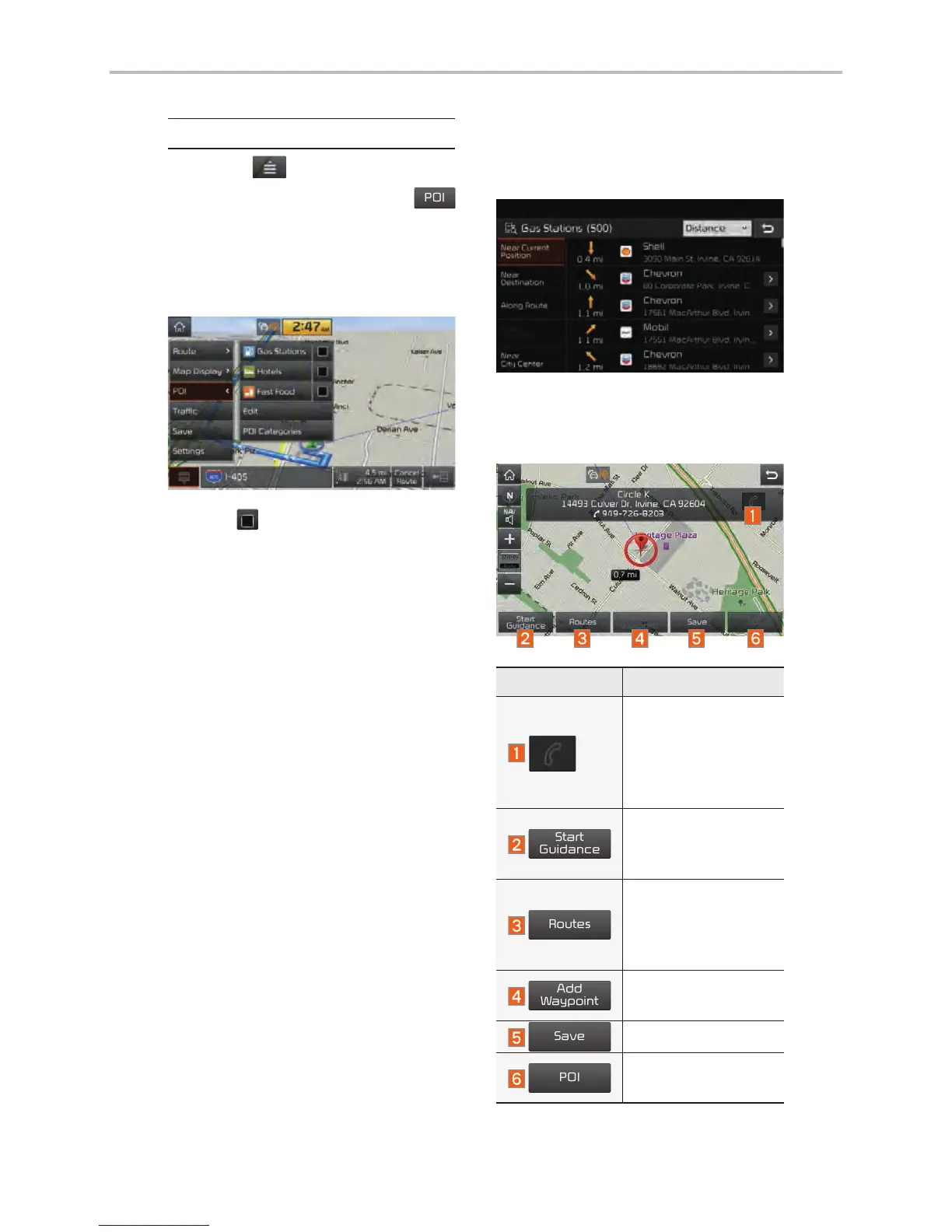
View Nearby POIs
Select check button to set
whether to show nearby POIs or not.
When categories are selected, they
will appear on the map. (ex. Gas
Stations)
The lists of nearby gas stations are
displayed.
The list can be sorted to display in
order of distance or name.
Name Description
Call to the selected
location (Phone
needs to be
connected via
Bluetooth).

Start
Guidance
Start the preferred
navigation route to
selected location.
Routes
Choose the pre-
ferred navigation
route to selected
location.
Add
Waypoint
Set the location as
a waypoint.
Save
Save the location.
POI
Search nearby
POIs.
Navigation

Other manuals for Kia Stinger

Related product manuals