EasyManua.ls Logo

Kia Stinger - Navigation Search Functions; Local Search and Categories

Kia Stinger
60 pages
Print Icon
To Next Page IconTo Next Page
To Previous Page IconTo Previous Page
Loading...
44
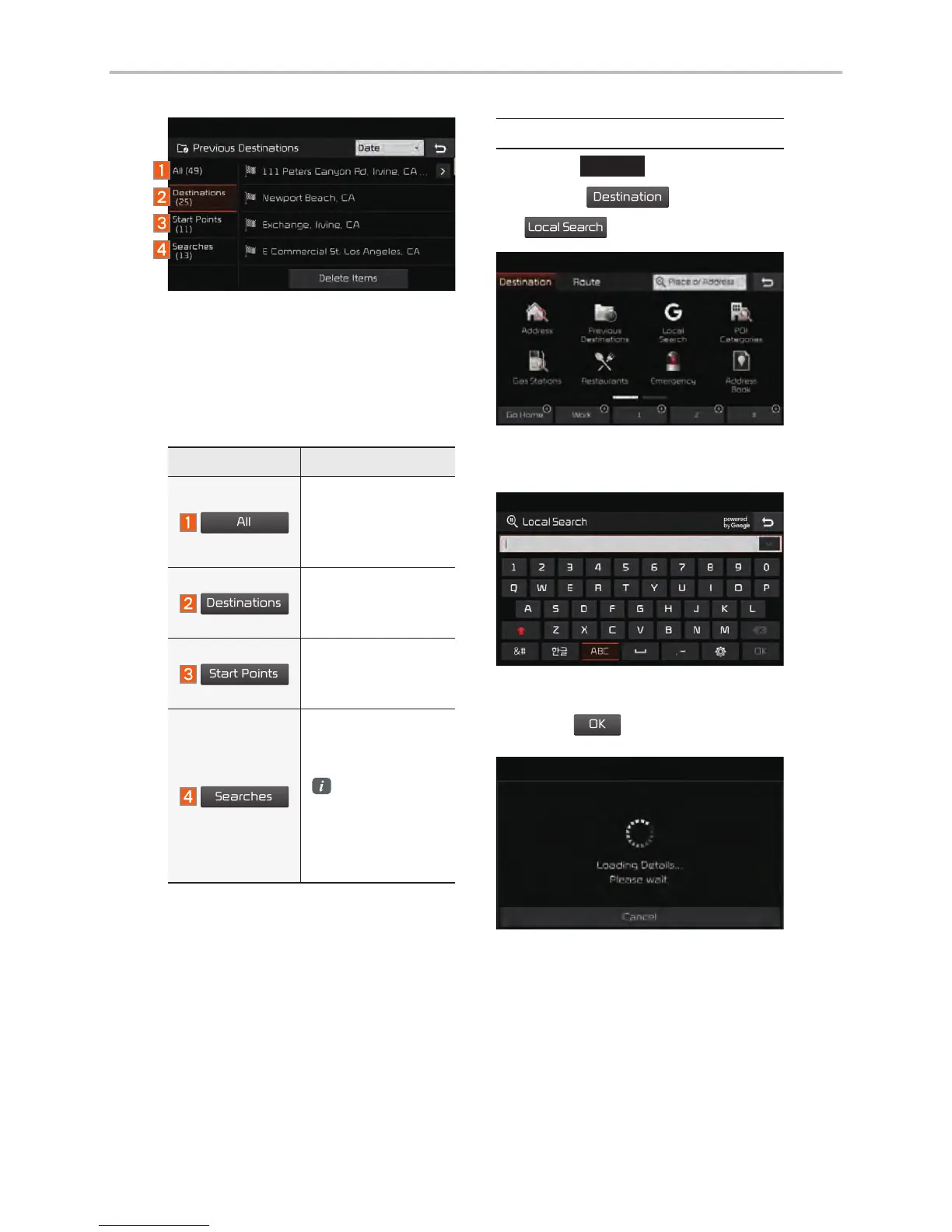
Local Search
Press the
NAV
head unit key.
Select the
Destination
tab.
Select
the
Local Search
icon.
Runs Google Local Search.
Enter the desired keywords and
press the
OK
button.
Searching is in progress.
Arrange by all, latest destinations,
latest searched places and latest
departing places. Arrange in order of
date and time.
Name Description
All
Display all desti-
nations, depart-
ing places, and
searched places.
Destinations
Display previous
destination places
for route guidance.
Start Points
Display previous
departing places
for route guidance.
Searches
Display previously
searched places
for route guidance.
But, not dis-
played when
the searched
places are set
as destination.
Navigation

Other manuals for Kia Stinger

Related product manuals