EasyManua.ls Logo

Kia Stinger - Navigation Coordinates and Favorites; Searching by Coordinates; Using Favorite Places

Kia Stinger
60 pages
Print Icon
To Next Page IconTo Next Page
To Previous Page IconTo Previous Page
Loading...
49
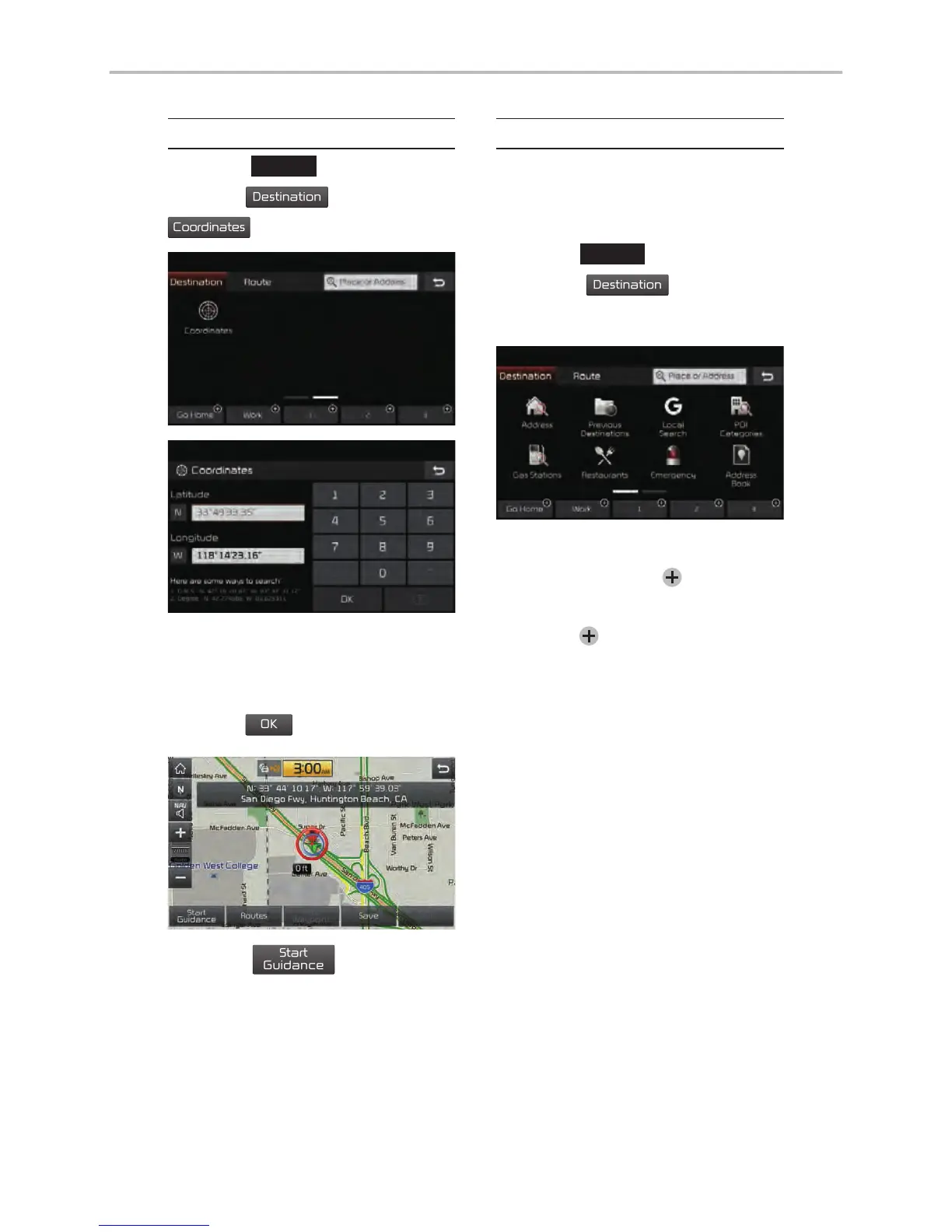
Coordinates
Press the
NAV
head unit key.
Select the
Destination
tab.
Select the
Coordinates
to search by coordinates.
There are two ways to search by
coordinates (D.M.S or Decimal
Degrees). After typing coordinates,
press the
OK
button to search.
Press the
Start
Guidance
button to start
guidance.
Favorite Places
Set the route using your favorite
places.
Press the
NAV
head unit key.
Select the
Destination
tab.
Select
from favorite places.
On the button where locations are
not registered, the icon is dis-
played. When a location is regis-
tered, the
button disappears and
the buttons 1 to 3 are displayed as
your favorite places.

Other manuals for Kia Stinger

Related product manuals