26 Part Name’s and Functions TOS8030
Chapter 4 Part Name’s and Functions
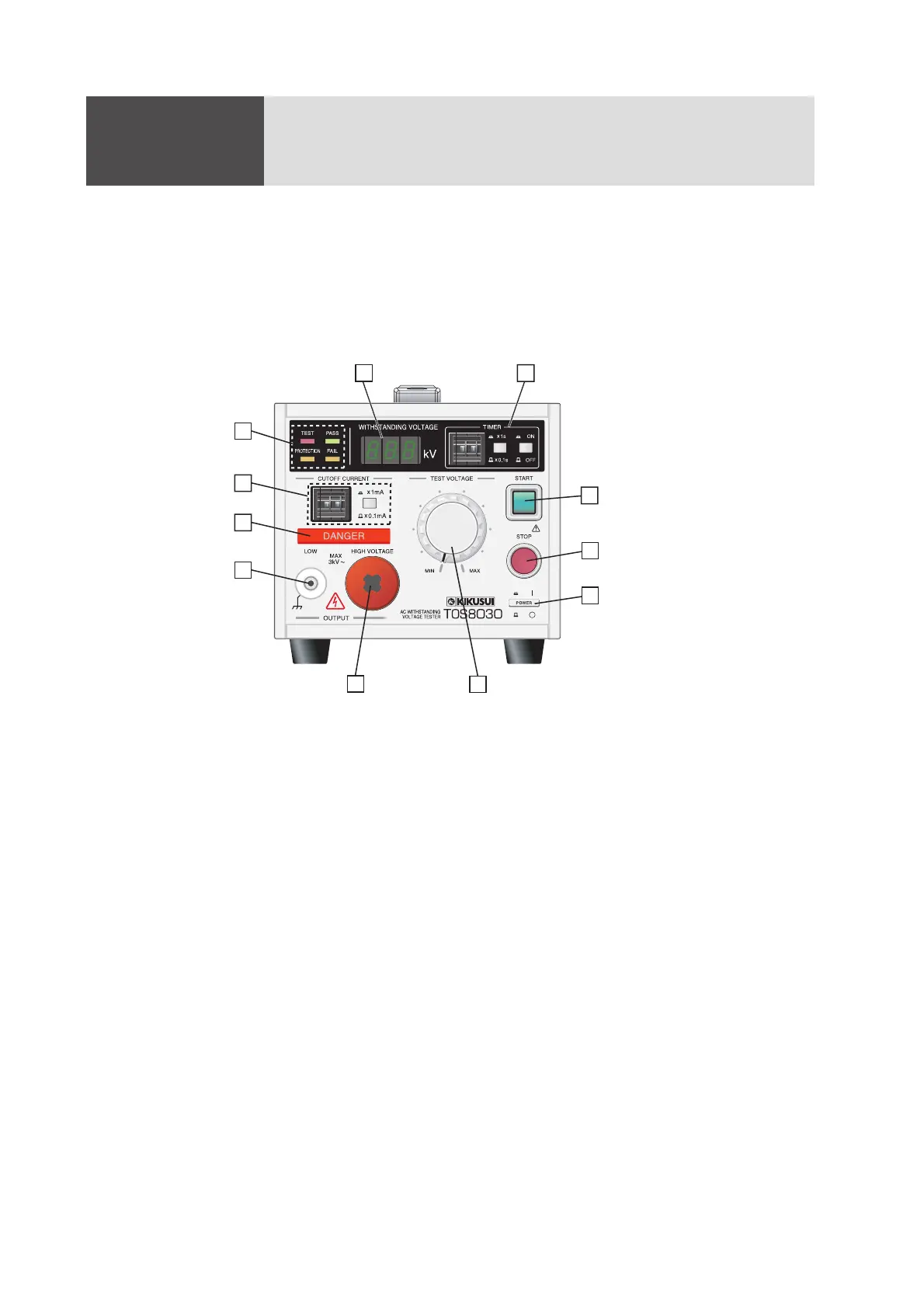
Gives the names of switches, terminals, and other controls of the TOS8030.
4.1 Front Panel
Fig.4-1 TOS8030 Front Panel
[1] POWER switch
Turns the tester power on/off. Depressing the switch turns power on ( | ).
Before turning the POWER switch on, see “5.1 Turning the POWER Switch On”
(page 30).
[2] STOP switch
This switch interrupts the test in progress.
Pressing this switch transitions the tester from PASS, FAIL, or PROTECTION to
the READY state. Tester states are defined in “5.2.1 Five States” (page 32).
[3] START switch
Press this switch when the tester is in the READY state to perform testing under
the current test conditions.
This switch is disabled for remote control operations.
1
2
3
4
7
8
9
10
11
6
5



 To Next Page