TOS8030 Part Name’s and Functions 29
4.2 Rear Panel
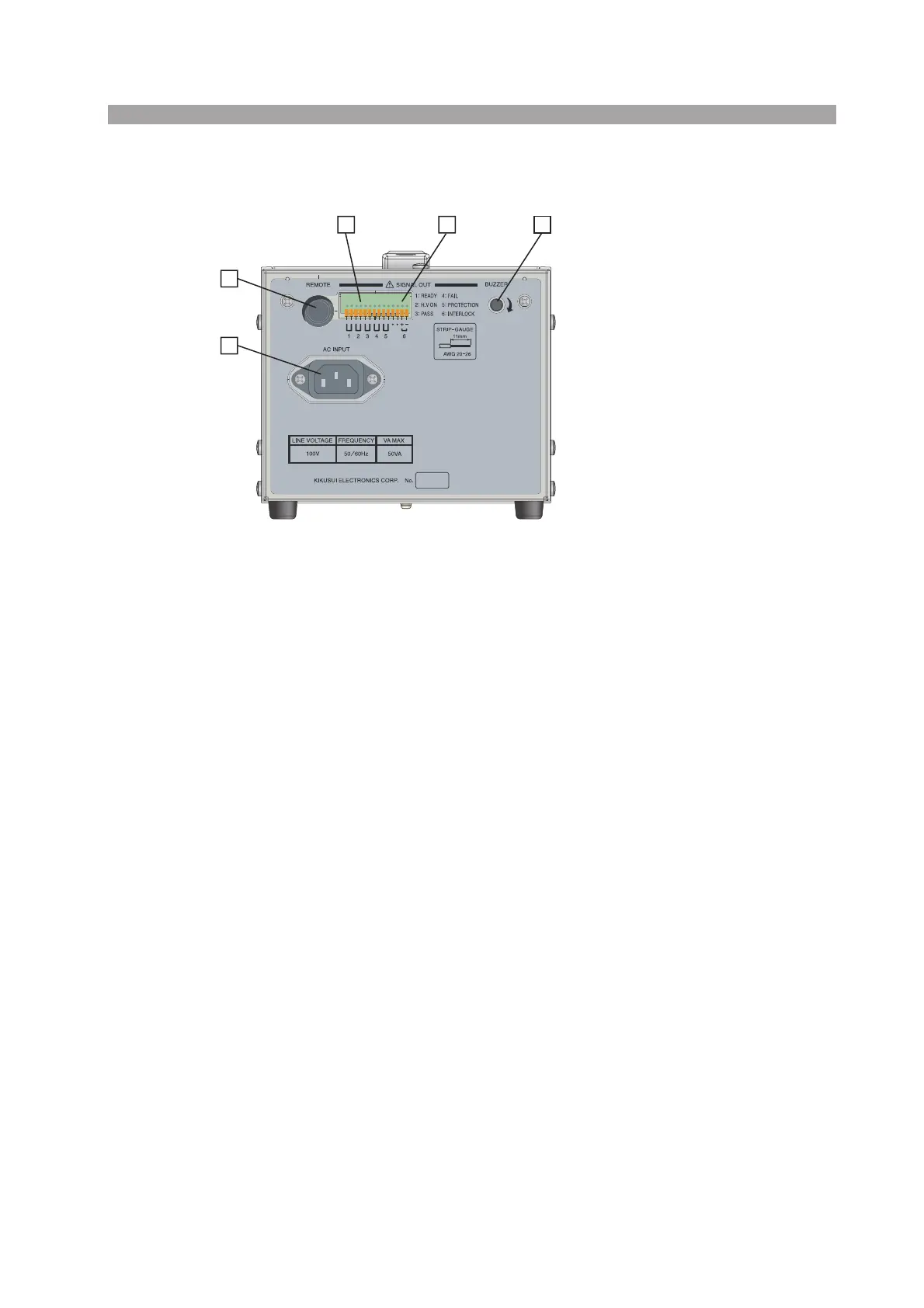
Fig. 4-2 TOS8030 Rear Panel
[1] REMOTE connector
Used to start or stop testing from a remote location.
For more information, see “Using the REMOTE Connector” (page 38).
[2] SIGNAL OUT terminal
Used to monitor the tester status externally.
There are five status terminals: READY, H.V ON, PASS, FAIL, and PROTEC-
TION.
For more information, see “Chapter 7 Status Signal Output” (page 43).
[3] INTERLOCK terminal
An interlock signal terminal.
Opening this interlock signal terminal causes the tester to enter the PROTEC-
TION state (P01), disabling testing.
For more information, see “6.2 Using the INTERLOCK Terminal” (page 42).
[4] BUZZER knob
Adjusts the volume of the buzzer that indicates a FAIL or PASS judgment.
Turning the knob clockwise makes the buzzer louder. The buzzer cannot be turned
off.
[5] AC INPUT
An AC power input connector.
Connect the provided power cord to this connector.
For more information, see “2.4 Connecting the Power Cord” (page 16).
NC03368-1
MADE IN TAIWAN
1
5
2
3 4



 To Next Page