Kinco-MK
User Manual
3.2.3.5 How to use high speed counter
Method 1:Use instructions for programming
1)Configure the control byte of HSC and define the current value (i.e. starting value) and the
preset value.
2)Use HDEF instruction to define the counter and its operation mode.
3)(Optional) Use ATCH instruction to define the interrupt routines.
4)Use HSC instruction to start the high-speed counter.
Method 2:Use wizard of HSC
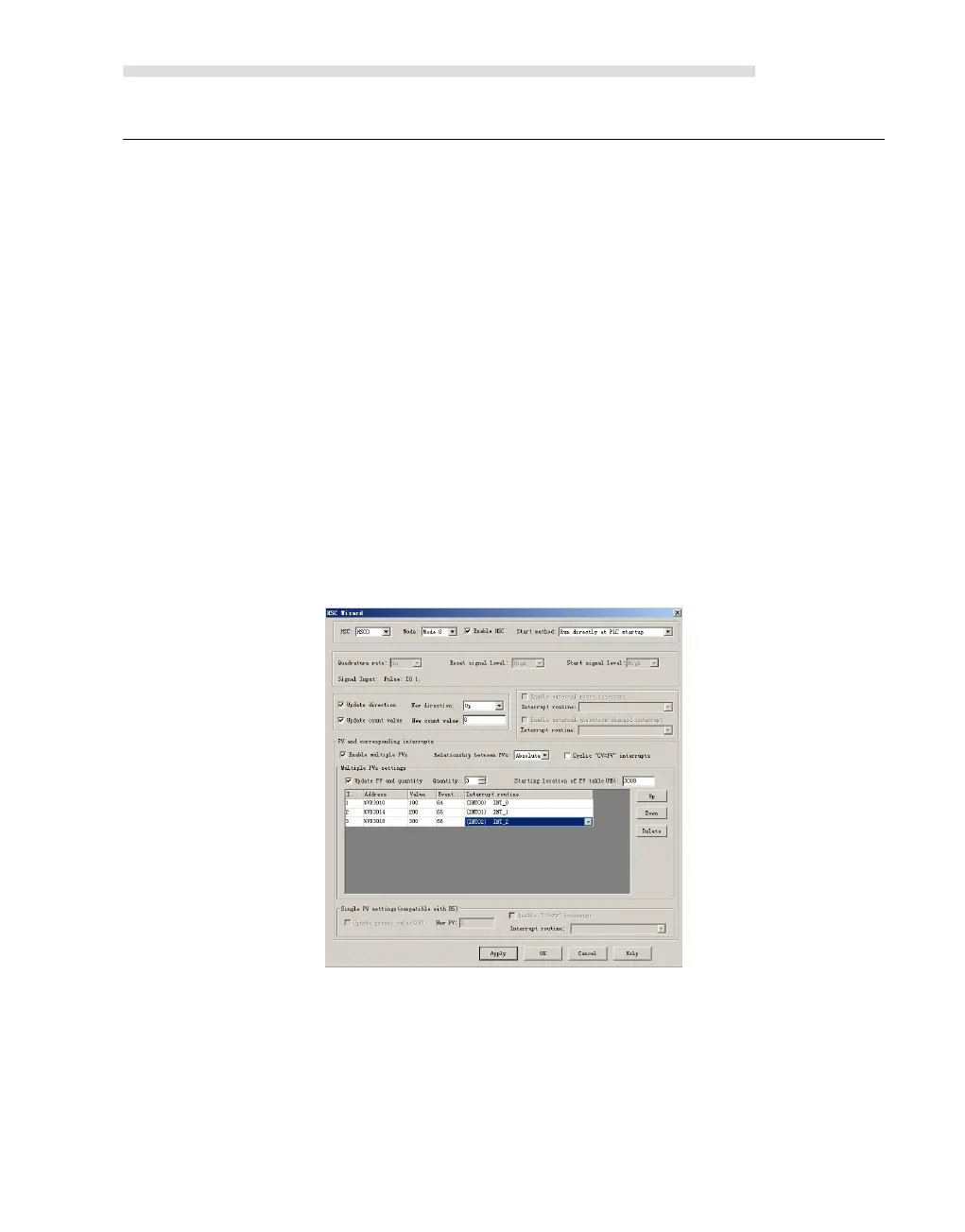
In HMI- PLC, it provides configuration wizard for high speed counter. Users can use the
wizard to configure all high speed counters and don’t need to program. The wizard is as
following figure:
After using wizard to configure HSC, user also can use “Method 1” to modify the parameters
of HSC.
How to use HSC wizard:
1) Select the counter in【HSC】.
2) Check【Enable HSC】, and then continue following configuration.
3) Select counter mode in【Mode】.



 To Next Page