EasyManua.ls Logo

Kodak EASYSHARE CX4230 - User Manual

Kodak EASYSHARE CX4230
108 pages
Print Icon
To Next Page IconTo Next Page
Loading...
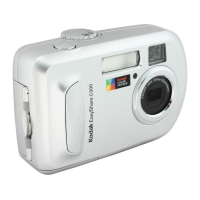
KODAK EASYSHARE CX4230
Zoom Digital Camera
Users Guide
Visit Kodak on the World Wide Web at www.kodak.com

Table of Contents

Questions and Answers

  • A
    Alexis WallaceSep 8, 2025
    Why can't I see pictures in Review mode on my Kodak EASYSHARE CX4230 Digital Camera?
    • B
      Bryan TuckerSep 9, 2025
      If you are in Review mode and don't see a picture on the LCD or don't see the picture you expected on your Kodak Digital Camera, the camera may not be accessing the correct storage location. Check the picture storage location setting.
  • D
    David WattsAug 23, 2025
    What does it mean when my Kodak EASYSHARE CX4230 Digital Camera says 'Memory card requires formatting'?
    • A
      Adam MyersAug 23, 2025
      If your Kodak Digital Camera displays the message 'Memory card requires formatting', it means the card is corrupted or formatted for another digital camera. Insert a new card or format the card.
  • V
    Valerie SmithAug 25, 2025
    What to do if the shutter button does not work on my Kodak EASYSHARE CX4230?
    • D
      Dorothy BushAug 25, 2025
      If the shutter button on your Kodak Digital Camera isn't working, first ensure that the camera is turned on. If the ready light is blinking, the camera is processing a picture; wait until it stops before taking another picture. If the card or internal memory is full, transfer pictures to your computer, delete pictures from the camera, switch storage locations, or insert a card with available memory.
  • R
    Raymond FoxAug 26, 2025
    Why is my Kodak Digital Camera picture too dark?
    • H
      Hannah SchwartzAug 26, 2025
      If your Kodak Digital Camera's picture is too dark, turn on the flash. If the subject is too far away, move closer, ensuring there's no more than 12.8 ft (3.9 m) in Wide angle or 7.5 ft (2.3 m) in Telephoto between the camera and the subject. If the subject is backlit, use Fill flash or change your position. If the lighting condition is too dark, increase exposure compensation.
  • P
    Philip CaseyAug 27, 2025
    Why doesn't my Kodak EASYSHARE CX4230 Digital Camera recognize my MMC/SD card?
    • C
      charles64Aug 28, 2025
      If your Kodak Digital Camera is not recognizing your MMC/SD card, make sure you are using a certified MMC/SD card. If the card is corrupt, reformat it, but be aware that formatting will erase all pictures from the card. Also, check that the card is fully inserted into the card slot.
  • S
    Susan ParksSep 22, 2025
    Why is the light off on my Kodak EASYSHARE CX4230 Digital Camera?
    • J
      Jacob MartinezSep 22, 2025
      If the light is off on your Kodak Digital Camera, the camera is not properly seated in the Camera Dock. Remove the camera and re-seat it.
  • J
    james72Sep 16, 2025
    What does 'Read only card, change to internal memory to capture' mean on my Kodak EASYSHARE CX4230 Digital Camera?
    • C
      Cynthia SmithSep 16, 2025
      If your Kodak Digital Camera displays 'Read only card, change to internal memory to capture', the card in the camera is write-protected. To take a picture, insert a new card or change the storage location to internal memory.
  • L
    Lindsey EricksonSep 18, 2025
    Why doesn't the ready light turn on and the camera doesn't work on my Kodak EASYSHARE CX4230?
    • M
      Miguel KingSep 18, 2025
      If the ready light does not turn on and the camera does not work on your Kodak Digital Camera, ensure the camera is turned on. If that doesn't work, the batteries may be exhausted; replace or recharge them. Also, if the power switch was on when batteries were reloaded, turn the camera off, then back on.
  • T
    Timothy SpencerSep 7, 2025
    Why does my Kodak EASYSHARE CX4230 Digital Camera say 'No images to display'?
    • J
      jessegrimesSep 7, 2025
      If your Kodak Digital Camera displays the message 'No images to display', there are no pictures in the current storage location. Change your picture storage location setting.
  • L
    lisamorrowSep 4, 2025
    How do I fix 'Not enough space to copy files' on my Kodak EASYSHARE CX4230 Digital Camera?
    • N
      Nicholas HowardSep 4, 2025
      If you see the message 'Not enough space to copy files' on your Kodak Digital Camera, it means there isn't enough space in the location you are copying to (internal memory or the card). Delete pictures from the location you are copying to, or insert a new card.

Summary

Product Overview

Camera Front

Identifies the front components of the KODAK EASYSHARE CX4230 camera.

Camera Bottom

Details the components located on the bottom of the KODAK EASYSHARE CX4230 camera.

Camera Back

Illustrates and labels the components on the back of the KODAK EASYSHARE CX4230 camera.

Getting Started

Install the Software First

Instructions for installing the KODAK EASYSHARE Software before connecting the camera.

Loading the Batteries

Step-by-step guide for correctly inserting camera batteries.

Taking Pictures

Taking a Picture

Step-by-step guide on how to capture a photograph with the camera.

Using the Flash

Guidance on selecting and using different flash modes.

Reviewing Pictures

To Enter Review Mode

Instructions on how to access the mode for viewing stored images.

Deleting Pictures

How to remove unwanted images from the camera's memory.

Tagging Pictures

Tagging Pictures for Printing

Marking photos for print jobs.

Customizing Camera Settings

To Access Setup Mode;Menus

Steps to enter the camera's setup menu for customization.

Formatting Memory or MMC;SD Card

Erasing and preparing storage media for camera use.

Installing the Software

Install the Software

Step-by-step guide for installing the KODAK EASYSHARE Software.

Connecting to the Computer

Connecting With the USB Cable

How to connect the camera to a computer using a USB cable.

Using the KODAK EASYSHARE Camera Dock II

Charging the Battery Pack

Steps to charge the camera's battery using the dock.

Troubleshooting

Troubleshooting-Camera

Solutions for common camera problems.

Camera LCD Messages

Explains and provides solutions for on-screen camera messages.

Getting Help

Helpful Web Links

Provides useful website addresses for support.

Appendix

Camera Specifications

Detailed technical specifications for the camera.

Kodak EASYSHARE CX4230 Specifications

General IconGeneral
Camera TypeCompact
Image SensorCCD
Effective Pixels2.0 MP
Optical Zoom3x
Storage MediaSD/MMC card
Battery Type2 x AA batteries
Image Resolution1600 x 1200
Display Size1.6 inches

Related product manuals