Features of the i-FAX / FAX - (continued)
xxi
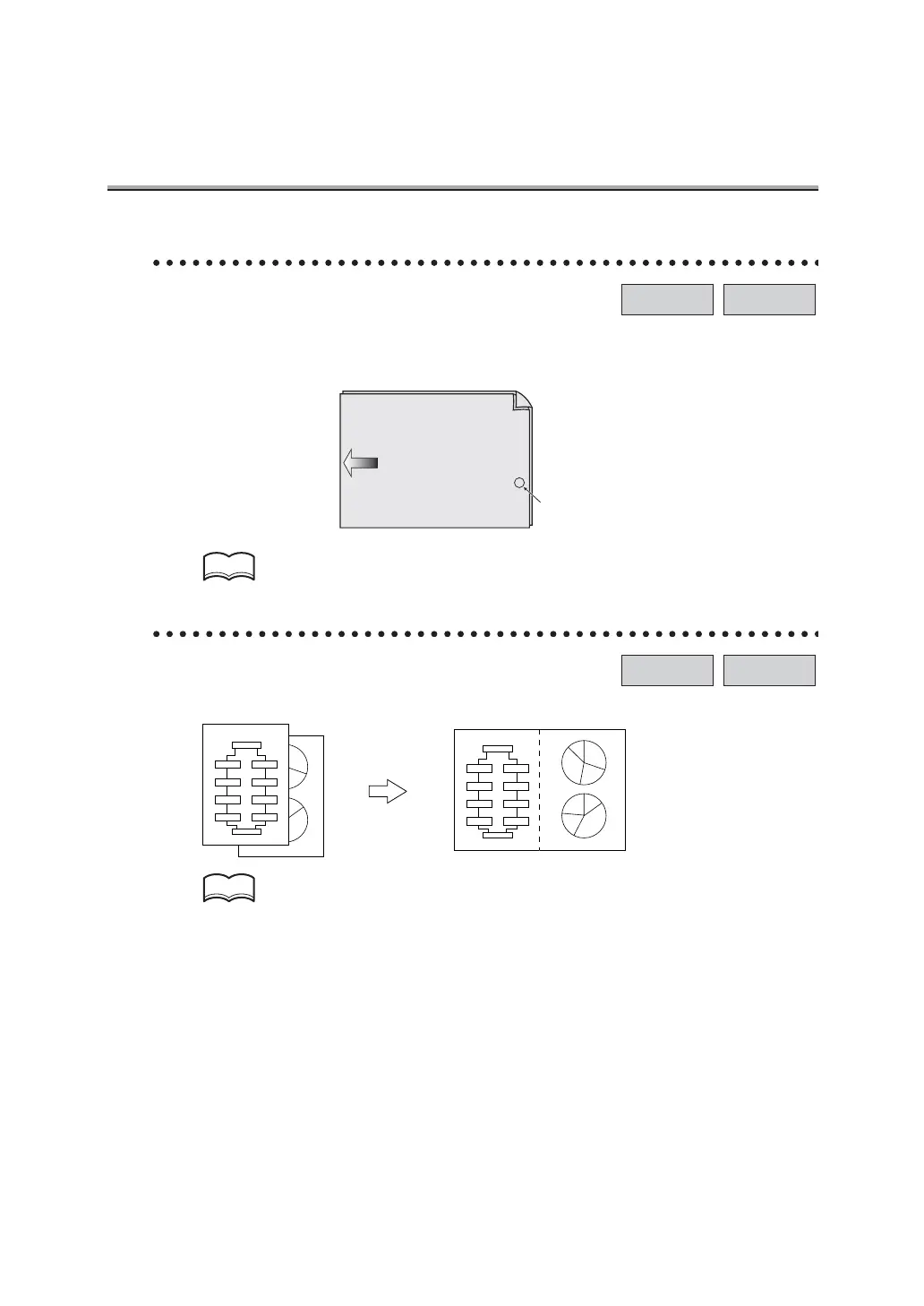
Verification Stamp
When transmitting a fax via the copier’s RADF, a stamp can be affixed to the pages of the
document that have already been scanned, allowing you to confirm that these pages have
been scanned.
For details, see "Verification Stamp" (p. 6-12).
2 in 1 transmission mode.
You can send a FAX by combining two pages as a double-page spread.
For detail, see "2 in 1 Transmission" (p. 10-8).
i-FAX FAX
Stamp position
Front surface of
original document
Original document
transmitting direction
HINT
i-FAX FAX
Step 1
Step 2
Step 3
Step
4
Step
5
Step 6
Step 8
Step 7
2
1
12
Flow Chart
START
FINISH
Step 1
Step 1
Step 2
Step 2
Step 3
Step 3
Step
4
Step 5
Step 4
Step 5
Step 6
Step 6
Step 8
Step 7
Step 7
Step 8
Flow Chart
START
FINISH
Step 1
Step 2
Step 3
Step 4
Step 5
Step 6
Step 7
Step 8
HINT


 To Next Page