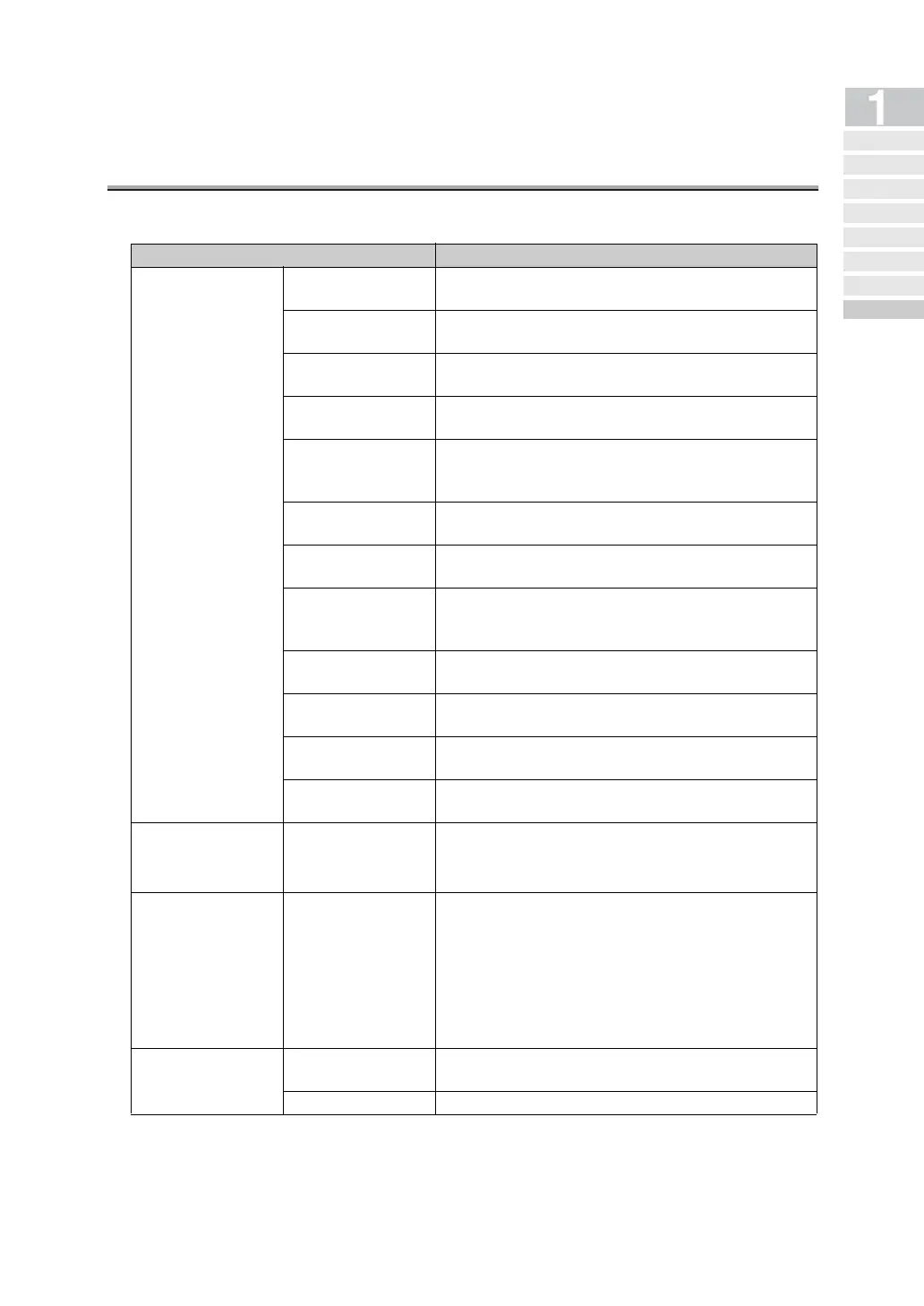
Specification (Internet Fax) - (continued)
1-15
Mail reception
Mail acquisition
interval
Can be set to 1 - 60 minutes
Manual POP recep-
tion
Possible
Reception by
specifying a box
Not Available
Received docu-
ment size
width : A4 / B4 / A3
length: Unfixed (800+alpha mm)
Reception
resolution
200 x 100 / 200 x 200 / 200 x 400 / 300 x 300 /
400 x 400 / 204 x 98 / 204 x 196 / 204 x 391 /
408 x 391
Reception coding
system
TIFF-F(MH / MR / MMR)
Max. reception
length
*1
see p. 1-17.
Received file size
Received attached file size: Unlimited
No. of pages : Max. 1000
Body size : Max. 20KB
Divided file recep-
tion
Not Available
Multiple file
reception
Max. 255 attached files
Mail message print
Mail message is printed but not printed when
received from WNET-FAX
Reception
not permitted
None
Exchange of ability
notice
• No function to register the ability of remote station
automatically when received MDN ability notice
• Ability to transmit MDN ability is provided
Transmission
check
• ON/OFF of MDN transmission result demand and
DSN transmission result demand can be individu-
ally set
• MDN transmission result demand is impossible at
the time of Internet Fax multi-station transmission
• MDN/DSN response monitoring time can be set in
the range of 1 to 99 hours
Transfer
Automatic transfer
Document received by G3 can be transferred to
addresses registered in advance (G3 Fax or E-mail)
Manual transfer Manual transfer to E-mail address is unavailable
Item Specification
Precautions
Features and System
Configura tion of In ter net Fa x
Int erne t Fa x Oper at ing
Envi ron ment
What You Can Do
with Internet Fax
Pr ep ar at ion f or Op er at ing
Inte rnet Fa x Fun cti on s
Use of Control
Panel
FAX Bas ic
Screen
Specification
(Internet Fax)


 To Next Page