• Filter settings
The
filter is
the
section
that
processes
the
waveform
produced
by
the
oscillator.
The
tone
color
will
change
dramatically
depending
on
the
settings
of
the
filter.
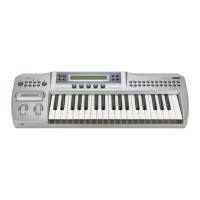
The
Prophecy
provides
two
filters,
and
since each allows
you
to freely
adjust
the
tonal
character, a
wide
variety
of
possibilities
are
available.
Let's
try
them
out
and
hear
how
the filters work.
Press the FILTER key to enter the Filter section page
FLT-1
[Filter Menu]. Make sure that
the
display
indicates "Routing:P ARALLEL". This
means
that
Filter 1
and
Filter 2 are
connected
in
parallel.
Let's adjust the settings of filter
1.
Rotate knob
3located
under
the [FILTR1] display to
make it read [FIL TR1] ,
and
press the ENTER key. Use the PAGE keys to move to page
FLl-1 [Type & Input]. Make sure that the display indicates "Filter Type:LPF". This means
that Filter 1 is being used as a
LPF
(low pass filter).
Use the PAGE keys to
move
to
page
FLl-2 [Cutoff]. Rotate knob
1located
below the
"Fc:99" display. Notice that as the value is increased the
sound
becomes brighter, and as
it
is
decreased the
sound
becomes darker. This is the result of changing the
upper
limit of
the frequencies which pass through the filter (the cutoff frequency). For this example, set
"Fc:80".
Use
the PAGE keys to move to page FLl-3 [Resonance]. Rotate knob
1located
below the
"Reso:40" display
and
change it to
about
"Reso:80". Notice
how
the
sound
changes. This
is the result of emphasizing the area
in
the region of the cutoff frequency
you
set
in
step
~·
Now
we
will use the
EG
(envelope generator) to modify the cutoff frequency. Press the
EG
key to move to page
EG-1
[EG
Menu]. Rotate knob
3located
under
the
[EG3]
display
so that it reads [EG3] ,
and
press the ENTER key.
Use the PAGE keys to
move
to
page
EG3-1
[EG
Level]. Rotate knobs
1-5
to
make
the
following
settings.
(There
is
no
need
for
the
values
to
be
exact.
Just
set
them
approximately.)
StaL+OO
AtkL+99 BrkL+70 SusL+50
RlsL+OO
[lJ
Use the PAGE keys to move to page EG3-2
[EG
Time]. In the same way, rotate knobs 1-5
to make the following settings.
Level
AtkT:20 DcyT:30
SlpT:SO
RlsT:40
Level
Key-on
Key-off o 99
--j-------------------------------·---------·----··---------------------------------------T·----------------------l
Cutoff
fr~~~'::,e•
quency
Time
~
l \
~
l \
l . \
: \ I•
•I
j
Sustain
Level
SusL
\...
\\EGin:./
,
~;:':,T
T;m,
''·······r·
-------------------------------------------------------------------------------------------------------------------------------/·,.··
I
I
/
/
Press the FILTER key,
and
use the PAGE keys to
move
to
page
FLl-2 [Cutoff]. Rotate
knob
1located
under
the "Fc:80" display so that it reads
about
"Fc:10". Next rote knob 3
located
under
"EG3:Int+00" so that
it
reads "EG3:Int+90". Play the keyboard
and
notice
that the cutoff frequency changes.
27


 To Next Page