22
7. Overview & operating status of components
7.1 Data Collector
2
1
3
D
4
C
B
A
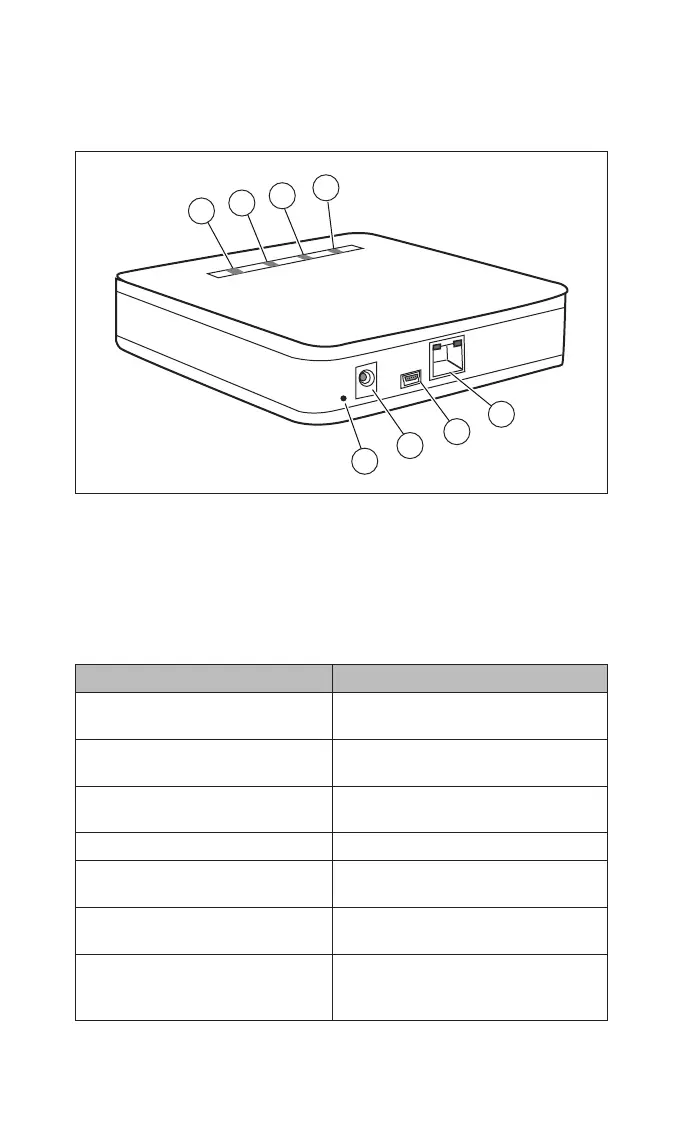
Fig.3 Data Collector
A Green LED 1 Reset button
B Yellow LED 2 Power supply unit socket
C Yellow LED 3 Mini USB connection
D Red LED (for fi rmware updates)
4 Ethernet port (RJ45)
Data Collector LEDs Explanation
Green LED (A) fl ashing every
second
Data Collector is running. No wire-
less connection to Data Stick.
Green LED (A) lit up Wireless connection to Data Stick
present.
Green LED (A) fl ashing irregularly Wireless connection to Data Stick
present. Data is being transmitted.
Yellow LED (B) lit up LAN connection present.
Yellow LED (B) fl ashing irregu-
larly
LAN connection present. Data is
being exchanged.
Yellow LED (C) lit up Power LED. Data Collector is run-
ning.
Red LED (D) lit up Lights up when the current status
is reporting an “error” in the system
overview.
00_PIKO Data Communicator.indb 2200_PIKO Data Communicator.indb 22 20.02.2012 10:23:3720.02.2012 10:23:37


 To Next Page