4.3 Configuration Menus Overview
User Manual User Manual
47
48
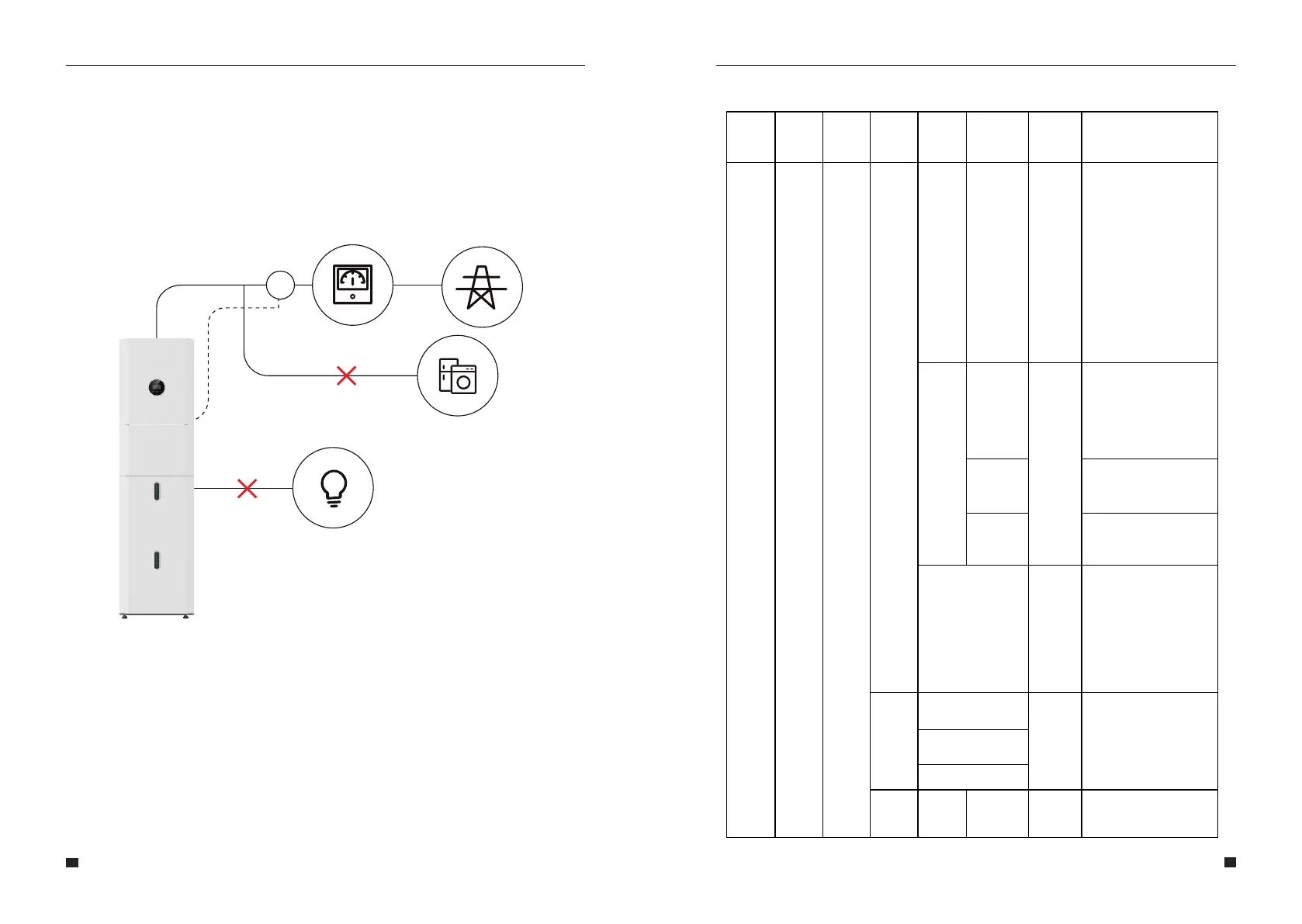
CT self-check steps:
Step 1: Open the external CT wiring port, the arrow points to the direction of the power grid,
put the wire into the external CT card slot, and buckle the buckle.
Step 2: Disconnect the backup loads and the normal loads.
Step 3: Connect the battery pack and Grid.
Step 4: Perform CT self-check via LCD.
GridGrid Meter
Backup Loads
Normal Loads
CT
SET UP
Enter
Password
(Default
00000)
SYS
Setting
Work
Mode
Enable
Peak
SHIFT
Time
Setting
Disable
Charge
DISCHG
BAT Priority
Disable
PV input
Independent
Parallel
CV
Zero
export
Enable
Disable
Disable
Allows the user to stop the
system exporting to the grid.
The energy generated by the
solar panels will be used in the
following order: Feed the
home loads; Charge the
battery and then, feed into the
grid. When the sun is not
present, the load will be
supported by the battery to
enhance self-consumption. If
the power supply from the
batteries is not sufficient, the
grid will support the load
demand.
This mode is designed for
time-use mode. The customer
can set up the desired
charging/discharging time &
power via the inverter screen
or APP.
Manually forces the system to
charge the batteries from the
grid.
Manually forces the system to
discharge to the connected
load.
The battery is only used as a
backup power supply when
the grid fails. As long as the
grid works, the batteries won’t
be used to power the loads.
The battery is charged with the
power generated by the PV
system or from the grid.
Allows the user to change the
PV array configuration (wiring
changes would also apply!)
.When parallel input is set to be
independent mode, PV power
will be imbalanced.
Self
Consume
Charge from
Grid Enable
Disable
(default)
Independent
Menu
Level 1
Menu
Level 2
Menu
Level 3
Menu
Level 4
Menu
Level 5
Menu
Level 6
Default
Selection
Comment



 To Next Page