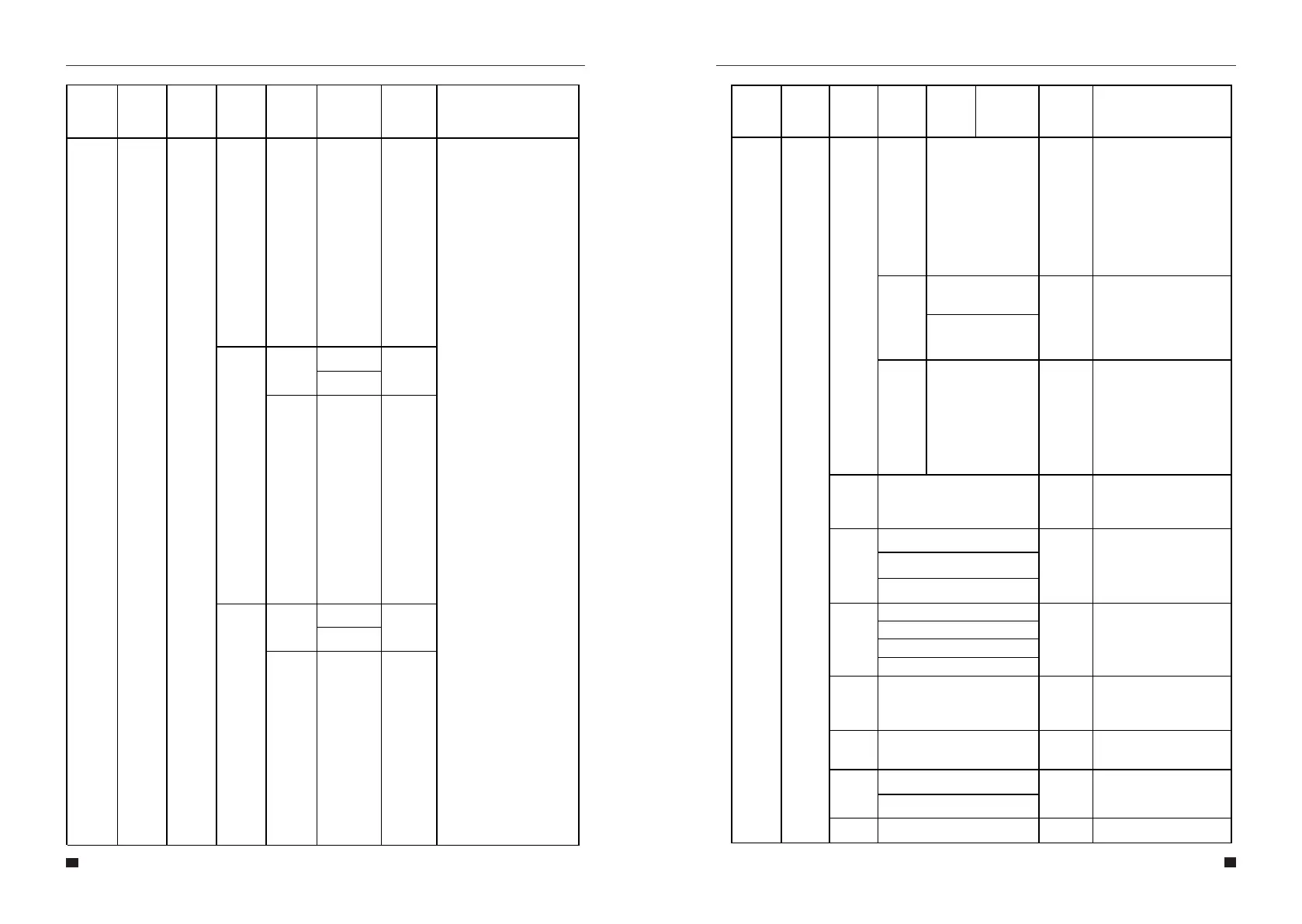
VOLT
200V
OVER
FREQ
Enable
Disable
Disable
Enable
FREQ
52Hz
UNDER
FREQ
Enable
Disable
Disable
Enable
FREQ 48Hz
REACT
RESP
6…60 Seconds
10
Seconds
VRT
ENABLE
Disable
Enable
Enable
POW SI
RATE
0…300% 100%
485
Address
1…32
1
Baud
Rate
1. 2400bps
9600bps
2. 4800bps
3. 9600bps
Language
1. 中
English
2. English
3. Italian
Backlight 20…120 seconds
20
seconds
Date/
Time
Set time, date and day
Clear
REC
Cancel
Cancel
Clears all stored records.
Confirm
Old password
00000
55
56
User Manual User Manual
This is the time it takes for the
exported reactive power to
reach the grid standard level.
This setting should not be
changed and is set according
to the grid standard.
Voltage-ride-through. This
setting should not be changed
and is set automatically
according to the grid
standard.
This is the rate of change of
the output. This setting should
not be changed and is set
according to grid standard.
100% means that the output
will hit full power within 1
minute.
Allows the user to select the
RS485 address for the COM
port.
Allows the user to select the
RS485 serial baud rate for the
COM port.
Allows the user to select how
long the display back light
remains lit.
Allows the user to set the
time, date and day.
set voltage(If
enabled,Once
the AC output
voltage is
lower than this
set value, the
output power
will start to
decrease.)
set
frequency(If
enabled,Once
the AC output
frequency
exceeds this
set value, the
output power
will start to
decrease.)
set
frequency(If
enabled,Once
the AC output
frequency is
lower than this
set value, the
output power
will start to
decrease.)
Menu
Level 1
Menu
Level 2
Menu
Level 3
Menu
Level 4
Menu
Level 5
Menu
Level 6
Default
Selection
Comment
Menu
Level 1
Menu
Level 2
Menu
Level 3
Menu
Level 4
Menu
Level 5
Menu
Level 6
Default
Selection
Comment
Allows the user to select
Chinese,English,Italian,Germ
an language.
4. German



 To Next Page