EasyManua.ls Logo

La Crosse Technology V50 - WIND; Viewing Your Wind Data

La Crosse Technology V50
23 pages
Print Icon
To Next Page IconTo Next Page
To Previous Page IconTo Previous Page
Loading...
11
Viewing Your Wind Data
WIND
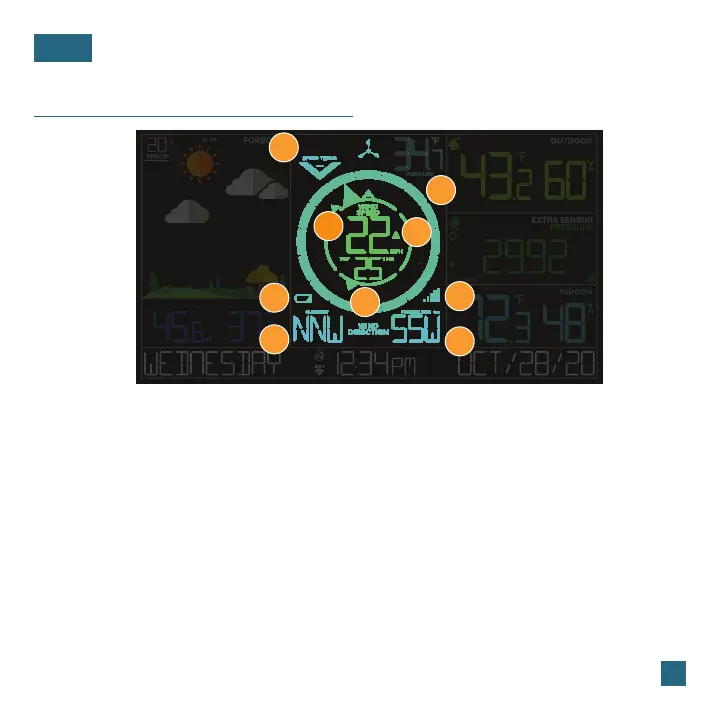
1. WIND SPEED TREND
INDICATOR
Shows wind speed trends
over the past 60 minutes
2. COMPASS ROSE
Displays cardinal direction
with animated arrows
(16 directions total)
Indicates if the station is
receiving data from the
sensor
8. WIND DIRECTION
3. CURRENT WIND SPEED
Appears when the sensor’s
batteries needs to be
replaced
6. BREEZE PRO SENSOR
LOW BATTERY ICON
The top wind speed in the
past 31 seconds
Choose between cardinal
points (letters) or degrees
in the Settings Menu for
Current Wind Direction
7. RECEPTION ICON
5. TOP WIND SPEED
The top wind speed in
the past 60 minutes
4. WIND SPEED ALERT
Appears if a wind speed
alert is set & active
9
1
2
3
4
5
6
7
8
Prevailing Wind Direction
over the past hour
9. PREVAILING DIRECTION

Table of Contents

Related product manuals