Viewing Your Forecast Data
FORECAST
Forecast Icons
Please Note: The Forecast Icons may not represent your current weather. They are a future prediction
of the weather to come over the next 12 hours.
When using this station without Wi-Fi connection, the
display will use changes in barometric pressure to
predict your weather to come in the next 12 hours.
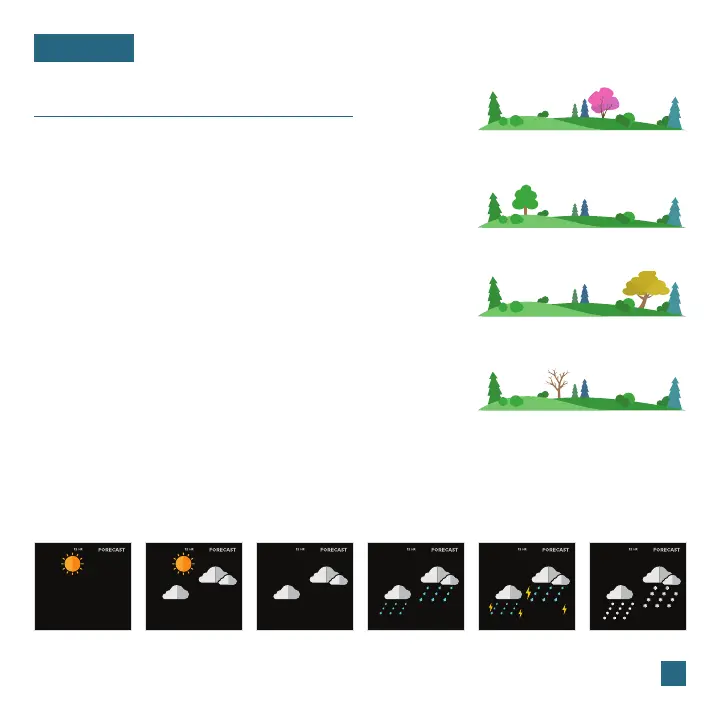
This is represented by the 6 forecast scenes below.
However, when connected to Wi-Fi, the station
will receive additional weather icons, chance of
precipitation values, and future forecast information.
These enhanced Internet features are powered by
AccuWeather.*
Seasonal Trees
Foliage Scenes
The foliage scene in the forecast section changes
seasonally. The dates are pre-programmed.
*Your display must be connected to Wi-Fi to receive AccuWeather forecast data.
Available Forecast Icons on Standalone Station
Sunny Clouds T-StormPartly Sunny Rain Snow
Spring (March 20
th
to June 20
th
)
Summer (June 21
st
to Sept. 20
th
)
Fall (Sept. 21
st
to Dec. 20
th
)
Winter (Dec. 21
st
to March 19
th
)
15















 To Next Page