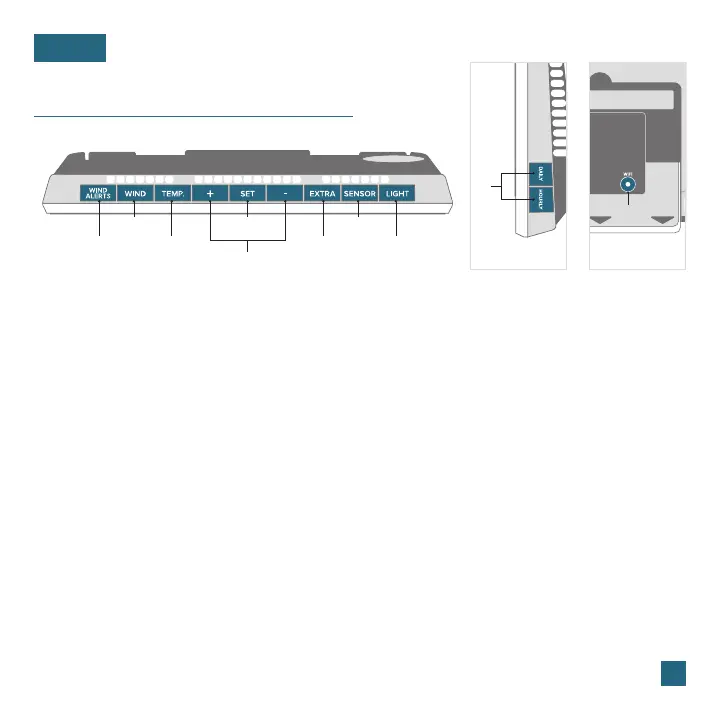
Buttons
BASICS
1. WIND ALERTS
Hold to enter Wind Alert Settings. Press to turn
Wind Alert on/o.
2. WIND
Press to view Wind Speed History. While viewing,
hold the MINUS button to reset the history value.
3. TEMP.
Press to view Temperature and Humidity History.
While viewing, hold MINUS button to reset the
history value. Hold to search for TH reading.
6. EXTRA
Press to toggle through extra sensors and
pressure. Hold to add sensors. While viewing,
hold the MINUS button delete the sensor.
9. DAILY/HOURLY
Press to see Daily or Hourly Forecast.
Hold to auto-scroll Forecast data.*
4. SET
Press to view Wi-Fi status. Hold to enter Settings
Menu.
7. SENSOR
Press to view sensor ID numbers. While
viewing, hold the MINUS button delete the
sensor.
5. PLUS/MINUS (+/-)
Use to adjust values.
8. LIGHT
Press to adjust backlight. Hold to enter
Auto-Dim settings.
1
3
2
6 8
7
4
9
10
Side View Back View
* Your display must be connected to Wi-Fi to receive Daily/Hourly forecast information.
07
10. WIFI
Press during initial setup for Wi-Fi
Connection (see app). Hold to re-enter
Configuration Mode and clear previous
Wi-Fi settings.















 To Next Page