5.2 Status Tab
The Status display is selected by tapping the Status
tab in Amplifier Module View.
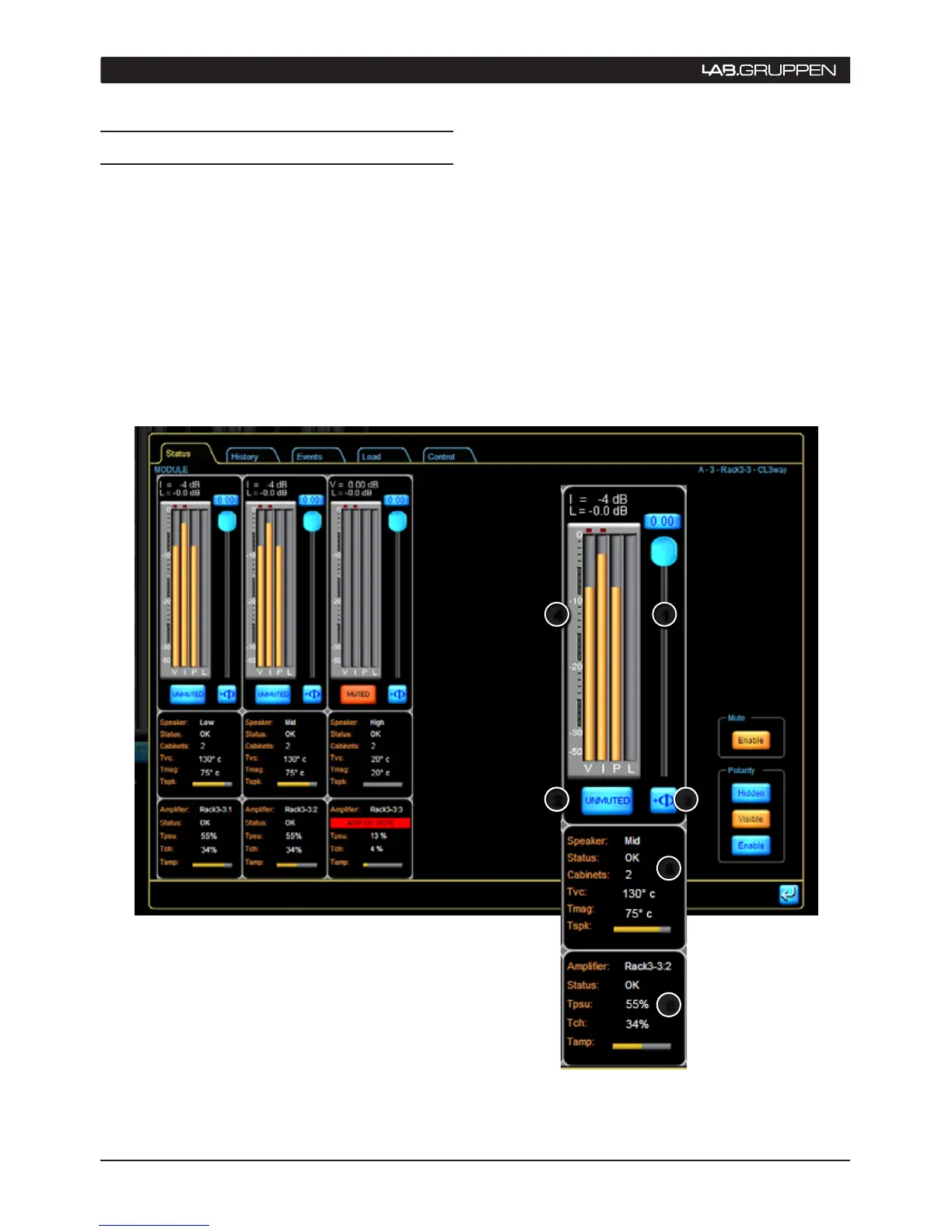
A horizontal set of “channel strips” displays data
relating to each power output section assigned to
the selected Module.
The channels are presented in Module output order
(e.g. low mid high). If a Module output is assigned
to more that one power output channel then this is
displayed accordingly (e.g. low, low, mid, high).
The PLM’s meters are reproduced as vertical bargraphs.
Each “channel strip” provides an attenuation fader,
phase reverse button, and mute button. Additional
identity and status information concerning the output
channel and connected loads is shown below in two
data blocks. To the right of the channel strips, a column
of “master buttons” provides options for displaying and
enabling the mute and polarity buttons on individual
channels. See Section 5.2.7.
5 operation
Figure 5.2: Status tab showing speaker and power output channel status
3
6
5
4
2
1


 To Next Page
 Loading...