
 Need help?
Do you have a question about the Lab.gruppen PDX3000 and is the answer not in the manual?
Specific warnings regarding electrical hazards and the risk of electric shock if the unit is opened.
Covers welcome message, features, Class D stage, and unpacking instructions.
Details protection, DSP, cooling, and operating voltage for optimal performance.
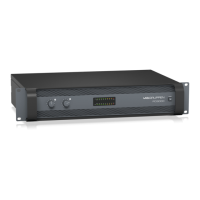
Description and layout of controls and indicators on the amplifier's front panel.
Explanation of the factory default DSP settings for immediate use.
Illustrates various signal flow configurations available within the DSP.
Overview of DSP capabilities, front panel operation, and accessing setup screens.
Details specific setup functions: loading presets, panel lock, device naming, and contrast.
Configure input/output routing and crossover filter settings for audio signals.
Control up to eight EQ bands for precise sound sculpting with various filter types.
Adjust dynamic EQ and signal delay parameters for enhanced audio processing.
Configure output limiter parameters like threshold, release, and hold.
Monitors signal levels, connection status, and displays input/output meters.
Overview of the software's functional tabs, including Setup, Configuration, Filters, EQ, and Dynamic EQ.
Controls amplifier mode, routing, delay, and limiting settings via the Configuration tab.
Steps for connecting the PDX amplifier to the PDX Controller software.
Configures amplifier operating modes (Dual Mono, Stereo, Bi-Amp) and details signal paths.
Guide to setting up the amplifier for bi-amping, including hardware and DSP parameters.
Instructions for physically installing the amplifier into a 19-inch rack unit.
Details on connecting audio inputs, speaker outputs, and power sources.
Comprehensive technical specifications including general, audio, DSP, protection, and power details.
Details on controls, indicators, dimensions, weight, finish, and approvals.
Covers online registration, malfunction support, and power connection safety precautions.
Details FCC compliance, potential interference, and corrective measures.
 General
| Brand | Lab.gruppen |
|---|---|
| Model | PDX3000 |
| Category | Amplifier |
| Language | English |



 To Next Page