30
13) GENERAL PROGRAMMING MENU
To enter the general programming menu while the automatic door operating program is shown on the display, hold the button
pressed for about 5 seconds.
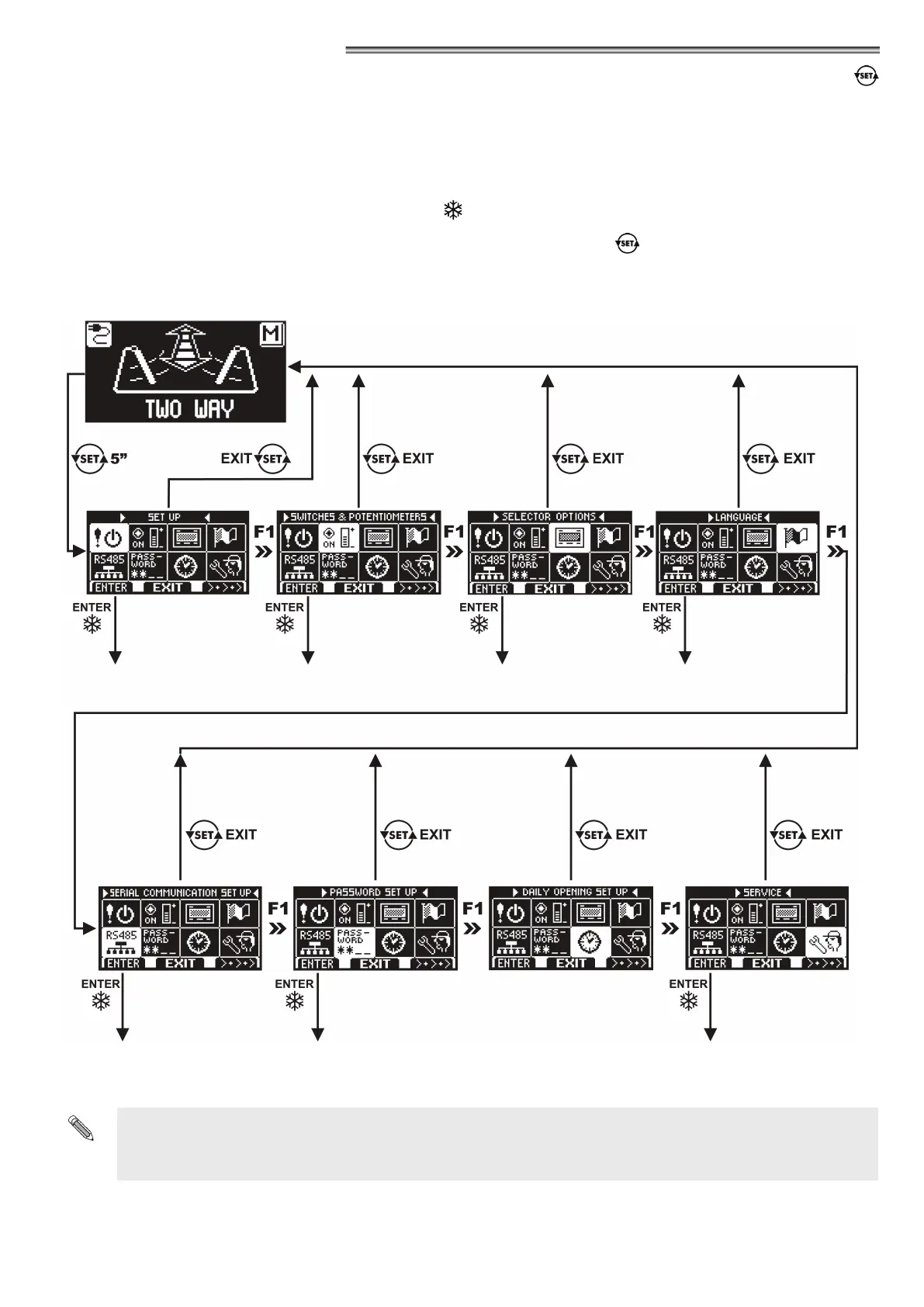
The programming menu includes several submenus organized by topic (Diagram 1).
Choose the section you wish to access by pressing the button F1 >> .
The selected menu icon is highlighted and the section title appears at the top of the display.
To enter the selected sub-menu, press briey the ENTER button
.
To exit the general programming menu and return to the work program view, press the EXIT button.
DIAGRAM 1
“INITIAL SETUP" SECTION
“SERIAL COMMUNICATION
SETUP" SECTION
“FUNCTIONS AND SETTINGS"
SECTION
“PASSWORD MANAGEMENT"
SECTION
"SELECTOR OPTION" SECTION “LANGUAGE" SECTION
“MAINTENANCE" SECTION
•
If you enter the initial setup section, see paragraph 10.3.
•
If you enter the serial communication settings section, see paragraph 10.2 for single leaf door, or paragraph 21.2
for dual leaf swing door.
•
For the other submenus, refer to the paragraph related to the section you entered
NOT USED


 To Next Page
 Loading...