EasyManua.ls Logo

laerdal SimPad PLUS - SimPad PLUS Setup; SimPad PLUS Configuration

laerdal SimPad PLUS
29 pages
Print Icon
To Next Page IconTo Next Page
To Previous Page IconTo Previous Page
Loading...
Using Manual Mode Using Manual Mode
20
21
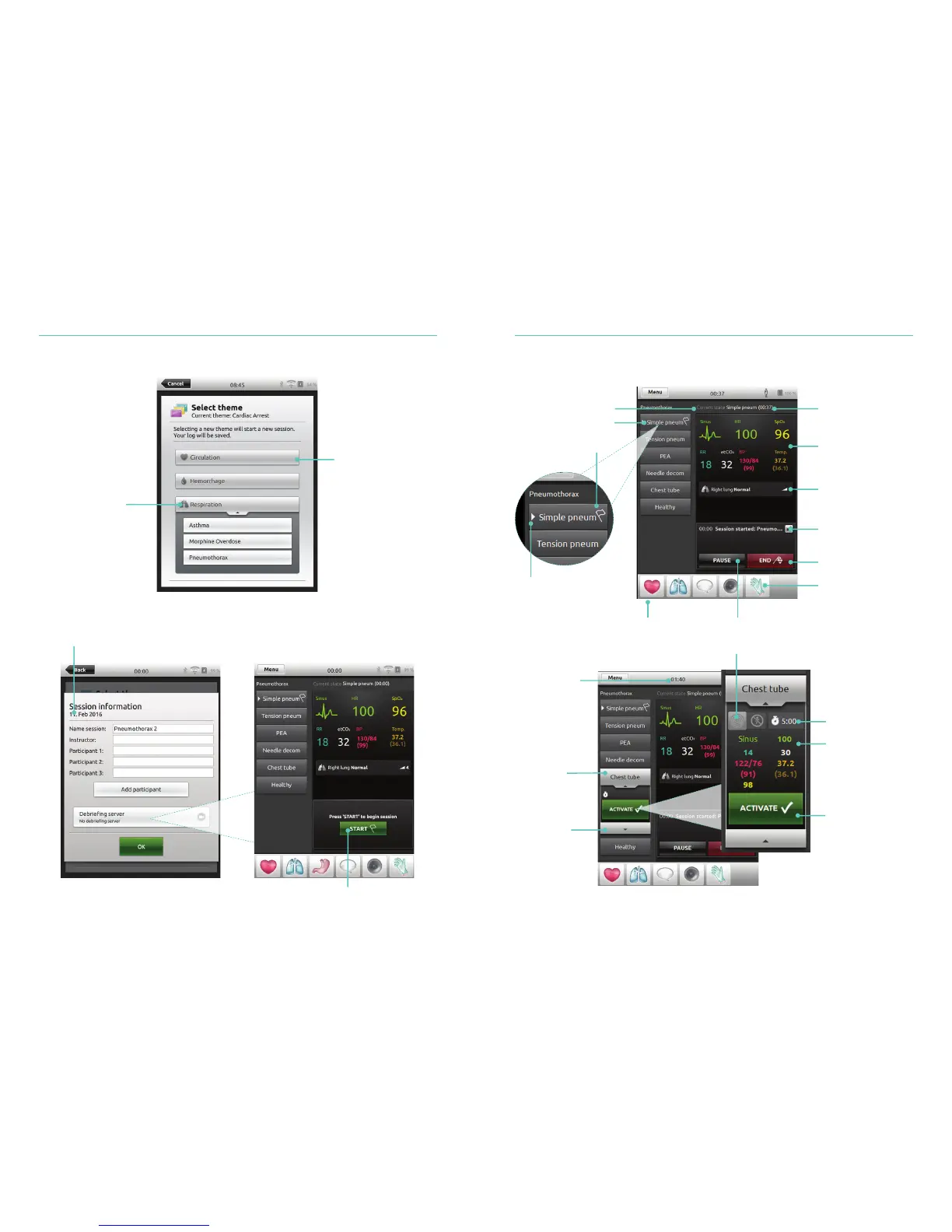
Select Theme
Select theme
for simulation
Folder of themes
Tap to open
Information about session entered
here will be added to log
Tap to start session
Parameters Overview
Time since current
state was activated
States
Current state
Select other parameters to adjust Pause session
Patient vital signs
Abnormal values
Collapse mini-log
End session
Register participant’s
interventions
White arrow indicates
last activated state
Flag indicates
start state
Tap to show
detailed State
information,
before activating
Tap to
open state
Time since
Session started
The expanded
state shows all
parameters in the
queue, ready to be
activated
Toggle On/Off shock activation
Set transition time
Tap to
activate state

Other manuals for laerdal SimPad PLUS

Related product manuals