SimStore SimStore
42
43
SimStore is the place to find peer validated content to standardize
simulation education. Unlock the full potential of SimPad PLUS manikins,
education staff and students.
SimStore offers pre-programmed content mapped to clinical guidelines and developed by
industry-leading experts. Reducing on-the-fly operation and using pre-programmed scenarios
can help present a more realistic clinical encounter and increase a simulation investment.
To access, visit www.mysimcenter.com
Visit SimStore to find:
• Immediate online access to world wide, validated content
• Standardized and repeatable training measures
• Easy search, find, and pay navigation
• Flexibility to purchase based on requirements
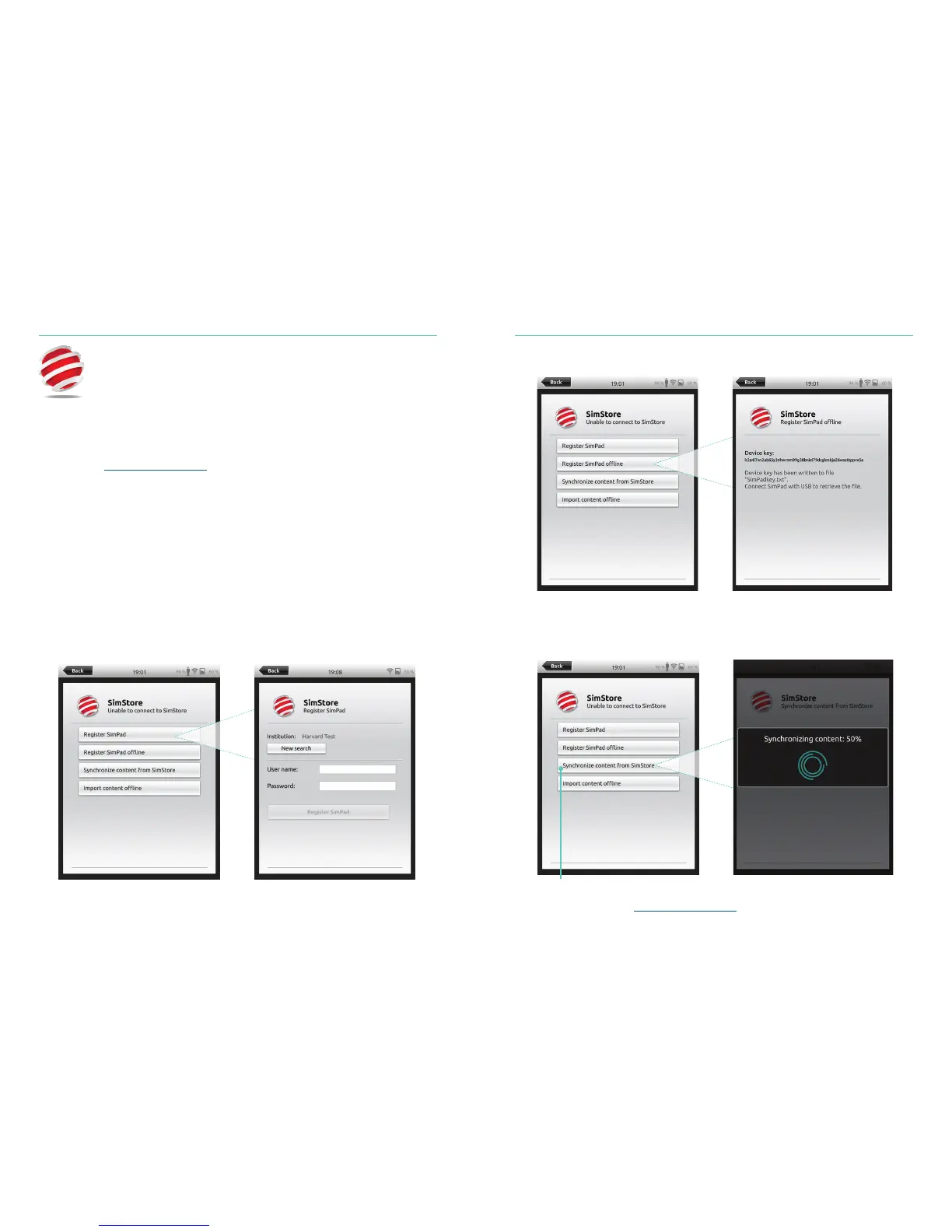
Register SimPad PLUS on SimStore
SimPad PLUS needs to be connected to a network in order to register with SimStore
online. See Connect to a Network section.
SimPad PLUS can also be registered offline. SimPad PLUS will generate a device key.
Register the device from a PC.
Synchronize SimPad PLUS with SimStore
After SimPad PLUS has been registered on SimStore, administration of the SimPad PLUS
and purchasing Scenarios on SimStore must be done from a PC.
For more information visit www.mysimcenter.com
Synchronize content from SimStore















 To Next Page