25
6 Commissioning/Decommissioning
6.4 Measurement Start-up
NOTICE
The maintenance switch always has priority.
NOTICE
During cold start the display and operating unit or the monitor output indicate the cell’s inner
resistance R
I
.
The measurement function is ready for operation after 10 minutes.
Measurement is shown
LED 6 OPERATION is ON
LED 5 MEASUREMENT is ON
NOTICE
The cold-start delay can be activated from the display and operating unit → [cal] key. Proceed
as prompted by the menu, or interrupt by pressing the multifunction key T2 (for longer than 3
seconds, or if a warning or a fault is still present, for longer than 6 seconds).
• Observe the cell’s inner resistance and read the probe voltage alternatively via display and
operating unit (if available) or at the monitor output.
NOTICE
To read the probe voltage --> confirm with [meas] and choose probe voltage U
S
.
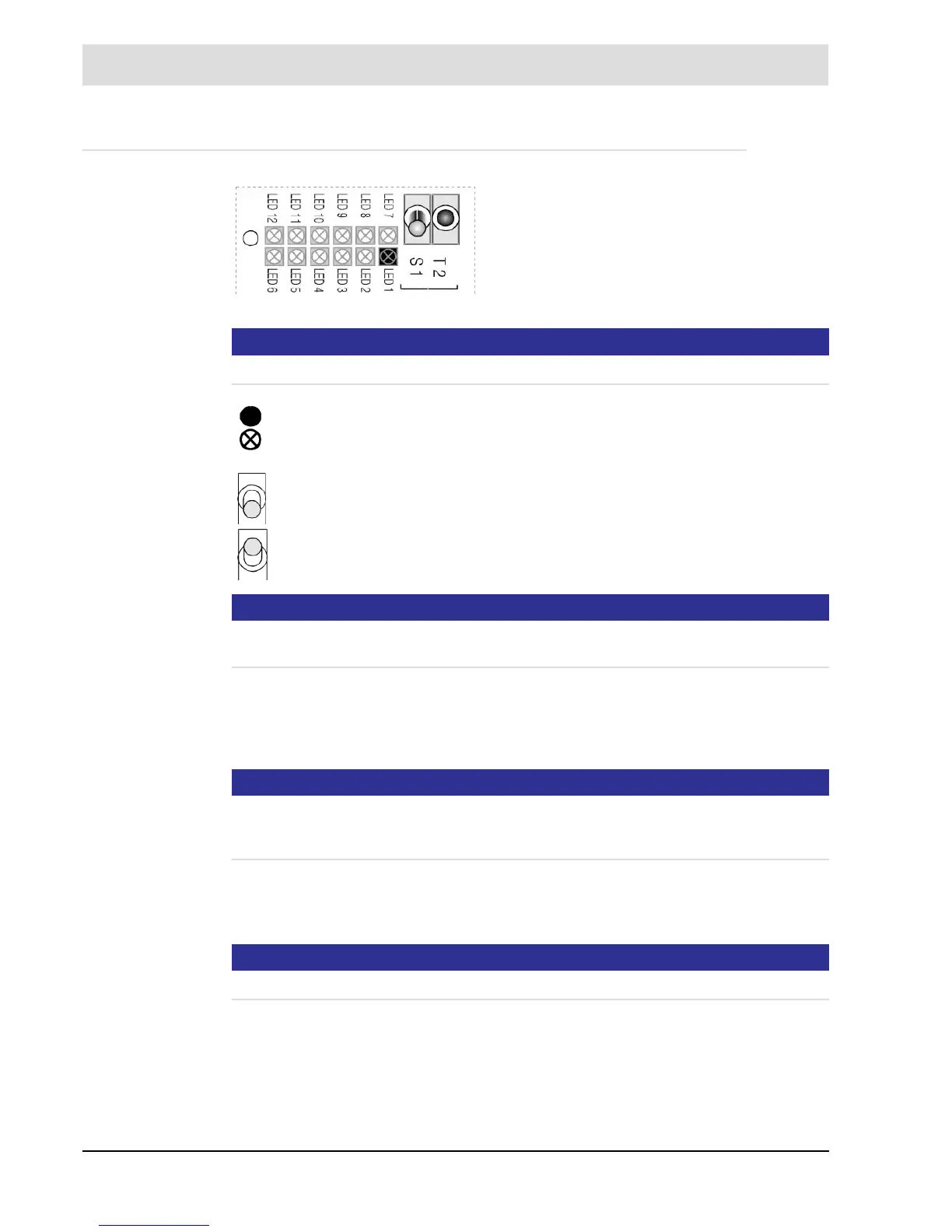
Fig. 6-6 Maintenance (orange) LED 1
• Connect the probe but do not install it
Switch to MAINTENANCE
either via the display and operating unit in menu
[diag] or with the maintenance switch S1
– MAINTENANCE mode
active
– Normal OPERATION
• Switch on voltage
• LED 1 shows MAINTENANCE
• Probe warms up
• COLD START is shown
LED 6 OPERATION ON
LED 5 MEASUREMENT OFF
– MAINTENANCE mode OFF
– MAINTENANCE mode ON


 To Next Page