Section #3 - Test Mode and Instrument Tests - Page 31
Copyright (c)[2013] Laser Technology, Inc. All rights reserved. Unauthorized duplication, in whole or in part, is strictly prohibited
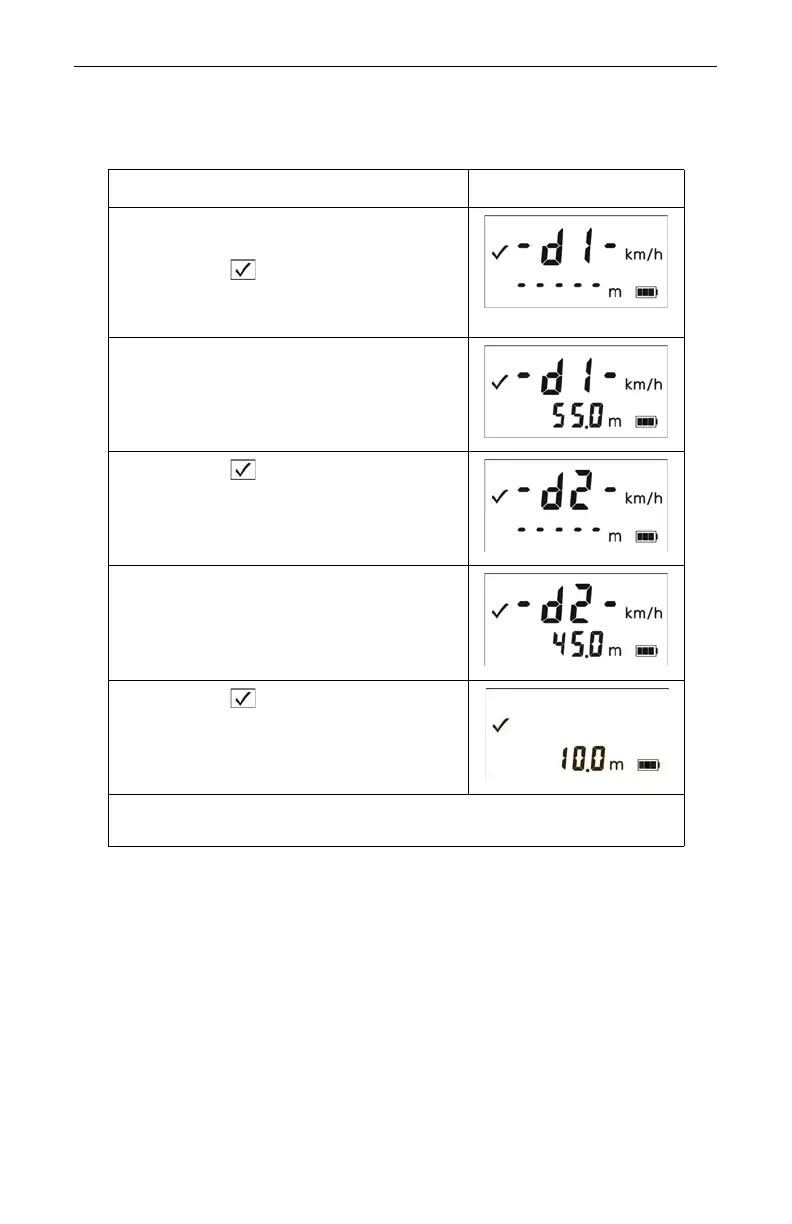
To conduct the test, refer to the table below.
• If the difference is 10 meters, the displayed distance should be
9.8 to 10.2 meters (15 cm displayed to 0.2 meters).
Action Results
1. Stand on the shooting mark.
2. Power ON the TruSpeed and
press the button 3 times until the
message -d1- appears in the upper
display.
3. Aim to the far target and press the
TRIGGER.
4. Check the display. If necessary, you
may repeat step #3.
5. Press the button. The message
-d2- appears in the upper display.
6. Aim to the near target and press the
TRIGGER.
7. Check the display.
If necessary, you may repeat step #6.
8. Press the button. The screen
displays the difference between the
two distances.
If the targets are shot in reverse order, the display is the same,
but the difference appears as a negative number
If you need assistance, contact Laser Technology, Inc.
See the inside front cover for LTI contact information.



 To Next Page