LTI TruPulse 360R User’s Manual Page 19
Copyright (c) [2017] Laser Technology, Inc. All Rights Reserved. Unauthorized duplication, in whole or in part, is strictly prohibited.
Select Measurement Units
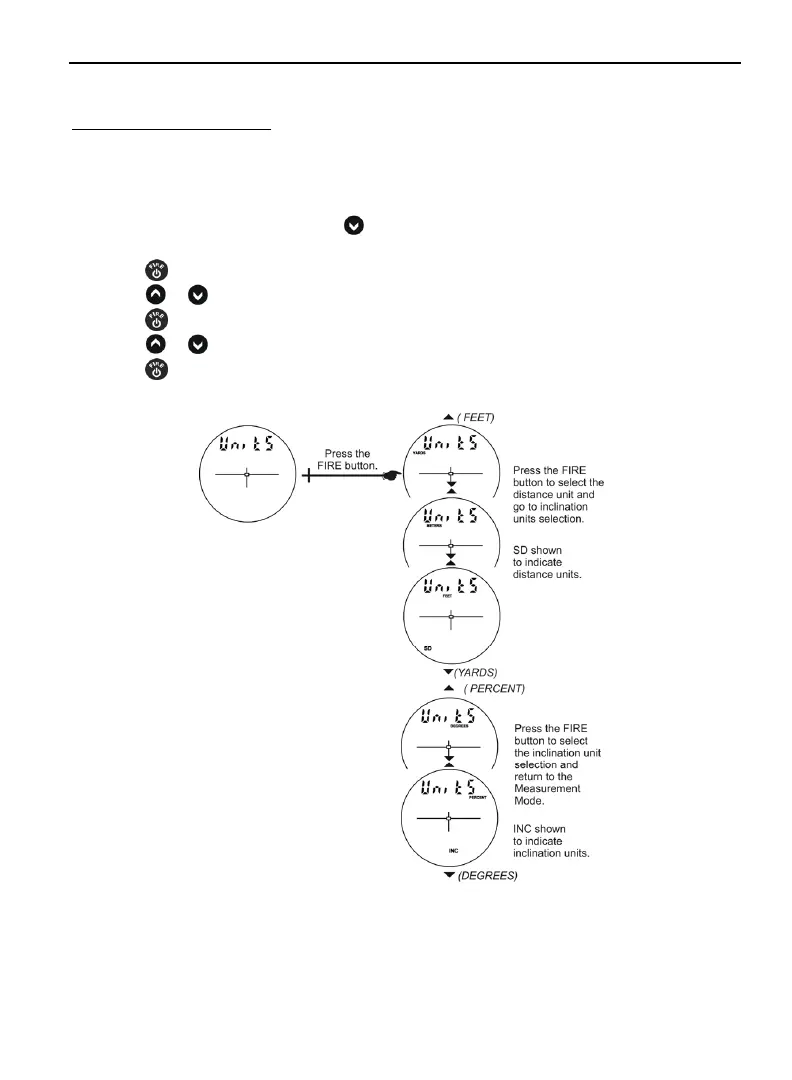
The TruPulse 360R allows you to choose between YARDS, METERS, and FEET for distance
measurements. Note: Only International lasers include meters.
To toggle the units selection:
1. From the Measurement Mode, press
for 4 seconds to access the System Setup Mode.
“UnitS” will appear in the Main Display as shown in Figure #11 below.
2. Press
to select the “UnitS” option.
3. Press
or to display the previous or next distance unit option.
4. Press
to select the displayed distance unit.
5. Press
or to select Inclination Units (PERCENT or DEGREES).
6. Press to select the displayed inclination unit and return to the Measurement Mode.
Each time the TruPulse 360R is powered ON, it will return to the same unit
setting that was last used.
Figure #11












 To Next Page